
A note to our app owners
One more time…iClock → iClock ProFor the next 30 years.
Happy holidays from julian
As a previous owner of iClock, you know the app. You’ve been peeking at it for years. Mark and I created it back in the last century, about 30 years ago. iClock’s been scheduled for a major overhaul for years. And now was the time to translate the app from the old code to Apple’s newest language. I’ve been working hard over the past 12 months on iClock Pro and the other apps to free them from any dependence on Rosetta.
iClock’s main developer was Mark Fleming, a great man, programmer and friend who worked at Queen’s University. We used to spend many a night on the phone, often past midnight for him on the East Coast. We talked about future features and bad bugs, and we made many apps together.
One app makes me laugh just thinking about it. Mark was a professional photographer, and he started putting digital frames around pictures. We had hundreds of digitized wooden and artistic frames and an app that would resize them to fit your photos. When we decided to share it, we talked about names and I said, “Let’s call it ‘I been framed’.” The icon was a rough-looking cowboy in a black hat, a varmint with both hands on the bars of his jail window, waiting forlornly for help to bust out of the hoosegow. I don’t think I’ll ever remake that app, but it was fun, funny and useful.
Mark died this past year, and I think of him often. Before he died, he cared for his wife for the last six years of her life while building their house in Kingston, Ontario. He was a very devoted husband and a great man I’m grateful to have known. We all benefited from his work on iClock. There’s much more to that story, but maybe in the next newsletter. Sometimes I digress. I’m getting older too.
Why rebuild now?
Rosetta gave Intel apps more time on Apple silicon. Apple is ending general-purpose Rosetta support after macOS 27. That gave me a reason to clean up the code and rebuild in Swift and SwiftUI. The new foundation lets us use current Apple technologies and spend more time improving the apps. The new iClock requires a newer version of macOS so we can build for Apple silicon and use more of Apple’s latest technologies. Apple’s Rosetta timeline
What’s different in the new clock?
If the old iClock still suits the Mac you use, keep on enjoying it. It’s a great app. We’ll maintain it as long as possible. The new version will get most of our coding attention. More is now possible, and like in the past, it’ll be fun to watch as new features are slowly added. This is a major paid upgrade. It’s free to download and try for 30 days. Test it out on your Mac to see how it works.
The biggest change is the one you can’t see. The Swift and SwiftUI foundation makes iClock easier to fix and improve. It also gives us a path to add Apple’s App Intents, so in the future you can build Shortcuts that work with iClock or ask Siri for information from it.
Four things to try first
- Add Places. Search nearly 237,000 cities and add the ones you care about to your Mac’s Time menu. Make a set for family in Japan, business associates in Africa, manufacturing partners in China, or banking clients in London. Switch sets to see the local times you need. It’s handy for anyone making calls across time zones, especially traders and sales teams.
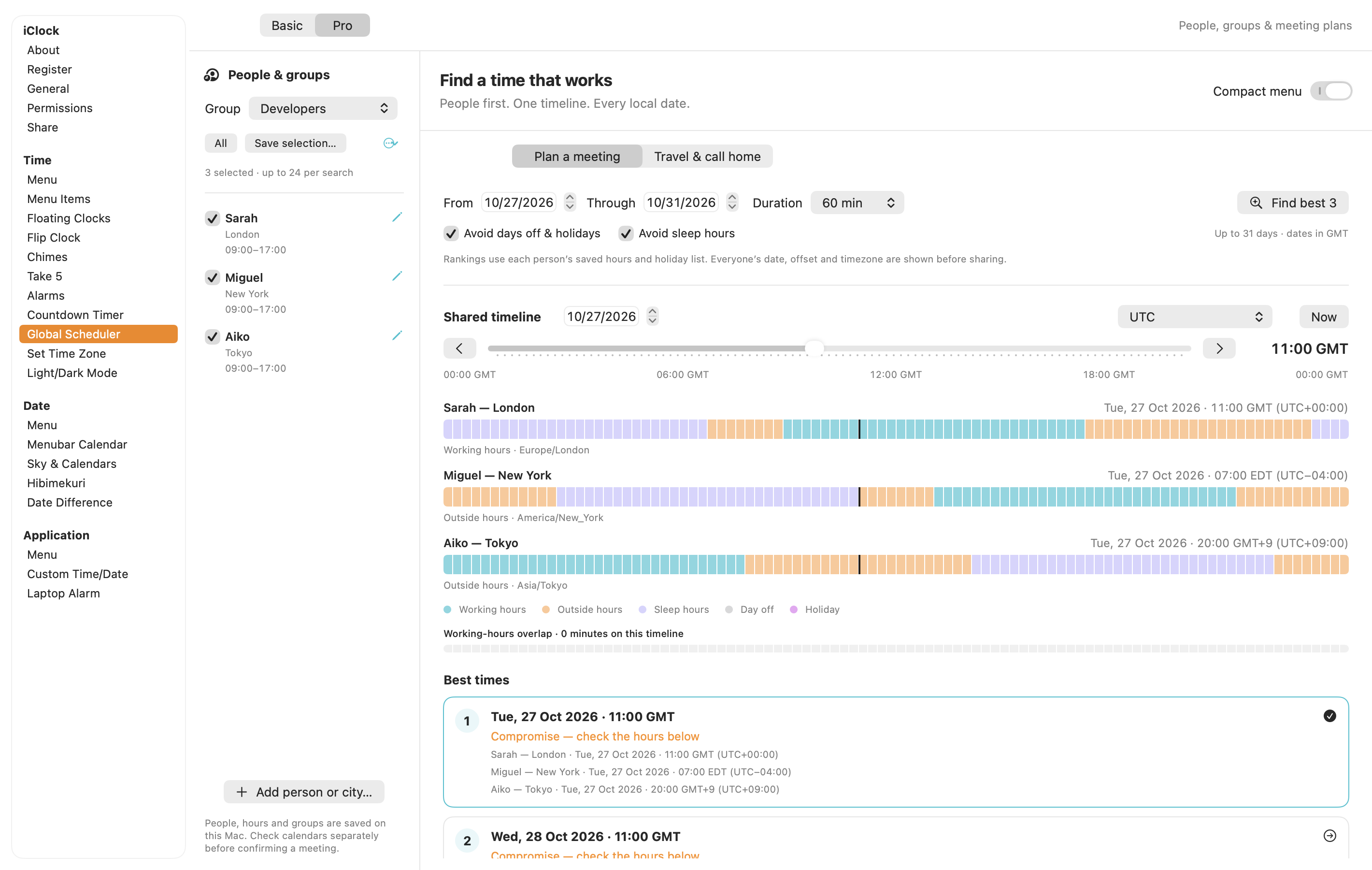
- Plan a Meeting. The new planner builds on Global Scheduler. Save people and groups, see everyone’s hours in their own time zone, and compare suggested times. Try it for a meeting with colleagues in 3 time zones, or a call with family scattered around the world.
- Hibimekuri · 日々めくり. Very zen from a calmer time.
- Sky & Calendars. Click the Moon to explore the sky for a city you choose. See the Moon’s phase, when it rises and sets, and where the planets are above or below the horizon. Pick an evening time and compare it with twilight to plan a look outside. There’s also a Calendars & Traditions tab to explore.
Meet iClock Pro for Mac
Find a moment this holiday season for everyone.
A meeting across time zones should not take a meeting to arrange. Choose your people, move the shared time slider and compare the best times, with everyone’s local date and time in view.
Add your family’s and colleagues’ cities to the Time menu so you can see when it’s a good time to call. Open little month calendars, set a reminder, pause over the Moon or turn over a new day with Hibimekuri.
Take a look at iClock PromacOS 14 or later. A 30-day, all-features trial begins in the app. Browse the illustrated manual.
Something useful. Something interesting.
A few words about our family of apps for your family.
Please try an app below that looks interesting and that you haven’t tried yet. Click its name to see what it does and find its free trial where available. If you can’t decide, try the Hawaiʻi Earthquake and Volcano Guide.
After 8 years on the Big Island, I realized that most visitors don’t know about its volcanoes. Some ask me, “What’s good to do here?” and I’ll tell them what Kīlauea is up to. They peer at my face for a while, trying to see if I’m kidding, and then say, “There’s a volcano on this island?” followed by, “Is it dangerous?” Hearing that 3 volcanoes have erupted since 1800, Mauna Kea is dormant, and Kohala is extinct rocks their world. Kīlauea is one of the world’s most active volcanoes, Mauna Loa is the largest active volcano on Earth, and Hualālai is, well, the one I live on. Kīlauea has been erupting in bursts since December 2024, sometimes sending lava fountains more than 1,000 feet into the air. When the lava goes that high, it freezes in the air. As those pieces, called tephra, crash down, it sounds like an avalanche of glass falling on rocks.
The app is for anyone who’s curious, from scientists to kids who love volcanoes. There’s a lot people are unaware of, so a lot to learn. That’s why it makes a good holiday gift. Download it and try it free for 2 days. Just those 2 days will change your conception of Hawaiʻi and perhaps change what you think an app can do. Hawaiʻi Earthquake and Volcano Guide for Mac · Hawaiʻi Earthquake and Volcano Guide for iPhone and iPad
Plum has been making apps for more than 30 years, and this is the best crop yet. I’m more inspired and working harder than ever. Apple’s tools and technology let me build apps that help you get things done. Seriously, they’re useful and fun too. Have a question, or did you like the earthquake app? A quick note from you makes me happy. Send me a note.
Work a little smarter
 PixelStick Pro
Measure pixels, angles, colors and real-world distances on screen. Line up a design or measure straight from a map.
 CopyPaste
Give your clipboard a memory. Find and reuse words, pictures and earlier clips.
 Clip Notes
Catch a thought in a sticky note before it flies away. Type it, speak it, find it.
 yKey
Turn repetitive Mac jobs into reusable workflows. Put several steps you do every day on a single hotkey.
 Volume Manager Pro
Keep network shares close at hand. Mount them automatically and reconnect when your network comes back.
 The Secretary
Turn speech into text with Apple Speech, local Whisper or an optional cloud account. Pick the engine that suits your recording.
Make more of your pictures
 PhotoShrinkr
Shrink a batch of photos for sharing or storage. Compare the images and file sizes before you export.
 WebP Wand
Make lighter WebP copies straight from Finder. Prep images for a web page without opening an image editor.
 Watermark360
Watermark and explore 360° panoramic photos with a view all the way around. Learn and experiment with 360° photos.
 iWatermark Pro 2 Win 11
Add your name, logo or copyright to a batch of photos. Give the whole collection consistent credit before sharing.
 iWatermark+ for Mac
Try the new Mac beta and its spacious photo workspace. Place a watermark and take a closer look at how it sits on your photo.
Take it with you
- iWatermark+ for iPhone and iPad
Watermark photos and videos with visible or invisible marks. Save a design you can use again on your next shoot.
 iWatermark+ for Android
Keep reusable photo and video watermarks on your phone. Give a new project the same look before you share it.
- iWatermark Pro for Android
Try the direct-download Android beta. Apply watermarks in batches and transform a whole collection of photos.
 SpeechMaker for Android
Prepare your words and stage cues in one place. Rehearse with the teleprompter before you step up to speak.
Follow a little curiosity
 Hawaiʻi Volcanoes & Earthquakes for Mac
Watch live volcano cameras and explore earthquake maps. See the Hawaiian Islands from a different angle in 3D.
- Hawaiʻi Volcanoes & Earthquakes for iPhone and iPad
Carry a window onto Hawaiʻi’s volcanoes and earthquakes. Check in on the islands from your iPhone or iPad.
 TinyAlarm
Set a small reminder for a break, a call or something worth remembering. Give yourself a nudge when it’s time.
 TinyCal
Open a little calendar from your menu bar. Browse the months and check dates and events without losing your place.
One more thing for iClock owners
A new generation,
with a familiar welcome.
iClock Pro is a major upgrade and requires a new paid license. You’ll get a license key by email that you can use to activate iClock Pro on up to 3 Macs.
Try it and check your settings and important alarms before retiring your old copy. After the 30-day trial with all features, iClock Pro keeps working. Preference changes last until you quit. A license restores saving.
Thank you for being part of the Plum Amazing family. All the best,
julian (ask me anything!)
Explore the new iClockSpend a moment with its manual ↗