

WebP Wand
Transform as many images as you want — JPEG, PNG, HEIC, and more — almost instantly to WebP from Finder. Photos are often half the size, yet the visual differences are imperceptible. WebP Wand never touches an original image; it only creates copies. Our apps are shareware. Download and try them out. This one's on sale for $2.99 for a short time (regularly $4.99).

Transform as many images as you want — JPEG, PNG, HEIC, TIFF, GIF, BMP, SVG — almost instantly to WebP. Right-click in Finder, choose Quick Actions → WebP Wand, and the new file appears beside the original. Batch selections welcome.
Photos converted by WebP Wand are much smaller than the originals, often half the size, yet the visual differences are imperceptible. Test for yourself.
WebP Wand never touches an original image. It only makes copies in other formats. Original images are never changed or altered in any way.
Download WebP Wand free and try it on your own files. Each converted image in trial mode carries a small watermark: "Created with WebP Wand." On sale — $2.99 for a short time (regularly $4.99). Enter your incantation (license key) from email to turn the watermark off — or replace it with your own name in the same corner.
See it work
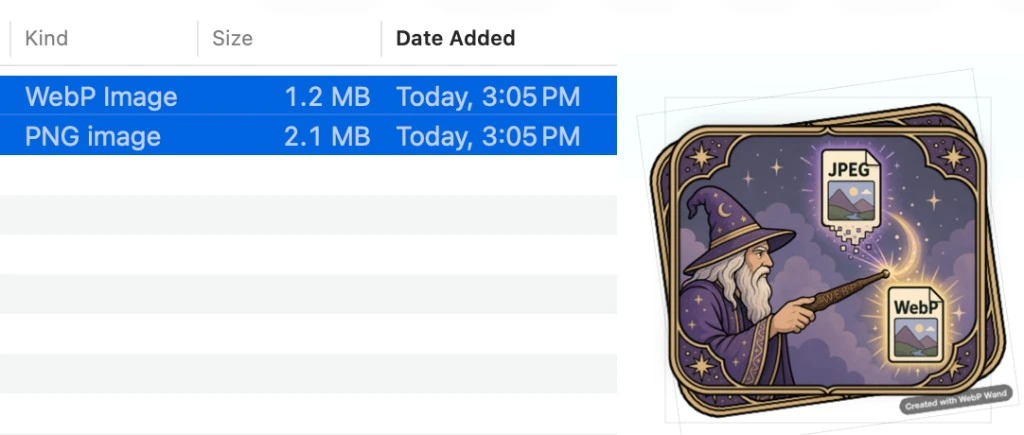
A real conversion from today: a 2.1 MB PNG became a 1.2 MB WebP — smaller on disk, ready for the web.
WebP Wand never touches an original image. It only makes copies in other formats. Original images are never changed or altered in any way.
A wand for the practical mage
Some may think WebP Wand belongs in the quiver of a hedge wizard — a village enchanter's tool for a simple task. They would be wrong. It does a simple task simply, easily, and speedily. Practical magic for lighter pages and faster sites.
Not illusion — real conjuring
This is not prestidigitation. The output is not trompe l'oeil. WebP is a durable format backed by serious engineering. One gesture in Finder; real files on disk.
How to wield it

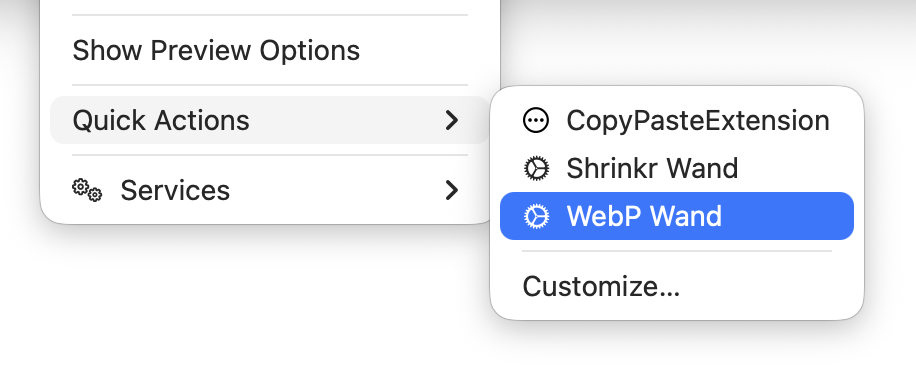
- Install WebP Wand to
/Applications(required for Quick Actions). - Select one or many images in Finder.
- Quick Actions → WebP Wand. A
.webpappears beside each original. - Upload, email, or publish — your originals stay untouched.
Speed
Conversions run locally and finish in moments — even on batches.
Formats in
JPEG, PNG, HEIC, HEIF, TIFF, GIF, BMP, and SVG.
Originals safe
WebP Wand never touches an original image. It only makes copies in other formats. Original images are never changed or altered in any way.
Try free
Watermark in trial mode; license turns it off or lets you add your own credit line.
WebP Wand never touches an original image. It only makes copies in other formats. Original images are never changed or altered in any way.
On sale — $2.99 for a short time (regularly $4.99) — one-time purchase via Lemon Squeezy. Download free, test the wand, then purchase here and enter your license key — then choose License & Watermark in the app to customize or remove the credit line.
Manual & FAQ (permissions, troubleshooting) →* All magics herein are of the white variety; no daemons have been summoned nor evil forces unleashed in the creation of this wand. Rated G by the wizarding task force.
Seeking greater magics?
If this charm proves effective, see also PhotoShrinkr — batch compression for Mac with its own Finder wand.
Changelog
1.0.5
patch📝 Changes
- Shortcuts & Siri — “Convert to WebP with WebP Wand” in the Shortcuts app (macOS 13+)
- Notarized build for smoother Gatekeeper on first launch
1.0.4
patch📝 Changes
- macOS compatibility fix — runs on macOS 12.0 and later (1.0.3 accidentally required 15.5)
- Fixes prohibited app icon and “not compatible with this version of macOS” on Sonoma and earlier
1.0.3
patch📝 Changes
- Improved first-launch onboarding with optional Help Doc prompt
- One-click Move to Applications when launched outside /Applications
- Choose Output Folder now works with Finder Quick Actions
- SVG images convert to WebP via Quick Action
- Menu cleanup and Disable Finder Quick Action option
- Crash fix for Choose Output Folder when no window is open
1.0.1
patch📝 Changes
- Notarized release with updated app icon
- Sparkle auto-update support verified
1.0
major📝 Changes
- Finder Quick Action — right-click images and choose WebP Wand to convert
- Many formats supported — JPEG, PNG, HEIC, TIFF, GIF, BMP, and SVG
- Originals stay safe — new .webp files appear beside the originals; your source files are never changed
- Batch friendly — convert one file or many at once
- Free to try — download and test; trial images include a small watermark
- License unlocks full use — remove the watermark or replace it with your own credit line
- Automatic updates — built-in update checks when new versions ship
If you enjoyed WebP Wand let us know.
No tutorials available for this app.
No manual needed for this app. It's magic.
Permissions, batch tips, and troubleshooting:Full FAQ →
No previous versions available for this app.