

Protect ownership
Keep your name, brand, URL, copyright, or invisible proof attached to the work as it spreads across Instagram, TikTok, Facebook, client galleries, and the web.
iWatermark+ is the professional watermarking tool for photojournalists, working photographers, influencers, artists, and beginners who want to protect work without slowing down the publishing process. Add a single watermark or build a layered system of visible and invisible marks that travel with the image wherever it goes.
13 watermark and output tools, reusable template libraries, real-time controls, and support for both photos and video in one mobile workflow.
Keep your name, brand, URL, copyright, or invisible proof attached to the work as it spreads across Instagram, TikTok, Facebook, client galleries, and the web.
Apply one watermark or many watermarks at once, queue large jobs, and keep reusable templates ready for the next shoot, campaign, or delivery.
Use the same watermarking workflow for stills and video instead of maintaining different tools for each medium.
Go subtle or unmistakable with visible and invisible marks, QR codes, metadata, signatures, vectors, borders, lines, filters, and export options.
The mobile workflow is built around speed: keep ready-made text, graphic, signature, and metadata marks on hand, then pick the right one when it is time to export, post, or deliver.


iWatermark+ is unusual because it treats watermarking as a reusable system, not a one-off overlay. Build your own library of marks, mix more than one at a time, and reuse them across campaigns, galleries, deliveries, and social posts.
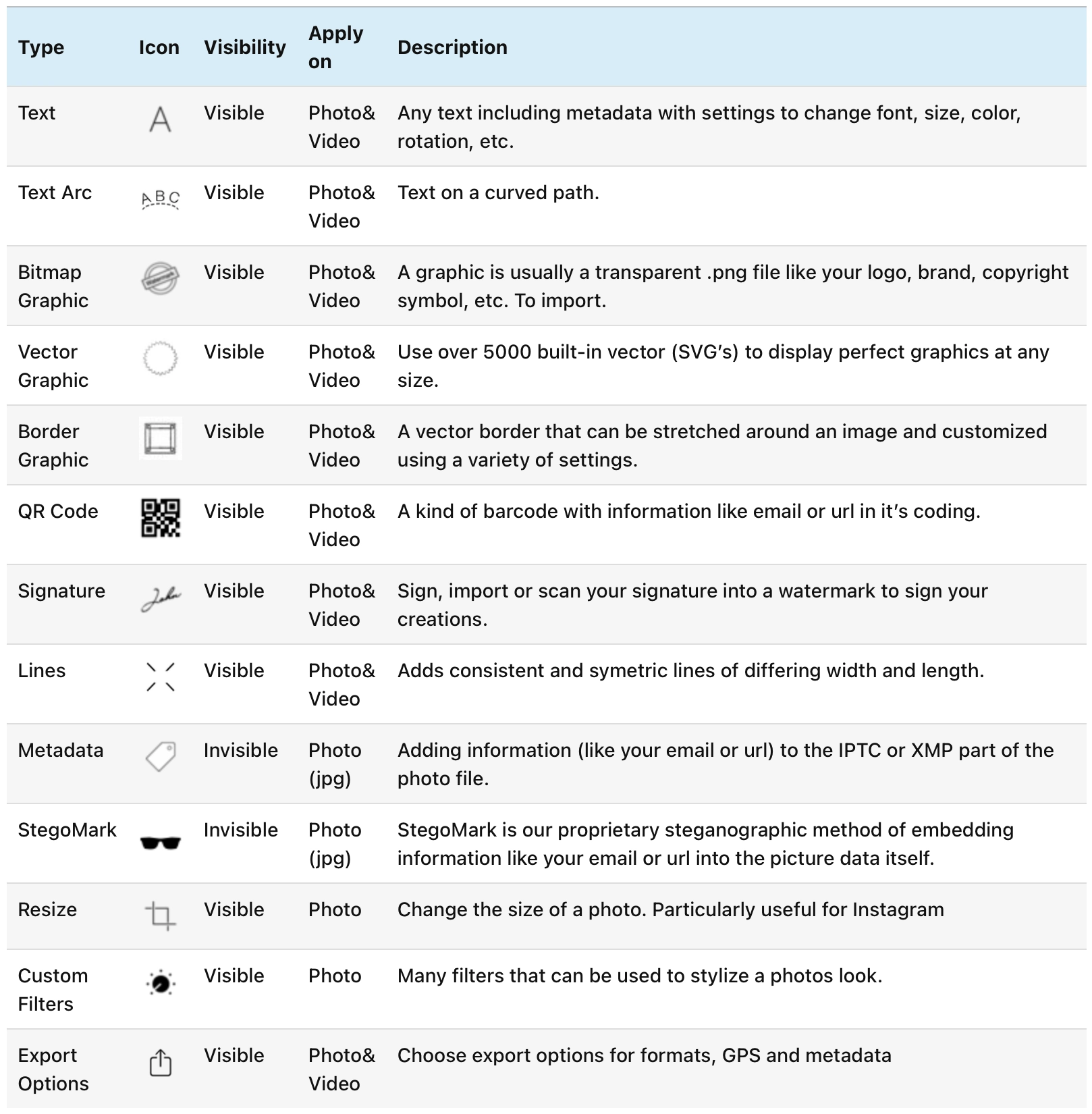
These are the watermark types that make the app feel like a studio instead of a stamp. Use subtle branding, documentary metadata, visible signature marks, or invisible proof so every shared image or clip keeps a clear trail back to its maker.

Names, copyright notices, brands, or clean captions with font, color, opacity, and placement control.

Wrap text into circles and arcs for seals, logos, and more distinctive branding.

Drop in your own logo, badge, or bitmap graphic and reuse it across jobs.

Scale crisp vector marks without sacrificing quality on large images or exports.

Draw, import, or scan a signature and place it like a studio sign-off.

Frame an image with branded borders that feel more editorial than stamped.

Guide the eye or build custom graphic treatments with simple linear marks.

Connect a watermark to a site, portfolio, campaign, or contact action with scannable QR codes.

Expose GPS, IPTC, and EXIF information when the workflow calls for visible metadata.

Embed invisible ownership proof inside the image for an extra layer of protection.
Prepare output sizes while watermarking so the deliverable is ready to share or publish.

Apply finishing adjustments as part of the export workflow instead of bouncing to another app.
iPad gives iWatermark+ extra breathing room for previewing, switching watermark types, and setting up templates that feel intentional before they go into a repeatable workflow.

The best watermarking tool is the one you keep using when the work gets busy. iWatermark+ is designed for exactly that: fast setup, reusable templates, touch-friendly controls, and enough depth to satisfy people who publish professionally every day.
Still images and video can move through the same mobile tool, so you do not have to switch apps when you want to protect both before they go out into the world.

Photos spread quickly, especially once they hit social platforms and blogs. Watermarking is the simplest way to keep authorship, credit, branding, and contact information tied to the image as it travels.
Touch-based controls make the watermark easier to refine on the device itself, whether you want something understated for clients or bolder protection for wide reposting.


The strongest praise is consistent: batch processing, control, invisible depth, and the feeling that this is a pro tool rather than a cosmetic add-on.
That combination is why iWatermark+ has lasted so long. It helps beginners start quickly, while giving power users enough range to make the watermark feel like part of the work instead of damage done to it.
"The ultimate Instagram tool."
"iWatermark+ is by far the best watermarking app I have seen to date on iOS. Nicely integrated as an iOS photo editing extension."
"Batch processing, embossed watermarks, transparency controls, placement controls, cloning variations, editing, font control. Just too many features to mention. Everything I have tried works."
Taste it today. If you want to protect photos and video with something more capable than a quick text overlay, iWatermark+ is the serious mobile choice. For deeper walkthroughs, examples, and tutorials, visit the manual and help pages.
User reviews coming soon.
No tutorials available for this app.
Select your platform and app to view the complete manual in a new window.
No previous versions available for this app.