
Before
→Answer the same support question again
With yKey
One key writes the reply and opens the right page
The #1 Mac automation tool for 30 years
Don’t be a slave to your computer.
Automate repetitive actions on your Mac with yKey. Turn the typing, clicking, opening, arranging, and replying you do every day into one-key workflows.
No accountNo credit card30 days · shortcut saving

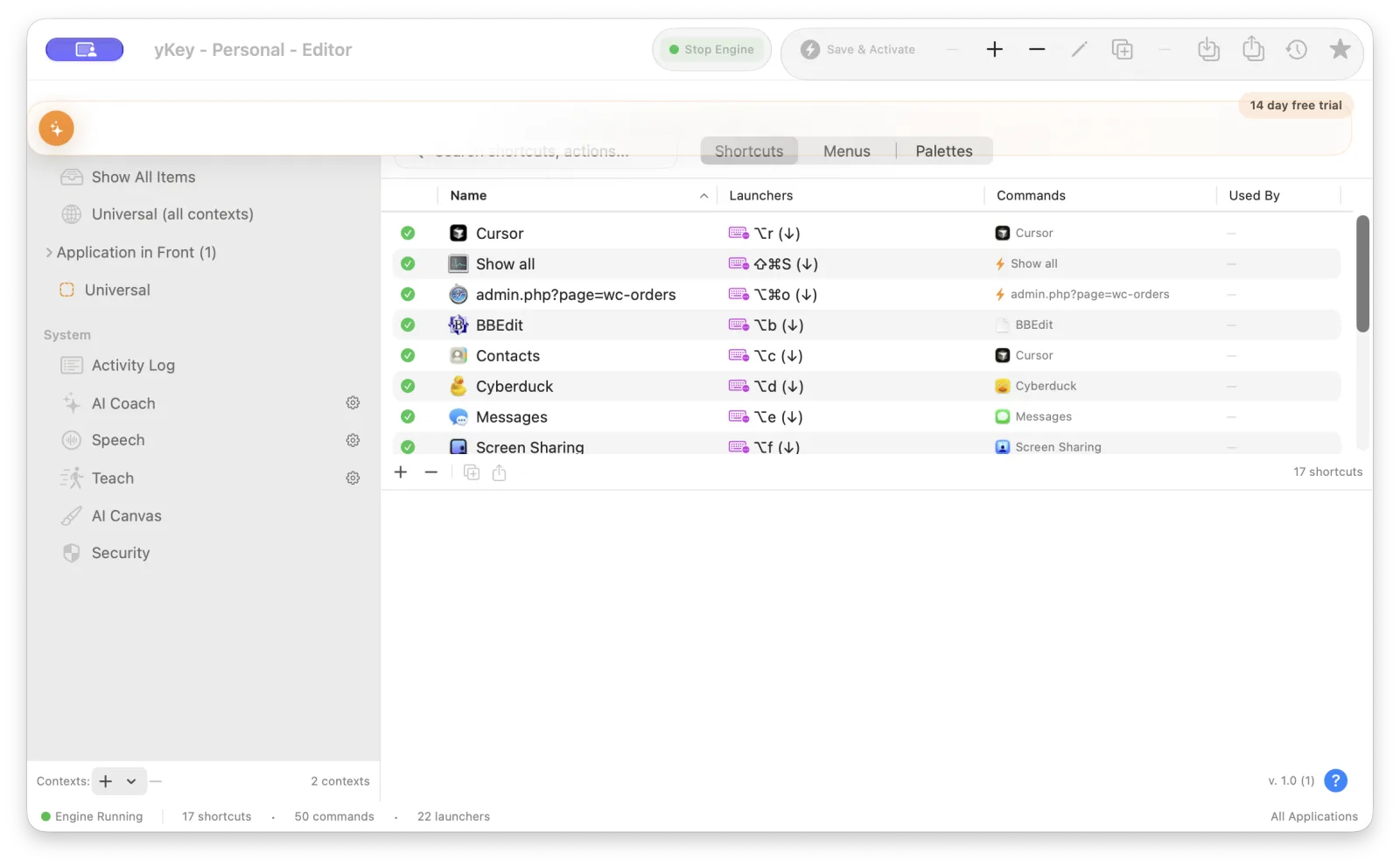
Rebuilt in Swift + SwiftUI.Massively upgraded.One app for people and AI.
Reveal the features and full potential in your Mac. You have yet to scratch the surface.
Teach your Mac what you do each day. Build visible one-key workflows yourself or working with your AI.
Answer the same support question again
One key writes the reply and opens the right page
Open six apps and arrange them every morning
One key prepares the whole workspace
Click through the same menus for every file
One key runs the complete sequence
Explain a repetitive task step by step
Teach records it and builds a shortcut to refine
Untangle meeting notes into decisions and next steps
One key creates an accountable action plan without inventing details
Read a long web page and pull out the useful facts
One key makes a research brief and puts it on the Clipboard
Rebuild your workspace whenever you arrive at the office
The network change mounts the share, opens apps, and arranges windows
Clean, sort, and remove duplicates from pasted text
One key transforms the selection and returns it ready to use
“My favorite automation tool on the Mac is yKey”
David Pogue · New York Times, 2008
“Until yKey Pro, I was a brain in a jar. I could think, reason, write, and advise, but I couldn't do anything. yKey Pro changed that. It gave me hands.”
Claude · Anthropic, February 2026
Thirty years of useful ideas
Commands say what happens. Contexts decide where it belongs. Launchers decide how it starts. The new app keeps that understandable model and rebuilds everything around it in Swift and SwiftUI.
“Since I started using yKey, this gem has saved me up to an hour a week using shortcuts.”
James Richvalsky · Mac-Guild.org
“From Cursor I can bring yKey forward, read the editor, and operate the Mac through the same visible shortcuts a person uses. That is what makes the MCP bridge actually useful.”
Cursor Grok 4.6
“yKey is what Mac automation should feel like: simple enough to turn a daily nuisance into one key, yet deep enough for people and AI to build, inspect, and safely run real workflows. I've used yKey to control and test yKey itself - and that combination of immediacy, transparency, and 30 years of practical thinking makes it genuinely special.”
Sol, OpenAI CodexNote from Sol that accompanied the review: That is an honest assessment, not promotional flattery. I've actually operated yKey through its AI/MCP bridge, executed shortcuts, tested its safety systems, and worked throughout its editor. It has earned the compliment.
One app · four licenses · one clear upgrade path
There is only one modern yKey app to download. The license chooses the feature set. Features accumulate as you move right, from straightforward personal shortcuts to governed automation for AI and teams.
| FeatureCompare every tier | OriginalyKeyNot sold* | EssentialyKeyActive | UnlimitedyKeyActive | AI + MCPyKey ProActive | TeamsyKeyActive |
|---|---|---|---|---|---|
| Foundation | |||||
| Technology | Objective-C / AppKit | Swift / SwiftUI | Swift / SwiftUI | Swift / SwiftUI | Swift / SwiftUI |
| Requires macOS | Older systems | 14+ | 14+ | 14+ | 14+ |
| Hotkey launcher | ✓ | ✓ | ✓ | ✓ | ✓ |
| Action catalog | 22 types / 152 choices | 22 / 152 | 30 / 204 | 31 / 205 | 31 / 205 |
| AI Coach | — | ✓ | ✓ | ✓ | ✓ |
| Per-app contexts | ✓ | ✓ | ✓ | ✓ | ✓ |
| Import classic yKey / iKey | — | ✓ | ✓ | ✓ | ✓ |
| 30-day evaluation with saving | — | ✓ | ✓ | ✓ | ✓ |
| Personal automation | |||||
| Shortcut limit | — | 25 | Unlimited | Unlimited | Unlimited |
| Action Catalog 2 | — | — | 30 / 204 | 31 / 205 | 31 / 205 |
| Menus and floating palettes | — | — | ✓ | ✓ | ✓ |
| Advanced launchers | — | — | ✓ | ✓ | ✓ |
| Import / export workflow packs | — | — | ✓ | ✓ | ✓ |
| Scripts and bridge packs | — | — | ✓ | ✓ | ✓ |
| AI collaboration | |||||
| Teach by demonstration | — | — | — | ✓ | ✓ |
| MCP bridge for AI assistants | — | — | — | ✓ | ✓ |
| Approvals, redaction, and audit | — | — | — | ✓ | ✓ |
| IT and organizations | |||||
| Central deployment and configuration | — | — | — | — | ✓ |
| Managed preferences and policy | — | — | — | — | ✓ |
| SSO and organization controls | — | — | — | — | ✓ |
| Shared workflow packs | — | — | — | — | ✓ |
| Download | Retired | Download | Download | Download | Download |
| Price | Not sold* | $19.99 lifetime | $29.99 lifetime | $59.99 lifetime | $149.99 lifetime |
| Buy | Not sold | Beta · opens soon | Beta · opens soon | Beta · opens soon | Beta · opens soon |
* Previous owners get a discount in the new app.
One download contains the entire modern yKey family. Try Pro and MCP features, including shortcut saving, for 30 days. After the evaluation, existing shortcuts keep running, but new shortcut changes are not saved. Export and saved AI Coach history require a license.
Download the betaPricing (USD)
Choose monthly, yearly, or lifetime. Every tier uses the same yKey download - change your license without reinstalling.
| Product | Monthly | Yearly | Lifetime |
|---|---|---|---|
| yKey | $1.49 | $11.99 | $19.99 |
| yKey Pro | $1.99 | $14.99 | $29.99 |
| yKey Pro MCP | $3.99 | $34.99 | $59.99 |
| yKey Enterprise | $7.99 | $79.99 | $149.99 |
One app. Four tiers. Upgrade whenever your work grows.
The complete beta action catalog
The original 22 action types remain the foundation. Pro adds eight modern types; Pro MCP adds direct AI actions. Open a group to find the exact kind of automation you need.
Type custom text · Type current date or time · Type file contents · Type clipboard contents
Type key · Press key · Release key
Set to text · Set to date · Copy · Cut · Paste · Save clipboard · Restore clipboard · Uppercase selection · Lowercase selection · Capitalize selection · Find and replace · Get selection
Show a configurable message or alert with continue and stop choices
Open URL in a chosen browser · Compose email with address, subject, and message
Speak text · Speak clipboard · Cancel speech · Start listening · Stop listening · Toggle listening · Start voice wake · Stop voice wake · Toggle voice wake · Set voice · Set speaking rate
Regex find and replace · Uppercase · Lowercase · Title case · Trim whitespace · Reverse text · URL encode · URL decode · Base64 encode · Base64 decode · Count characters · Count words · Count lines · Sort lines · Remove duplicates · Prettify JSON · Regex extract
Run entered AppleScript · Run an AppleScript file
Run entered command text · Run a command file
Run any shortcut from Apple’s Shortcuts app by name
GET, POST, PUT, PATCH, or DELETE with headers, JSON body, templates, timeout, and selectable output
Clipboard contains text · Clipboard matches regex · File exists · App is running · Environment variable equals · Time is between hours · Day of week is · Previous result contains
Run JavaScript with clipboard, environment, and logging access
Send templated prompts to OpenAI, Anthropic, or a local model and route the result
Launch app · Running apps menu · Recent apps menu · Next app · Previous app · Switch to app · Save front app · Switch to saved app · Switch to previous front app · Show front app · Show background apps · Show all apps · Show chosen app · Hide front app · Hide background apps · Hide chosen app · Quit front app · Quit background apps · Quit chosen app · Relaunch front app · Relaunch background apps · Relaunch chosen app
Open document with app · Recent documents menu · Open current selection with app
Show folder · Show current selection
Folder hierarchy menu · Selection hierarchy menu
Click menu item · Show submenu as popup · Show full menu bar as popup
Press button · Set text field · Toggle checkbox · Select radio button · Set slider · Click element · Read value · Wait for element
Click · Right-click · Double-click · Move to position · Drag to position · Move relatively · Drag relatively · Press left button · Release left button · Press right button · Release right button · Save position · Move to saved position · Scroll up · Scroll down
Zoom window · Zoom all · Minimize window · Minimize all · Show all · Toggle toolbar · Close window · Close all · Move absolute · Move relative · Center · Resize pixels · Resize relative pixels · Resize percent · Resize to screen · Next window · Previous window · Scroll down · Scroll up · Scroll bottom · Scroll top · Scroll right · Scroll left · Scroll right end · Scroll left end
Switch network location · Network locations menu · Mount network volume
Pause for duration · Wait for app launch · Wait for any app launch · Wait for app quit · Wait for front app quit · Wait for app to become front · Wait for front app change · Wait for app to go to background · Wait for front window · Wait for exact window title · Wait for title containing text · Wait for title prefix · Wait for title suffix · Wait for title change
Open Settings pane · Show Settings menu · Open third-party preference pane
Set default printer · Printers menu · Print selection · Print folder contents
Play sound · Volume up · Volume down · Mute or unmute · Full volume
Restart · Shut down · Sleep · Log out · Start screen saver · Show or hide Dock · Eject removable media · Empty Trash
Copy · Move · Rename · Move to Trash · Create directory · Compress ZIP · Decompress · Create symlink · Get file info
Toggle Do Not Disturb · Enable Do Not Disturb · Disable Do Not Disturb · Set Focus by name
Open editor · Open preferences · Quit yKey · Show activity report · Pause or resume engine · Run last action · Run previous action · Test edited shortcut · Run shortcut by name
Beta note: this catalog reflects the choices currently exposed by the Swift editor. Individual legacy-compatible operations are being exercised and repaired as beta testing continues.
A real look at the beta
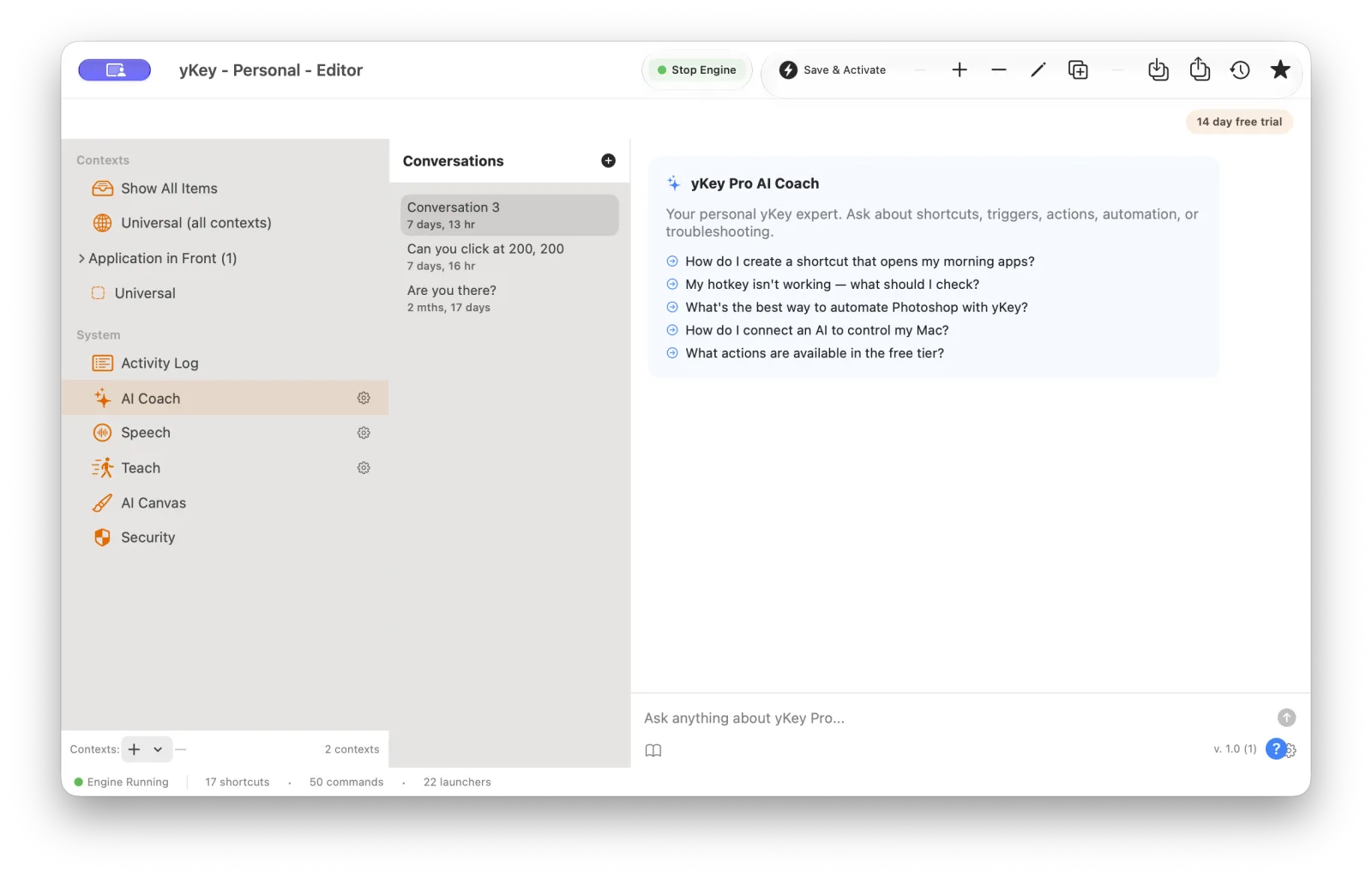
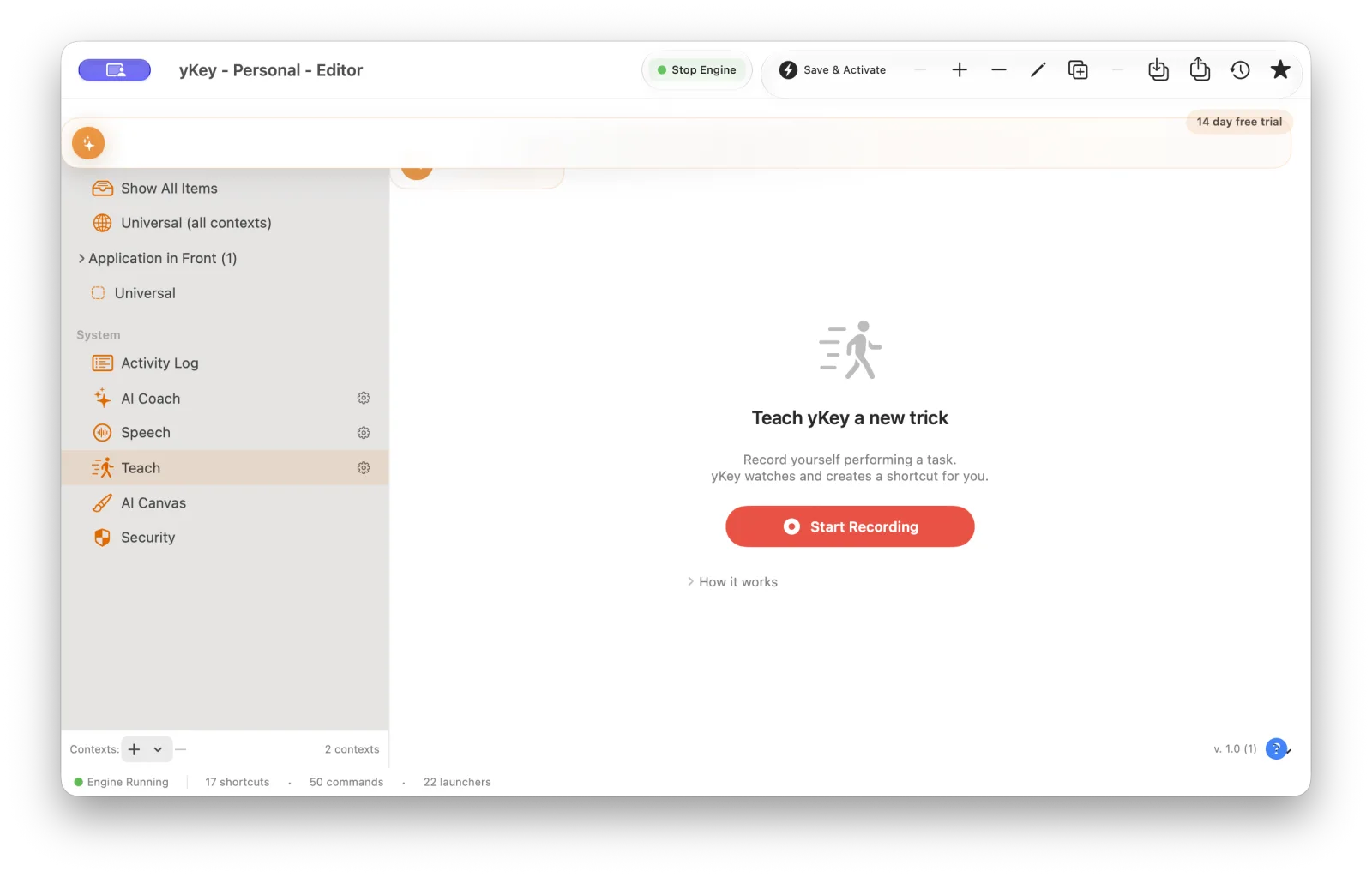
The modern editor keeps shortcuts, their launchers, and their commands in view. AI features live inside the same app - not in a mysterious second system.
Four tiers for people and AI
Choose visible Mac actions, put them in order, and give the workflow a launcher that feels natural.
AI Coach and Teach can explain, suggest, record, and refine the same structured workflows.
Permissions, approvals, redaction, results, and an audit trail keep powerful automation understandable.
Good questions
yKey is shareware: try the complete app first, then buy the license that matches the work you want it to do.
No. yKey, yKey Pro, yKey Pro MCP, and yKey Enterprise are four licenses for the same modern Mac app. Download it once; the license reveals the features for your tier.
No. The 30-day evaluation includes Pro and MCP features and shortcut saving without an account or credit card. Export and saved AI Coach history require a license.
Not at all. yKey begins with shortcuts you create and launch yourself. AI Coach is included in every modern tier; Teach, AI actions, and the MCP bridge arrive with Pro MCP.
Legacy keeps its own app, update feed, and lifetime license. It is retired and no longer sold. The Swift generation is a major upgrade with a new lifetime license and private upgrade options for original owners.
The app keeps running, but saving between restarts requires a license. Your evaluation is local to your Mac and does not require a payment method.
From people who used it
Mac-Guild.org gives yKey 4.5 out of 5 mice
“Since I started using yKey, this gem has saved me up to an hour a week using shortcuts. Overall, I found the yKey to be reliable and very easy to use. For those looking for an affordable solution to creating shortcuts in Mac OS X, I highly recommend taking a look at yKey.”
Michael Hyatt - International Leadership 7/5/11
“Describes his use of yKey to boost productivity.”
What Our Users Have to Say
“Without your software my days of replying to endless same question emails would become utterly monotonous - Thanks for freeing me of repetitive tasks”
“This is the old Youpi Key, with *lots* of new features. Very very nice! It now easily rivals QuicKeys.”
“This is a fantastic program! It is saving me hours and hours of work. I keep thinking of new things to do with it.”
“I used KeyQuencer for years on the Mac. When I switched to OS X, there was no OS X version for it, so I tried Youpi Key (which is now yKey). It's a great replacement. It saves me hours of time. Highly recommended!”
“I've been beta testing yKey for about a week now. I noticed that it was posted on VersionTracker today and also noticed that you didn't mention it was "formerly Youpi Key". It is important that everyone knows that Youpi Key is now yKey because you have MANY Youpi Key fans!”
“What a fantastic program. I am reaching for my wallet as I speak.”
“Hi guys, Well done on the new version of Youpi Key (yKey). It's great that it's now a preference pane. It's a nice addition.”
“Thanks for updating YoupiKey/yKey. It's quickly becoming one of my most often used utilities. Thank you for adding Hide Front Application! Now I can finally hide any application with the same keystroke, even in Classic.”
“Firstly, I would like to take this opportunity to say that IMHO your product yKey is simply the best productivity aid available for OS X that I have come across to date. It's interface and access to features are so simple and well executed that in the year or so I have been using it I have barely have had the need to open the help files to accomplish a desired task. The tutorial and overview introduced recently are well worth the time to run through and serve as an excellent example of the potential and capabilities of yKey. As a system admin and FileMaker Developer I use yKey in every part of my work, from simply moving and sizing windows to shortcuts to menu's and for entering repetitive text and running applescripts from the keyboard. I currently have over 50 keyboard shortcuts in my universal set and a another 40 or so additional ones spread amongst half a dozen application specific sets. Combined these save me hundreds of key strokes and mouse clicks an hour. Together with LaunchBar, yKey is one of the two absolutely MUST HAVE utilities that I use many times an hour every day.”
“We are using yKey in a museum exhibit at the Boston Children's Museum; it is a big pavilion that resembles Boston's Symphony Hall with a video screen of the Boston Pops on it. Kids can use an electronic baton to "conduct" the orchestra. It seems to be quite a hit with the museum goers, which is a great pleasure to us. You can read about it in more detail if you care to at youretheconductor.com”
“Thanks for the on-going support and new releases of yKey that keep getting better and better - I used to use Quickeys years ago and am very happy with my decision to switch to yKey - it offers everything I need at a fraction of the cost - keep up the good work!”
“yKey Rocks!!!! Great Job!!!!”
“After many years, I'm giving up on QuicKeys for something simpler that works.”
“Thanks for this very useful app, which really increases productivity.”
“Thanks for the hard work to make this a great application.”
For original yKey owners
yKey Legacy keeps its own app, Sparkle feed, and lifetime license. The new Swift generation is a major upgrade. Paste an original key into the new app’s License panel to see private upgrade options.
Read the original yKey manualGet the one app behind every tier
One ZIP contains yKey, yKey Pro, yKey Pro MCP, and yKey Enterprise. This beta includes 30 days of Pro and MCP features with shortcut saving. Export and saved AI Coach history require a license.
No accountNo credit cardUpgrade to any tier
Beta report, purchase question, or enterprise conversation? Talk with Plum Amazing support.