

TinyCal – Google & Apple Calendar for Mac
TinyCal – Google and Apple Calendar in the Mac Menubar.
Easy access and view of Google or Apple Calendar, straight from the menu bar. Add events, reminders, lots of options. It can show multiple months, use custom calendars, show holidays from many religions and countries. Displays multiple personal/business calendars at once. Simple, easy and very handy!
Overview
Easy access and view of Google or Apple Calendar, straight from the menubar. Add events, reminders, lots of options. It can show multiple months, use custom calendars, show holidays from many countries and multiple personal/business calendars.
TinyCal has many useful features.
- Apple Calendar instantly view mini calendar & access from the Mac menubar
- Google Calendar instantly view mini calendar& access from the Mac menubar
- Support for Google Calendar Gadgets
- Configurable month display
- Configurable event display
- Custom calendars
- Tear-away menu
- Growl reminders
- Create and delete events
- Hot keys
- ISO 8601 week numbers
- Secondary calendar overlay
- Many options
Requirements
TinyCal requires Mac OS X 10.9 or later. Google Calendar integration is provided by the Google.
Showing Multiple Months
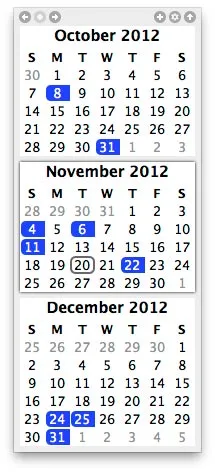
TinyCal can be customized to show 1, 2, 3 or 12 months at one time. The display can be arranged as tall or wide.
Google Calendar
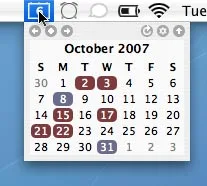
TinyCal can display public Google Calendars for holidays for 40 different countries, from Australia to Vietnam. It can also display events from your personal Google Calendar. The following screenshot shows holidays from the USA in blue and a personal calendar in red.
Custom Calendars
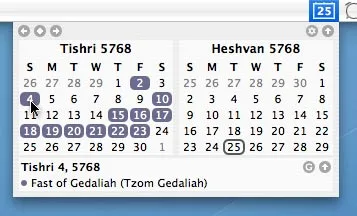
TinyCal can be customized to show other calendars, such as Buddhist, Hebrew, Islamic, and Japanese. The following screenshot show the Hebrew calendar with Jewish holidays.
Tear-Away
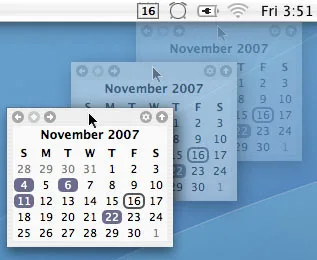
The TinyCal window is a tear-away menu that can be repositioned anywhere on the screen.
Today's Events
In the TinyCal window, today's date is circled. In addition, if there are any events occurring today, they are reflected in the menubar icon. In the following screenshot, the blue triangle in the lower right indicates that there is an event today.

Controls
The basic controls are illustrated in the screenshot below.
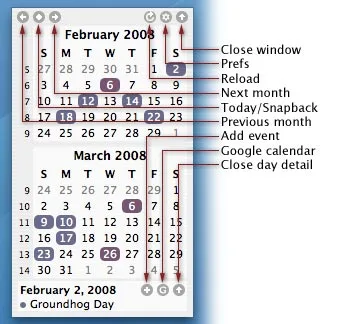
For more information about TinyCal, please visit the manual page.
Reviews
"TinyCal displays Google or Apple Calendars & Events instantly in a tiny dropdown calendar with a quick click in the menu bar."
User Raves
"Easy access and view of Google or Apple Calendar, straight from the menu bar. Add events, reminders, lots of options. Simple, easy and very handy!"
No tutorials available for this app.
Product Manuals
Product Manuals
Select your platform and app to view the complete manual in a new window.
No previous versions available for this app.