A thought worth keeping
Clip it. Color it. Leave it beside the work that inspired it.
Small notes. Surprisingly big ideas.
Floating sticky notes for Mac
Put colorful notes one click from your menu bar. Write normally or in Markdown, dictate instead of typing, find anything instantly, and stretch a sticky into half a page when an idea needs room.
No accountNo credit cardYour notes stay on your Mac
Clip it. Color it. Leave it beside the work that inspired it.
Small notes. Surprisingly big ideas.
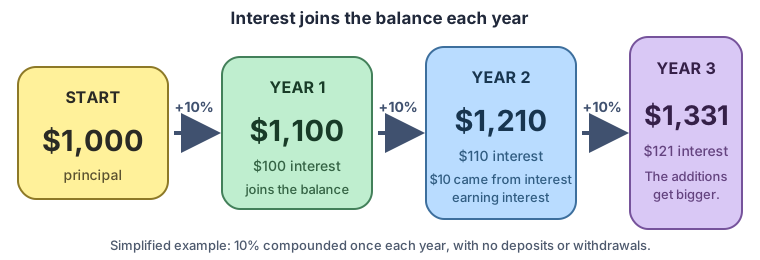
Interest can earn interest. That is the quiet engine behind long-term growth.
# A useful list
✓ Call Ana
✓ Send the sketch
□ Save the brilliant part
Seven colors. Rich text and Markdown. Apple Dictation. Instant search.Add an optional calendar and pendulum timer whenever you want a little playfulness.
Simple first. Capable when needed.
Capture something in seconds, leave it floating beside your work, or turn it into a richer document without moving to another app.
Choose among seven paper colors, then make your favorite the default for every new note.
Write normally, edit Markdown source, use a split editor and preview, or simply read the rendered result.
Press Control-T to transform a compact sticky into half a sheet of paper-and back again.
Use Apple Dictation from the note title bar, the app menu, or your familiar system-wide shortcut.
Search the full text of locally stored notes, browse recent notes, or open the slide-out notes list.
Open a compact calendar or set the pendulum-style timer. Turn either control off in Preferences.
The scrap of paper you always have
A phone number. A promise. The name of a book. An idea that might vanish in thirty seconds. Now you do.
Don’t forget to call your boss and remind him about the raise he promised last month.
Meet the original
Certainly not the most private place to keep a computer password-or another important scrap of information. And yet far too many of us do exactly that.
Then the glue dries. The note flutters from the monitor and joins the tiny graveyard of good ideas somewhere behind the desk.
Paper notes fall off. They get lost. And they never grow into something larger or more useful.
Clip Notes can be locked, searched, remembered, and transformed from a little sticky into half a page.
Blueberries on top 🫐
The morning keeps
one golden pocket
for the idea
that woke too soon.
Maya
(808) 555-0142Call after 4
💍WeddingJune 12
♥AnniversaryAugust 8
🎂Kai's birthdayOctober 21
↗Business appointmentTuesday · 10:30
Automatic idea-catcher.
Probably.

Private by design
A Clip Note can be private and locked in the app. That is a considerable improvement over leaving your password stuck to the front of your monitor.
Paper sticky note
Anyone walking past can read it. What could be worse?
Private Clip Note
One little keyboard shortcut
A sticky is perfect for the beginning of an idea. Press Control + T and it expands into a half sheet of paper - room for the plan, the poem, the lesson, or the equations behind one compact truth.
“The beginning is the most important part of the work.”- Plato
Then give the idea enough room to become useful.
Written in silver,
folded by waves,
opened at dawn
by the shore.
Several useful forms lead back to one memorable relationship.
## E = mc²Energy = mass × the speed of light squared.
Learn with Clip Notes · Experimental
Ask for “Interest,” “Gravity,” or another topic. Clip Notes arranges a short lesson as colorful cards with plain explanations, examples, a useful picture, something to try, and a memorable quotation.
Money earns interest. Then the interest can earn interest too.
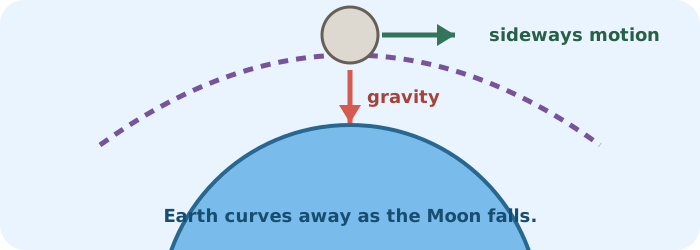
An orbit is a fall that keeps missing the ground.
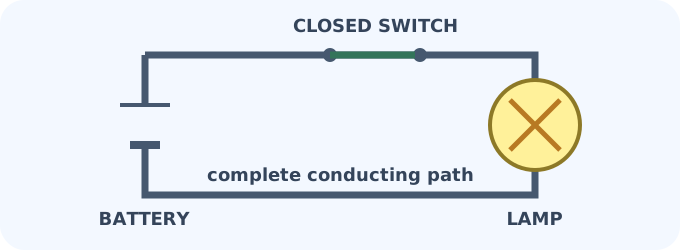
A complete path lets electrical energy do useful work.
Ten reviewed lessons are bundled today. They work completely offline and never mix with your personal notes unless you choose “Keep This Card in My Notes.”
Everything is included
Every feature is available during the 15-day tryout. There are no “premium” controls hidden behind a higher tier.
| Feature | What it does | Available in tryoutTryout |
|---|---|---|
| Menu-bar notes | Create a note from the menu or with an Option-click | ✓ |
| Floating, resizable windows | Keep notes beside the work they belong to | ✓ |
| Sticky-to-page transform | Switch between compact sticky and half-page size | ✓ |
| Seven paper colors | Use per-note colors and choose a default | ✓ |
| Rich-text editing | Write with familiar formatting, including bold and italic | ✓ |
| Markdown modes | Edit source, use split view, or read the rendered preview | ✓ |
| Markdown images | Show bundled SVG illustrations and optional HTTPS images | ✓ |
| Apple Dictation | Use the microphone button, menu command, or system shortcut | ✓ |
| Search and recent notes | Search note text and quickly reopen stored notes | ✓ |
| Custom title bars | Show date, time, app name, no title, or your own title | ✓ |
| Calendar | See a compact calendar and today’s events; completely optional | ✓ |
| Pendulum timer | Set a playful 0-30 minute alarm; completely optional | ✓ |
| Local auto-save | Keep ordinary notes safely on your Mac | ✓ |
| Privacy lock | Use Touch ID or your Mac password during the session | ✓ |
| Portable .cpnt files | Export a note and open it again later | ✓ |
| Shortcuts and Siri | Create, search, and dictate with App Intents | ✓ |
| Learning lessons | Explore ten bundled, offline, experimental lessons | ✓ |
| Sparkle updates | Check for and install direct-download updates | ✓ |
Internet is needed only for purchasing, license activation, updates, and optional remote Markdown images.
A familiar room inside a larger house
The standalone app stays focused on notes. CopyPaste includes Clip Notes alongside its clipboard history, clip sets, actions, and other clipboard tools.
Try before you buy
No account. No payment method. If Clip Notes earns a home on your Mac, choose the license that feels right.
$0.99per month
The smallest possible way to begin.
Choose Monthly$6.99per year
A year of notes for less than two coffees.
Choose Yearly$14.99once
Buy it once and keep it for life.
Choose LifetimeSaved notes remain safe and readable. Temporary notes and edits can still live for the current session. Activate later and permanent saving, preferences, and the complete lesson library return immediately.
Good questions
Clip Notes is designed to feel friendly before, during, and after the tryout.
No. The 15-day tryout begins locally on your Mac, includes every feature, and does not ask for a credit card.
Your saved notes remain safe and readable. New notes and edits can still live for the current session, but they are not permanently saved until you activate Clip Notes. Preferences reset at the next launch, and Interest, Loans, and Gravity remain available in Learning.
Ordinary notes are stored locally on your Mac. Internet access is used only for purchasing, license activation, updates, and optional remote Markdown images.
Clip Notes is Universal. The same download runs on Apple Silicon and Intel Macs with macOS 13 or later.
It is the same focused note experience. Clip Notes can run independently and can also be included as a helper inside the direct-download edition of CopyPaste.
Make a little room for your next idea.