

CopyPaste
Copier & Coller, Gestionnaire de clips multiples - Nouveau ! La plupart des gens utilisent copier et coller des milliers de fois par semaine. Passez au niveau supérieur avec CopyPaste ! Le premier et le plus populaire utilitaire de presse-papiers multiple.

CopyPaste : une fois essayé, on se demande comment on a pu s'en passer !
CopyPaste a changé ma vie… C'est le logiciel complémentaire le plus important sur mon Mac.
Aperçu audio/vidéo
Vue d'ensemble
Vous comparez ce nouveau CopyPaste avec CopyPaste Pro/Classic ? La page de comparaison explique les différences, quelle app convient à quel flux de travail et pourquoi les deux versions existent.
Comparer les versions de CopyPasteAutrefois, les applications n'étaient pas multitâches. On n'utilisait qu'une app à la fois. Le partage était difficile. Pour surmonter cela, Mac OS a été le premier à utiliser un presse-papiers système.
Vers cette époque est sorti l'original CopyPaste, qui permettait au Mac de mémoriser plusieurs presse-papiers depuis n'importe quelle app. Il retenait 10 clips et fut le premier utilitaire multi-presse-papiers pour tout ordinateur. Des décennies plus tard, en 2021, une réécriture complète de CopyPaste a eu lieu.
La plupart des gens utilisent copier-coller des milliers de fois par semaine et diraient que c'est essentiel et incroyablement utile. Le presse-papiers classique est crucial, mais un seul presse-papiers qui disparaît à chaque copie ne suffit plus. Passez au niveau supérieur avec CopyPaste !
Attention : CopyPaste peut créer une dépendance.
Fonctions
 Toucher
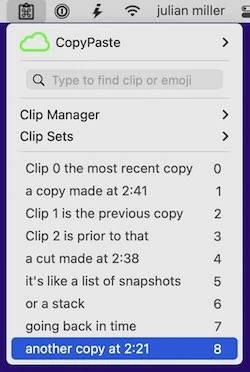
Historique des clips
CopyPaste mémorise automatiquement chaque copie ou coupe et la conserve dans l'historique des clips. C'est comme une machine à remonter le temps pour le presse-papiers.
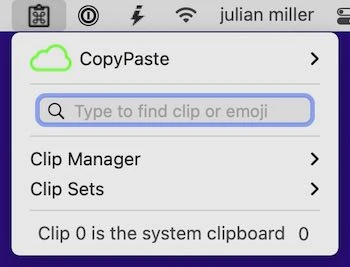
Clip 0
Le clip 0 est la copie la plus récente — la même que le presse-papiers système. Avec CopyPaste, chaque copie est mémorisée.
 Toucher
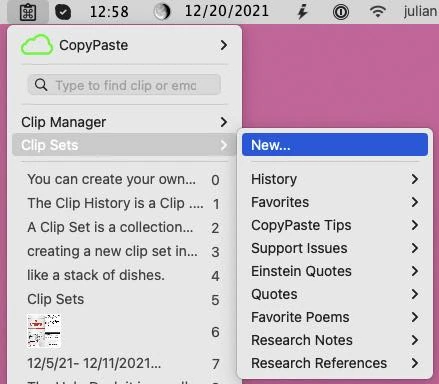
Ensembles de clips
Les ensembles de clips sont des archives de copies pour texte et images que vous utilisez souvent.
 Toucher
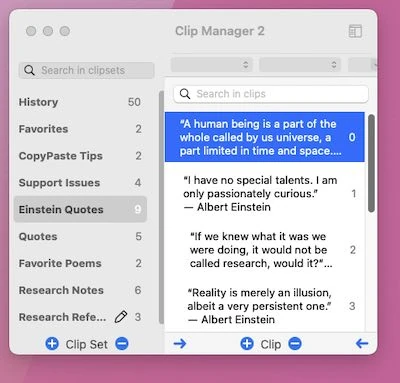
Gestionnaire de clips
Le gestionnaire de clips permet de modifier, afficher, trier et gérer vos clips.
 Toucher
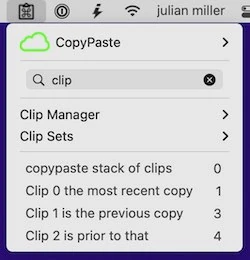
Recherche et filtres
Recherchez instantanément parmi toutes vos copies précédentes. Le filtrage est en temps réel.
 Toucher
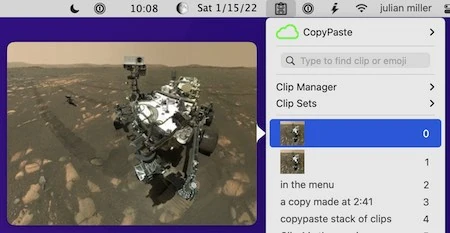
Aperçu des clips
Prévisualisez les clips à tout moment : graphiques, texte, pages web, etc.
 Toucher
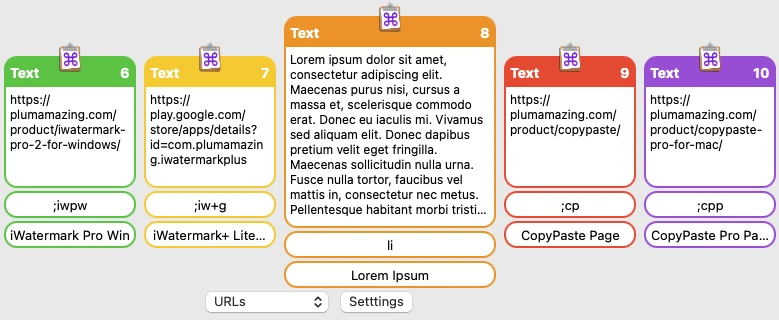
Navigateur de clips
Le navigateur de clips aide à trouver, accéder et coller des clips depuis l'historique et les ensembles.
 Toucher
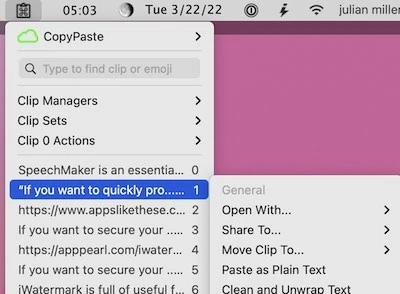
Actions sur les clips
Transformez les clips avec Extraire, Convertir, Traduire, Nettoyer, Insérer, Trier, Stats, Citations et opérations URL.
 Toucher
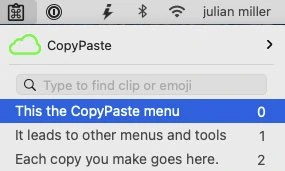
TriggerClip
Tapez quelques caractères pour coller instantanément texte, image, tableur ou fichier depuis un clip.
 Toucher
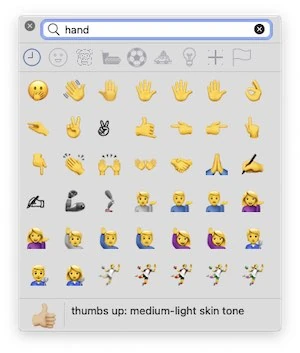
Trouver des emojis
Ajoutez facilement des emojis aux clips avec Contrôle-E et la palette emoji.
 Toucher
Grab/OCR
OCR du texte n'importe où à l'écran dans un clip.
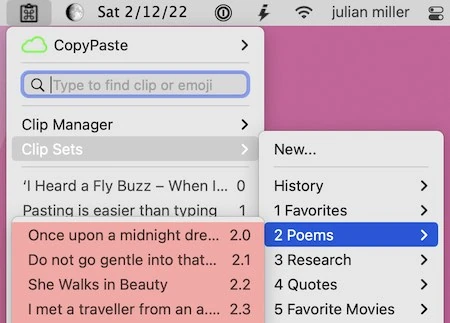
ToucherColler depuis les ensembles
Collez directement depuis tout ensemble avec Contrôle-Maj-V.
 Toucher
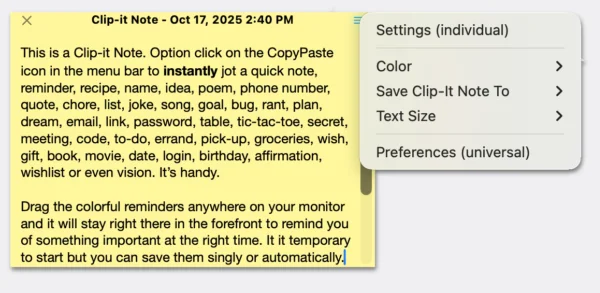
Notes de clips
Option-clic sur l'icône CopyPaste pour ouvrir les notes de clips — des notes autocollantes numériques.
 Toucher
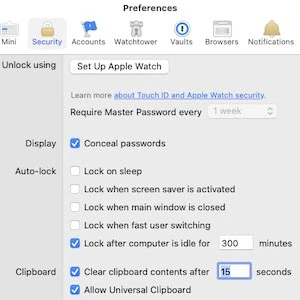
Sécurité gestionnaire de mots de passe
Préserve la confidentialité des gestionnaires de mots de passe comme 1Password.
 Toucher
Enregistrer et réutiliser
Conservez l'historique et vos ensembles de clips entre les lancements et redémarrages.

Ajout de clips
Construisez un clip à partir de nombreuses petites captures ajoutées au clip 0.

Sauvegarde et restauration
Sauvegardes manuelles ou automatiques de l'historique, des ensembles, des notes et des réglages.

Partage iCloud
Partagez des fichiers de toute taille via iCloud avec un lien placé dans le clip 0.
 Toucher
Coller en texte brut
Raccourci pour coller tout texte formaté en texte brut dans n'importe quelle app.
 Toucher
Bibliothèque de prompts IA
Enregistrez vos meilleurs prompts et modèles IA dans des ensembles de clips consultables.

Types de clips multiples (UTI)
Contrôlez les types de presse-papiers cachés conservés dans chaque clipboard.
 Toucher
Actions URL
Maj-clic sur un clip pour ouvrir les URL dans votre navigateur.
 Toucher
Collage séquentiel
Collez par numéro, par exemple contrôle 7 ou contrôle 7-11 pour une série de clips.
 Toucher
Tutoriels CopyPaste
CopyPaste – Gestionnaire de presse-papiers multiples
CopyPaste fut le premier et le plus populaire utilitaire de presse-papiers multiples. Chaque copie est mémorisée dans un historique de clips — comme une machine à remonter le temps pour le presse-papiers.
Augmentez le presse-papiers. Améliorez la productivité. Incroyablement utile. Ne perdez plus jamais un presse-papiers. Un gain de temps précieux pour tous les utilisateurs Mac depuis 1996.
Historique de l'app CopyPaste
CopyPaste, le premier utilitaire de presse-papiers multiples, a été créé par Peter Hoerster en 1993. CopyPaste pour Mac fut la première version.
CopyPaste est l'utilitaire de clips multiples original pour le Mac. Sa popularité massive tient à son utilité : il amplifie le presse-papiers en arrière-plan.

CopyPaste
Le premier et le plus populaire utilitaire de presse-papiers multiples. Ne perdez plus jamais un presse-papiers. Gain de temps pour tous les Mac depuis 1996.
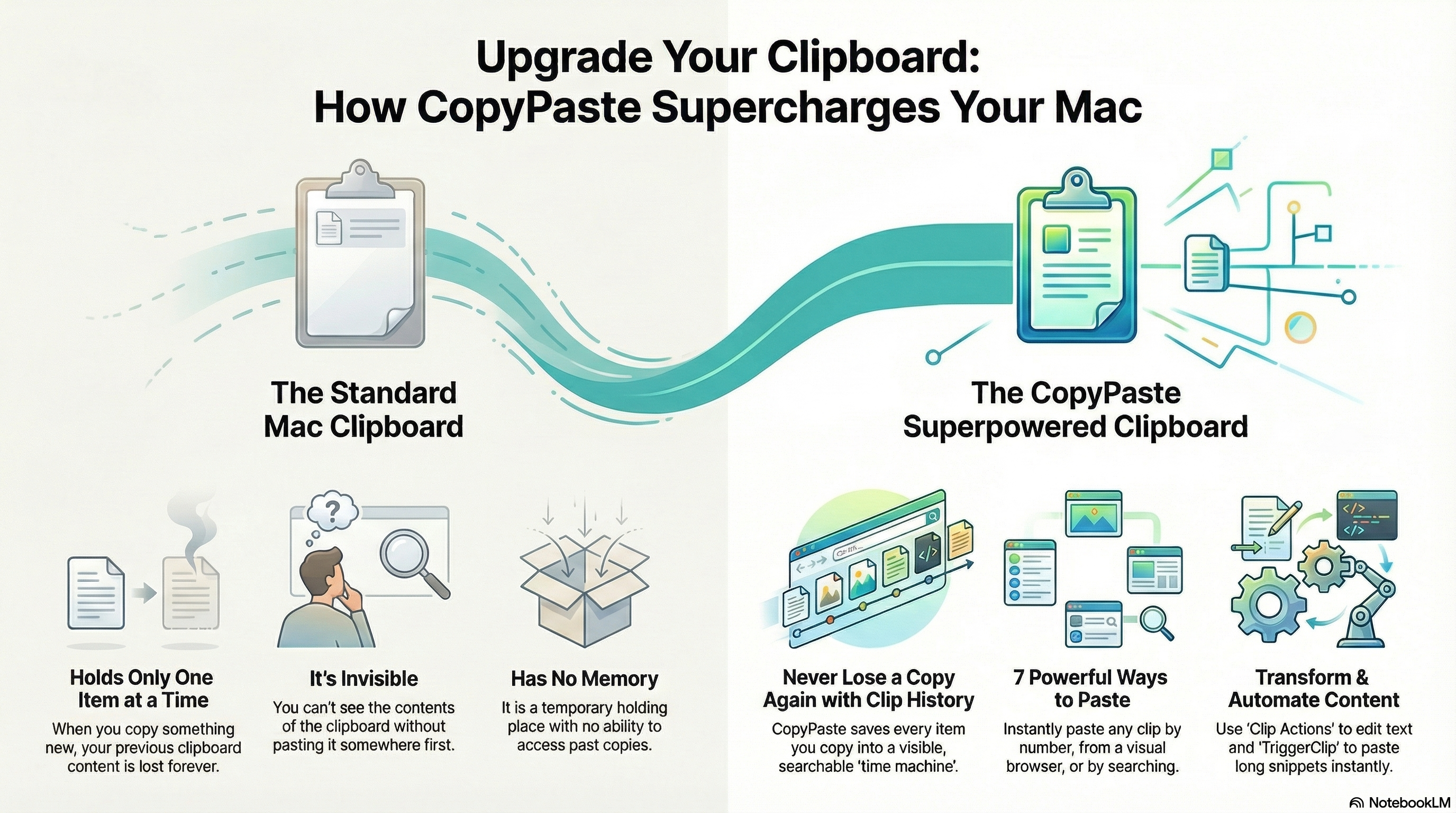
Limites du presse-papiers Mac standard
Le presse-papiers Mac intégré a 6 limitations majeures:
- Ne contient qu'un seul clip à la fois
- Il est invisible
- Il ne sauvegarde pas les copies précédentes
- Au redémarrage du Mac, le presse-papiers est vide
- On ne peut pas le modifier
- Aucun outil pour agir directement sur les clips
CopyPaste fournit toutes ces fonctions manquantes et bien plus encore.
Pour plus d'informations sur CopyPaste, consultez la page du manuel.
Historique
0.95.2
update📝 Changes
- Added Delete key support for deleting clip notes and selected clips.
- Fixed crashes in preview, OCR text grabbing, and Clip Notes paste flows.
- Improved OCR main-thread request handling.
- Added hierarchical save menu and text/RTF save options for Clip Notes.
- Added drag-and-drop text/file workflows for Clip Notes.
- Updated Textra to Extract Text, with image and PDF support.
- Improved Clip Manager readability, clip note positioning, sounds, and Command-VV behavior.
✨ New Features
- Delete clips and clip notes with the Delete key.
- Save Clip Notes as text or RTF files.
- Drag text from Clip Notes to create text files at the drop location.
- Drop Finder files onto Clip Notes to display their content.
- Extract Text action supports images and PDFs.
🔧 Improvements
- Improved OCR main-thread request handling.
- Changed default Clip Manager content font size from 9 point to 12 point.
- Improved clip note window positioning.
- Added delete sound for clips.
- Renamed Textra actions to clearer Extract Text actions.
🐛 Bug Fixes
- Fixed the crash in preview.
- Fixed the crash when grabbing OCR text and pasting in Clip Notes.
- Fixed Command-VV option behavior from Copy to Clip or Paste from Clip.
- Fixed sounds playing incorrectly when trying multiple copies.
0.95.01
BREAKINGmajor📝 Changes
- Major performance improvements and a redesigned database for clip sets, clip history, and metadata.
- Improved backup and restore with new features and better reliability.
- Removed clip limits; paid users now have unlimited Clip Notes.
- Free users keep existing clip notes but are prompted to upgrade for unlimited notes.
✨ New Features
- Extract Text from images and PDFs directly from the action menu.
- Clipset Lock to prevent accidental changes.
- Show Me Menu to help users discover CopyPaste features.
- Multiple clip notes can open in different positions.
- Option-click the menu bar icon to quickly show a note.
- Added sound feedback when deleting clips.
🔧 Improvements
- Improved performance when handling large clip libraries.
- Better memory usage and faster loading.
- Larger default font in Clip Manager for readability.
- Editing clips now shows a clear save indicator.
- Live updates when clip content changes.
- Improved preview handling for large images.
- Better synchronization between the menu and Clip Manager.
🐛 Bug Fixes
- Fixed the license window not appearing.
- Fixed copying text to custom clips.
- Fixed trigger clips not working in the App Store version.
- Fixed the duplicate clip removal preference.
- Fixed paste shortcuts and clip number shortcuts.
- Fixed Clip Manager editing crashes.
- Fixed clip note preview display.
- Fixed backup import reliability.
- Fixed menu and sound preference issues.
0.94.48
update0.94.47
minor📝 Changes
- Option click on the CopyPaste icon for a good surprise
- Other misc. improvements
✨ New Features
- Option click on the CopyPaste icon for a good surprise
🔧 Improvements
- Other misc. improvements
0.94.45
minor📝 Changes
- General improvements and fixes
🔧 Improvements
- General stability and performance improvements
0.94.42
minor📝 Changes
- Fixed issue after search in main menu duplicate items
- Completed CSV file editing feature. After editing of CSV file changes will be saved automatically
- Shows CSV file with columns header in ClipManager. User can edit the file, save feature is not completed
- Fixed issue in clip 0 action menu item, all items are grayed out
- Added CSV file preview in ClipManager and Main Menu
- Many other misc. changes and improvements
✨ New Features
- Completed CSV file editing feature. After editing of CSV file changes will be saved automatically
- Shows CSV file with columns header in ClipManager. User can edit the file, save feature is not completed
- Added CSV file preview in ClipManager and Main Menu
🔧 Improvements
- Many other misc. changes and improvements
🐛 Bug Fixes
- Fixed issue after search in main menu duplicate items
- Fixed issue in clip 0 action menu item, all items are grayed out
0.94.40
minor📝 Changes
- Fixed archive error for apple mac appstore version
- Fixed issue ClipManager sorting not synched with favorite menu
- Fixed issue in ClipManager when loading more clips loaded all the clips then text message not showing correctly
🐛 Bug Fixes
- Fixed archive error for apple mac appstore version
- Fixed issue ClipManager sorting not synched with favorite menu
- Fixed issue in ClipManager when loading more clips loaded all the clips then text message not showing correctly
Reviews
"CopyPaste is a fantastic program and I use it everyday a lot…really handy tool, and I congratulate you for it!✌️ Best to you and the team. Many many thanks!!"
"This new (CopyPaste) app is 100% AMAZING and I use its numerous features thousands of times daily – literally. It has been a time-saver, increased work-flow efficiency, and so much more."
User Raves
"CopyPaste has changed my life! To be able to keep save multiple snippets, instead of having each one die when you copy a new passage, is a game changer. I use it every day for so many different projects. CopyPaste is the only app I've ever paid for, and I'll keep paying for it because it's so useful."
"I frequently find myself copying and pasting standardized text snippets across various applications, both social and non-social, to ensure consistent alignment in the diverse platforms where I write. Simultaneously, I incorporate distinct portions of the text based on the specific occasion. Notably, I refer to captions of standard photographs and phrases, as well as iconic images.
Prior to utilizing CopyPaste, I relied solely on manual copying and pasting, which often resulted in subpar outcomes. However, the introduction of CopyPaste revolutionized my workflow, enabling me to efficiently manage and utilize my clips from the Favorites set of the application, as well as extensive text from the History section. Consequently, I have significantly increased my productivity and achieved a more organized and well-structured output.
In my opinion, CopyPaste deserves to be integrated into the macOS operating system. Furthermore, its availability on iOS would be highly beneficial, and I eagerly anticipate its eventual integration.
I extend my sincere gratitude for the creation of this invaluable tool."
"I am just writing to say how pleased I am with CopyPaste 2022! I have used CopyPaste for a lot of years, and while it has always been handy, this new version substantially upped the game! My new fave is the copy to OCR - it has saved me hours with out resorting to endless work-arounds. iCloud Storage and expanded clip sets have sealed the deal. CopyPaste was always worth the money. Now it is an absolute bargain!!"
"CopyPaste has made my life so much easier and I cannot imagine a computer without it. If you are writing a lot on the keyboard and are cutting and pasting this is the right tool for the job. Store all sorts of things like letter headers and addresses to insert at the touch of a key. Very simple to use."
"CopyPaste Pro is a true workhorse for me, and my oldest app in constant, heavy use."
"Ich muss mich eigentlich fast selbst über mich selbst wundern, dass ich diese Software noch nicht eher gefunden und im Einsatz hatte. Mittlerweile kann ich mir schon gar nicht mehr vorstellen, wie ein Mac ohne diese App „funktionieren" soll. Also ich gehe jetzt mal von meinem „Arbeits-Mac" aus, an dem ich den ganzen Tag sitze und erst da spiel die Software ihren Nutzen so richtig aus. Im Gegenzug dazu hab ich noch ein etwas älteres MacBook Pro und da fehlt mit die Software überhaupt nicht. Seltsam nicht. 😉 Aber wie in der Überschrift schon angedeutet: „CopyPaste Pro ist sowas ähnliches wie eine TimeMachine für die Zwischenablage." Ich glaube dieser Satz beschreibt kurz und bündig, was die Software leisten kann."
TRANSLATION: "I actually have to wonder about myself that I haven't found and used this software earlier. By now I can't even imagine how a Mac should "function" without this app. I'm talking about my "work Mac" where I sit all day and that's where the software really shows its value. On the other hand, I also have an older MacBook Pro and there I don't miss the software at all. Strange, isn't it. 😉 But as already indicated in the headline: 'CopyPaste Pro is something like a TimeMachine for the clipboard.' I think this sentence describes briefly and concisely what the software can do."
"There is not a day goes by that I do not make use of Copy Paste. Thanks again for a superb utility."
No tutorials available for this app.
Product Manuals
Product Manuals
Select your platform and app to view the complete manual in a new window.
Previous Versions
- Version 0.9.93
- Version 0.9.90
- Version 0.9.87
- Version 0.9.86
- Version 0.9.84 - is said to the be the best for Mac OS 10.15.7