
Visible watermarks
Let people see who made it.
Put a name, logo, signature or other visible mark on the picture. Choose the type that says what you need to say.
For example
A photographer’s signature in the corner.

Made for your Mac workspace
Bring your photo collection into a spacious desktop workspace. Refine a watermark in the side inspector, see your photos in the tray and build a consistent identity for the work you share.
Mac Catalyst beta · separate from the older iWatermark Pro
One idea. Three ways to make it yours.
In the iWatermark family, you choose a watermark type with a purpose. Types belong to three categories. Combine the ones that fit your photo, your identity and the way you want to share.
Let people see who made it.
Put a name, logo, signature or other visible mark on the picture. Choose the type that says what you need to say.
For example
A photographer’s signature in the corner.
Carry information beneath the surface.
Carry creator and copyright information in the photo’s metadata. StegoMark encoding is not available in this Mac preview.
For example
Creator and copyright information inside the exported file.
Give the picture your finishing touch.
Use a filter, resize the picture or choose how it is exported. These tools shape its appearance and delivery instead of adding a visible credit.
For example
A consistent look and size for a collection.
Let people see who made it.
 TextA name, copyright line, caption or website.
Try it: Keep the credit readable at the size people will actually see.
 Text on ArcCurved lettering for a seal or emblem.
Try it: Try it around a logo rather than across your subject.
 Bitmap GraphicYour existing logo or other image.
Try it: A transparent background gives a clean result. Check sharpness when enlarging.
 Vector GraphicArtwork with crisp edges at different sizes.
Try it: Choose artwork, then adjust its color, scale and position.
 SignatureA personal signature for your work.
Try it: Make it once, save it and use it again.
 QR CodeA scannable route to a link or text.
Try it: Leave contrast and clear space around it. Scan an exported copy.
 BorderA frame that becomes part of your presentation.
Try it: Check both portrait and landscape photos before using it on a batch.
 LinesA pattern of visible lines over the picture.
Try it: Tune width, color and opacity to keep the subject understandable.
Try it: Inspect the saved copy before sharing. Redaction does not remove other copies or metadata.
Carry information beneath the surface.
 MetadataCreator, copyright, comments or keywords stored in the photo file.
Try it: Other services may strip metadata. Pair it with a visible credit when attribution needs to be obvious.
Give the picture your finishing touch.
 Photo FilterA visual treatment for your own photographic style.
Try it: Compare skin tones and highlights with the original.
Try it: Check that important details fit before exporting the whole collection.
Try it: Choose settings for the recipient, then inspect one exported example.
A photo collection deserves some elbow room.
See the picture, the selected photos and the controls together. This Mac Catalyst beta gives the iWatermark+ workflow a desktop layout of its own.
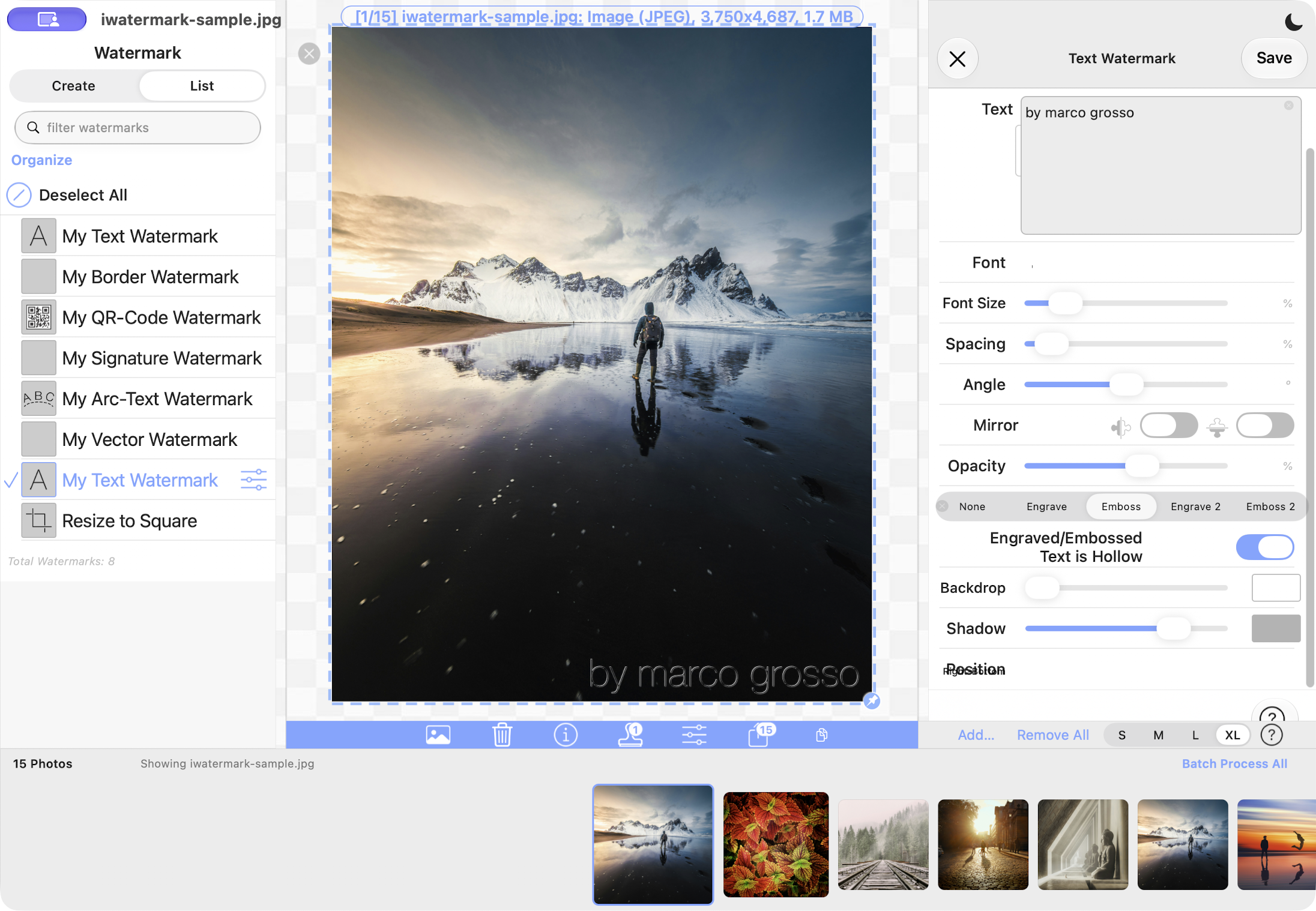
Keep selected photos in view. Choose S, M, L or XL thumbnails to suit the detail you want to inspect.
Work on the watermark’s settings while keeping the main picture visible. Adjust the inspector’s width to fit your workspace.
Experiment with the newer Engrave 2 and Emboss 2 text treatments. Check the saved result at the size you intend to share.
Looking for the older desktop application? iWatermark Pro for Mac has its own page.
Make a little recipe. Reuse it.
You don’t have to use every tool. Choose the combination that serves the picture.
For the photographer
Visible: Signature or Text.
Invisible: Metadata.
Transformation: Resize Photo.
Leave a readable credit, carry creator information in the file and prepare a consistent sharing size.
For the shop or studio
Visible: Bitmap Graphic or Vector Graphic.
Invisible: Metadata.
Transformation: Export Options.
Reuse the same identity on product photos. Inspect a portrait and a landscape image before processing the batch.
For the artist
Visible: Text on Arc or Border.
Invisible: Metadata.
Transformation: Photo Filter.
Create a recognizable visual treatment, then save the marks that make your work feel like yours.
Illustrated recipes. Available formats and video behavior differ by platform; test one exported file before a large batch.
A family with a photographic following
These new betas continue the iWatermark idea: let your photos carry your identity in the way that fits your work.
From the iPhone & iPad App Store community. Reviews of the iWatermark+ family, rather than these new betas.
Delight
“Love. I love this app so much! You make a watermark one time and it saved it so I don't have to write it out all over again. Font and all . 👍🏾👍🏾👍🏾”
Creativity
“This app is awesome!!!. I love this app! As an artist this is a great app to watermark photos before I post online! Whether it's a logo or meta data it works and it is so super easy to use!”
Craft
“Perfect. Does exactly what's needed, very flexible and creates watermarks varying font, size, colour, placement, angle and much more.”
A new chapter on the desktop
The beta is a chance to try the new Mac workspace with your own photos. Tell us which controls feel natural, where a layout needs more room and what would make your everyday workflow easier.
The screenshots show the 7.2.7 workspace. This beta is still being refined; please send feedback with the version and build you tested. SocialID and Provenance Label are currently Android-only. Mac StegoMark encoding is unavailable, and the current fast batch export saves to Photos.
Good questions, clear answers
No. This is the new iWatermark+ Mac Catalyst beta. The older iWatermark Pro for Mac has its own product page and download.
This beta has a desktop workspace with a photo tray and a side inspector. It shares iWatermark+ ideas with the iPhone and iPad app while giving your collection room on the Mac.
Download the ZIP, expand it and move the app to Applications. Quit an older beta before opening the new copy. This download is signed and notarized by Apple. If macOS reports a damaged or unverifiable app, stop and contact support instead of disabling security.
No. This beta uses the full-version configuration. Mac purchasing, license-key activation and an automatic update feed are not configured yet. Check this page for new beta builds. An iPhone or iPad purchase does not activate the Mac beta.
Yes. Select saved watermarks to build the combination you need: visible credit, invisible information and photo transformations each have a different purpose.
No. SocialID and Provenance Label have not yet been brought to the Mac beta. This page lists the Mac tools separately.
No. Sharing services may remove metadata. StegoMark encoding is not available in this Mac beta. Add a visible credit when people need to recognize your work.
You made the picture. Let it carry a little of you.