


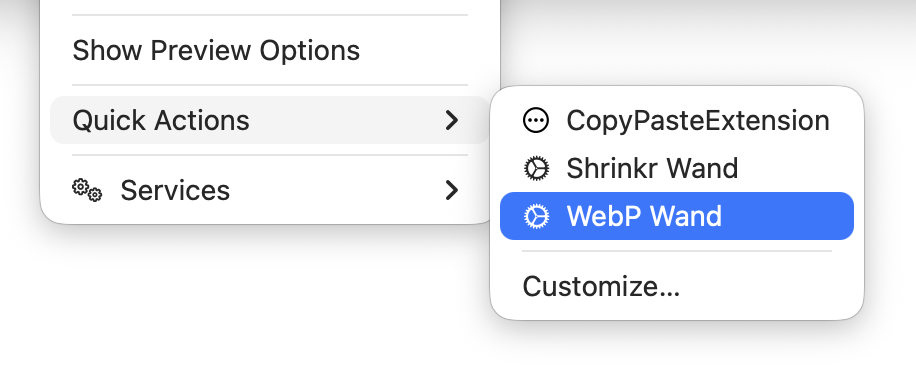
随心转换任意数量的图像 — JPEG、PNG、HEIC、TIFF、GIF、BMP、SVG — 几乎瞬间转为 WebP。在 Finder 中右键,选择 Quick Actions → WebP Wand,新文件会出现在原文件旁边。支持批量选择。
WebP Wand 转换的照片比原图小得多,通常只有一半大小,但 视觉差异几乎无法察觉。亲自试试看。
WebP Wand 从不触碰原始图像。它只会在其他格式中创建副本。原始图像绝不会以任何方式被更改或修改。
免费下载 WebP Wand,用自己的文件试用。试用模式下每张转换后的图像都带有小水印:“Created with WebP Wand.” 促销 — $2.99,限时优惠(原价 $4.99)。输入邮件中的 咒语(许可证密钥) 即可关闭水印 — 或在同一角落换成你自己的名字。
看看实际效果
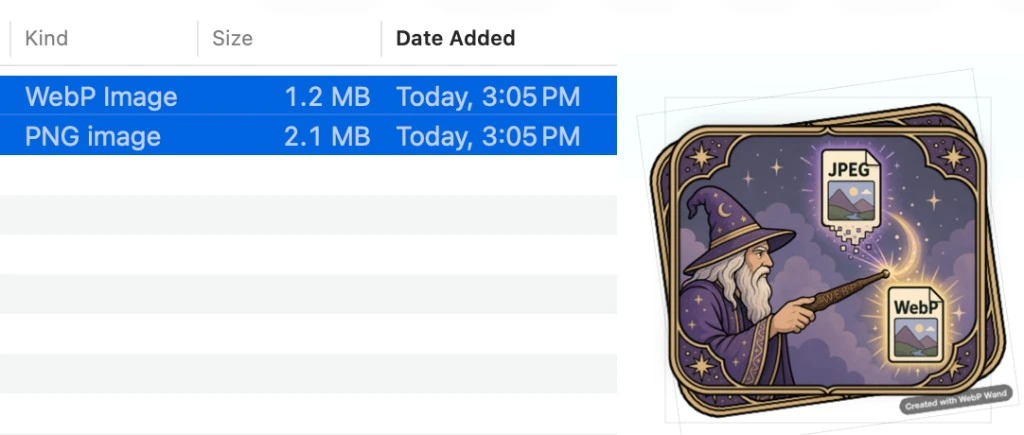
今天的真实转换:2.1 MB 的 PNG 变成了 1.2 MB 的 WebP — 磁盘占用更小,可直接用于网页。
WebP Wand 从不触碰原始图像。它只会在其他格式中创建副本。原始图像绝不会以任何方式被更改或修改。
实用法师的魔杖
有人可能觉得 WebP Wand 只是乡村法师箭袋里的工具 — 村巫师的简单法术。他们错了。它把简单任务做得 简单、轻松、迅速。让页面更轻、网站更快的实用魔法。
不是幻象 — 是真法术
这不是戏法。输出也不是 trompe l'oeil。WebP 是由扎实工程支撑的稳定格式。在 Finder 中一个手势;磁盘上是真实文件。
如何使用

- 将 WebP Wand 安装到
/Applications(Quick Actions 所需)。 - 在 Finder 中选择一个或多个图像。
- Quick Actions → WebP Wand。每个原文件旁会出现
.webp文件。 - 上传、发送邮件或发布 — 原文件保持不动。
速度
转换在本地运行,片刻完成 — 批量也一样。
支持格式
JPEG、PNG、HEIC、HEIF、TIFF、GIF、BMP 和 SVG。
原图安全
WebP Wand 从不触碰原始图像。它只会在其他格式中创建副本。原始图像绝不会以任何方式被更改或修改。
免费试用
试用模式含水印;许可证可关闭水印或添加你自己的署名行。
WebP Wand 从不触碰原始图像。它只会在其他格式中创建副本。原始图像绝不会以任何方式被更改或修改。
促销 — $2.99,限时优惠(原价 $4.99)— 通过 Lemon Squeezy 一次性购买。免费下载、试用魔杖,然后 在此购买 并输入许可证密钥 — 在应用中选择 License & Watermark 以自定义或移除署名行。
手册与常见问题(权限、故障排除)→* 此处所有魔法均属白魔法;制作此魔杖时未召唤任何恶魔,也未释放邪恶力量。经巫师任务部队评为 G 级。
想要更强大的魔法?
如果这个法术好用,也可以看看 PhotoShrinkr — Mac 批量压缩工具,自带 Finder 魔杖。
更新日志
1.0.5
patch📝 Changes
- Shortcuts & Siri — “Convert to WebP with WebP Wand” in the Shortcuts app (macOS 13+)
- Notarized build for smoother Gatekeeper on first launch
1.0.4
patch📝 Changes
- macOS compatibility fix — runs on macOS 12.0 and later (1.0.3 accidentally required 15.5)
- Fixes prohibited app icon and “not compatible with this version of macOS” on Sonoma and earlier
1.0.3
patch📝 Changes
- Improved first-launch onboarding with optional Help Doc prompt
- One-click Move to Applications when launched outside /Applications
- Choose Output Folder now works with Finder Quick Actions
- SVG images convert to WebP via Quick Action
- Menu cleanup and Disable Finder Quick Action option
- Crash fix for Choose Output Folder when no window is open
1.0.1
patch📝 Changes
- Notarized release with updated app icon
- Sparkle auto-update support verified
1.0
major📝 Changes
- Finder Quick Action — right-click images and choose WebP Wand to convert
- Many formats supported — JPEG, PNG, HEIC, TIFF, GIF, BMP, and SVG
- Originals stay safe — new .webp files appear beside the originals; your source files are never changed
- Batch friendly — convert one file or many at once
- Free to try — download and test; trial images include a small watermark
- License unlocks full use — remove the watermark or replace it with your own credit line
- Automatic updates — built-in update checks when new versions ship
If you enjoyed WebP Wand let us know.
No tutorials available for this app.
No manual needed for this app. It's magic.
Permissions, batch tips, and troubleshooting:Full FAQ →
No previous versions available for this app.