

Windows • 水印 • 批量
iWatermark Pro 2 Windows 版
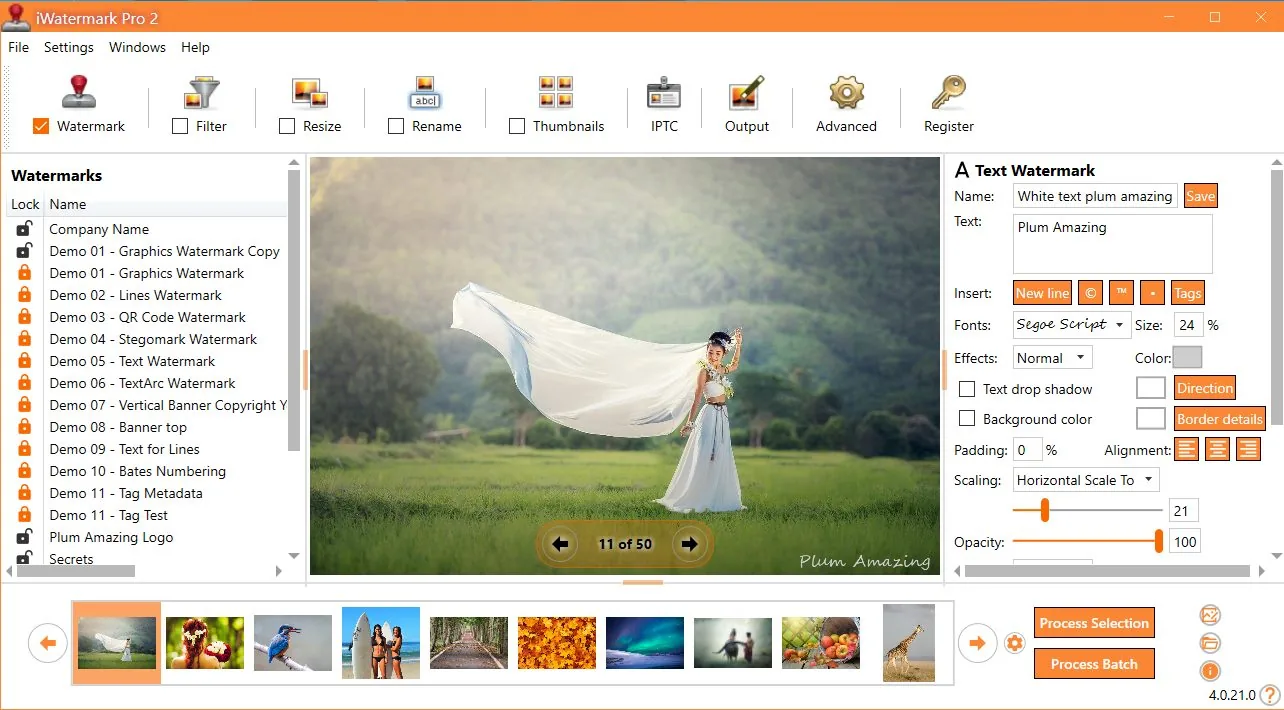
主要功能
批量工作流
为一张照片或数千张照片添加水印,位置一致,设置可重复使用。
多种水印类型
文字、标志/PNG、矢量形状、二维码、EXIF/IPTC 及隐形 StegoMark 选项。
专业输出格式
面向真实工作流:JPG/PNG/TIFF 等,并提供重命名/调整大小选项。
现代 Windows 界面
新一代重写,注重性能、清晰度和生产力。
元数据支持
添加或保留元数据,在工作流中维护归属与详细信息。
更新日志与说明
在 更新日志中查看新功能与历史变更。
水印类型

主要特性
iWatermark Pro 2 for Windows 的部分主要特性。
- 一次批量为整个文件夹的图像添加水印
- 同时使用多个水印
- 导入/导出/共享水印预设
- 将图像缩放到一致的输出尺寸
- 创建带水印图像的缩略图
- 使用文字或 PNG/TIFF 标志水印
- 设置水印透明度
- 旋转、缩放并将水印放置于任意位置
- 特效:阴影 / 浮雕 / 更多
- 保留元数据(EXIF/IPTC/XMP)
- 支持多种图像格式
- 二维码水印
- 需要时按坐标一致定位
功能概览
| 水印类型 | 文字、标志/PNG、二维码、元数据、隐形 |
|---|---|
| 工作流 | 单张或批量处理,模板/预设 |
| 输出 | 调整大小/重命名选项,多种图像格式 |
| 元数据 | 导出时保留 EXIF/IPTC/XMP |
| 最佳参考 | 手册 (截图 + 完整工作流) |
iWatermark Pro 2 中的水印类型
iWatermark 不仅限于「文字 + 标志」,还包括多种可见与不可见水印类型。
| 类型 | 可见性 | 适用于 | 说明 |
|---|---|---|---|
| 文字 | 可见 | 照片与视频 | 任意文字含元数据;字体、大小、颜色、旋转等。 |
| 弧形文字 | 可见 | 照片与视频 | 沿曲线路径的文字。 |
| 横幅 | 可见 | 照片与视频 | 任意边/上/下的矩形条带文字。 |
| 位图图形 | 可见 | 照片与视频 | 从文件导入的透明 PNG 标志/品牌/版权标记。 |
| 线条 | 可见 | 照片与视频 | 图库公司使用的可调线条水印。 |
| 二维码 | 可见 | 照片与视频 | 编码 URL/电子邮件/其他信息;从图像扫描。 |
| 元数据 | 不可见 | 照片与视频 | 在文件内添加 IPTC/XMP 信息(可经受基本编辑)。 |
| StegoMark | 不可见 | 照片与视频 | 专有隐写方法,将信息嵌入图像数据。 |
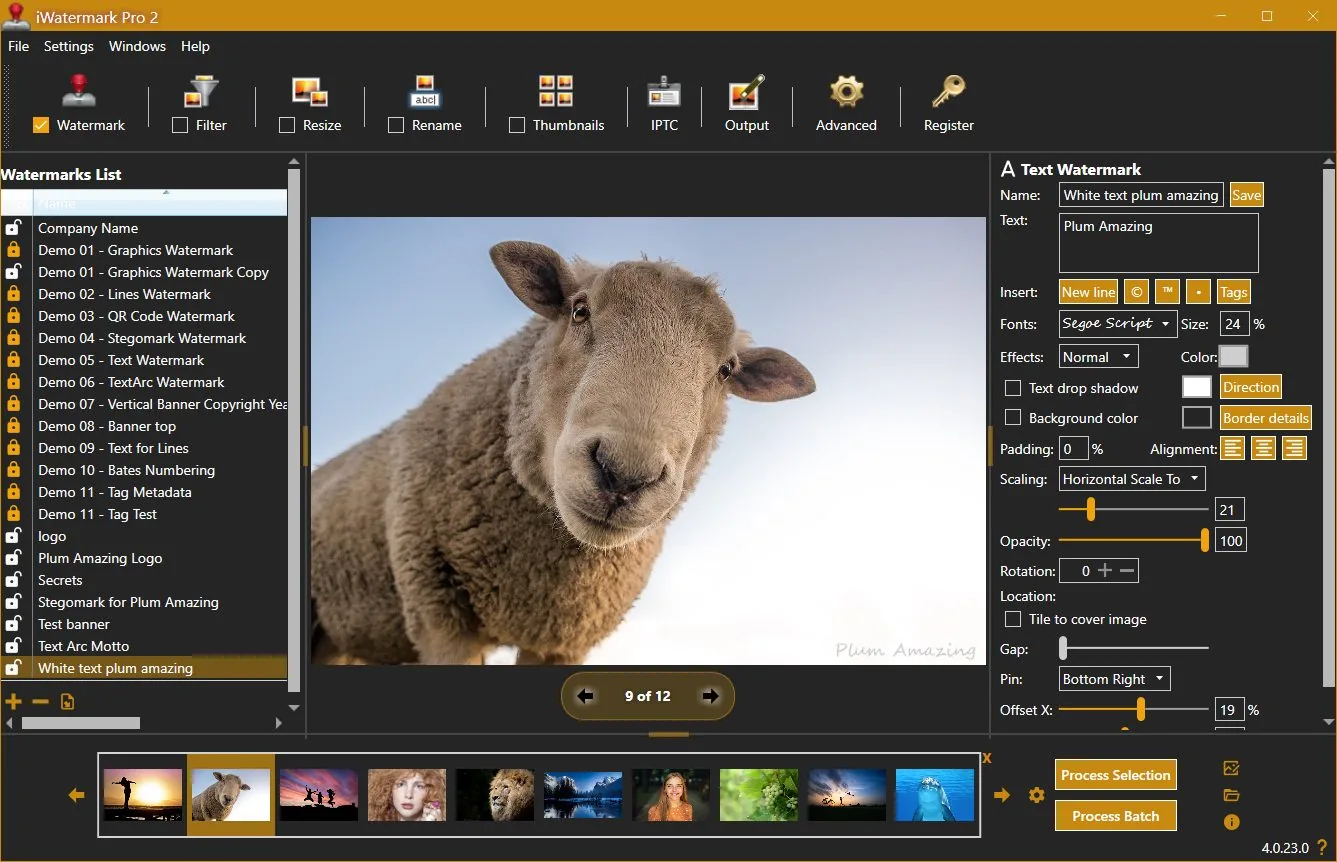
专为水印设计的用户界面
评论者评价
「在我评测过的水印软件中,iWatermark Pro 功能最为丰富…」
— Thomas Boldt(评论摘录)
「有照片?给每张加上水印以声明版权。」
— Jeffrey Mincer, Bohemian Boomer(摘录)
「还有其他水印共享软件,但没有这么全面…」
— Daniel M. East, Mac Design Magazine(摘录)
用户评价
「我喜欢你们产品的一点是,水印位置基于图片边长的百分比,而非固定像素数…标志位置将始终一致。」
— Scott Baldwin
「作为专业冲浪摄影师… iWatermark 是我花过的最值的 20 美元…这个程序帮我节省大量时间,快速为文件夹照片加水印并发送…」
— Diane Edmonds, YourWavePics.com
「我花了很长时间尝试各种软件…你们的无疑是我遇到的最简单、最具性价比的…」
— Peter Kearns, pfphotography.co.uk
「我一直在用 iWatermark…销量上升了…好产品、好价格,而且最重要的是易于使用。」
— Chris, Action Digital Photography
「你们的程序帮了我大忙…有助于阻止未经授权使用我们的作品…」
— Jon Wright, J&K Creative
「我在 craigslist 上发布房源…买 iWatermark 之前有些照片被盗用。现在骗子会另选目标…」
— Southpaw Steve
更新日志
4.0.35
update📝 Changes
- Updated new registration area to accept the Lemon Squeezy license key.
🔧 Improvements
- Updated new registration area to accept the Lemon Squeezy license key.
4.0.34
update📝 Changes
- General improvements and fixes.
🔧 Improvements
- General improvements and fixes.
4.0.32
minor📝 Changes
- This version of iWatermark Pro 2 resolves high memory usage issue and minimizes memory after it finishes processing. Optimizing the memory has increased the speed and eliminated previous issues.
- Fixed the 'Failed to process watermark'. message which occured in the previous version in some situations.
- Now the installer is a self contained package. It no longer needs to install .Net Core 3.1.19 separately.
- New item added to the Output Folder Hierarchy drop down menu is US date format for naming the top folder (requested by user) and the current time is used for the name of subfolders.
- Minor refinements in the UI, grammar and spelling
✨ New Features
- New item added to the Output Folder Hierarchy drop down menu is US date format for naming the top folder (requested by user) and the current time is used for the name of subfolders.
🔧 Improvements
- This version of iWatermark Pro 2 resolves high memory usage issue and minimizes memory after it finishes processing. Optimizing the memory has increased the speed and eliminated previous issues.
- Now the installer is a self contained package. It no longer needs to install .Net Core 3.1.19 separately.
- Minor refinements in the UI, grammar and spelling
🐛 Bug Fixes
- Fixed the 'Failed to process watermark'. message which occured in the previous version in some situations.
4.0.0
major📝 Changes
- Next generation watermarking engine
- Advanced AI-powered features
- Professional workflow integration
✨ New Features
- Next generation watermarking engine
- Advanced AI-powered features
- Professional workflow integration
Reviews & articles
Curated links and excerpts adapted from the legacy iWatermark Pro 2 for Windows page.
- Mac Informer Review (6/3/2021)
- Best Photo Watermarking Software 2020
- Top 10 Best Photo Watermarking Software in 2020 — Filmora (1/15/2020)
- Review of iWatermark Pro for Windows — Tarekma (12/9/2019)
- Photo Review: iWatermark Pro 2 released for Windows 10/11
- “The Best Watermarking Software 2018” — Thomas Boldt, SoftwareHow
- Review by GIGA (German) (7/15/2016)
- Compendium of reviews (Pinterest)
- iOS iWatermark reviews (1500+ 5-star reviews)
- “Got Photos? Put A Watermark On Each To Claim Your Copyright” — Jeffrey Mincer
- SlideToMac (Italian magazine)
- SMMUG Review of iWatermark Pro — L. Davenport (PDF)
- Thorough review in Swedish — Henning Wurst
- PC World Review
- ATPM review — Chris Dudar
- Macworld review — Jay Nelson
- Macworld “Mac Gems” — Dan Frakes
- Digital Camera Magazine article (PDF)
- Comparison of Visible (iWatermark) vs Invisible (DigiMark) watermarking
Selected excerpts
“iWatermark Pro is by far the most feature-packed watermarking software I reviewed… QR code watermarks and even steganographic watermarks…”
— Thomas Boldt, SoftwareHow
“It is a good application for its primary purpose… and it accomplishes this job easily and with some great additional features…”
— Chris Dudar, ATPM
“If you need to add watermarks to a lot of images, iWatermark provides a big bang for your buck…”
— Jay Nelson, Macworld
“The beauty of iWatermark is its combination of ease of use and functionality… I’ve yet to see a better solution…”
— Dan Frakes, Macworld
“How can you protect your pictures? … Just drag a single picture or a folder full of pictures… specify the watermark text… or a watermark image…”
— Dave Johnson, PC World
User raves
(These are also featured on the Info tab — keeping them in both places for visibility.)
“One thing I like… placement… is based on a percent of the picture side, not a specific number of pixels…”
— Scott Baldwin
“This program has saved me sooo much time to quickly watermark a folder of photos and send it off…”
— Diane Edmonds, YourWavePics.com
“...yours is without doubt the easiest and most cost effective I have come across…”
— Peter Kearns, pfphotography.co.uk
“...my sales have gone up… great product… best of all EASY to use.”
— Chris, Action Digital Photography
“...It has helped to stop unauthorized use of our work…”
— Jon Wright, J&K Creative
“I list houses on craigslist… got some of my pics hijacked BEFORE I bought iWatermark…”
— Southpaw Steve
No tutorials available for this app.
Product Manuals
Product Manuals
Select your platform and app to view the complete manual in a new window.
No previous versions available for this app.