

iWatermark Pro for Mac
iWatermark Pro for Mac is a professional watermarking app that protects your photos, artwork and graphics before they go online. Add text, logo, vector, QR, metadata and steganographic watermarks, then batch‑process entire folders at high quality. Built‑in templates, presets and live previews make it easy to brand hundreds or thousands of images for Etsy, Instagram, client delivery or stock sites – while preserving color profiles and EXIF/IPTC data. Trusted by photographers, studios and organizations worldwide to claim copyright and stop image theft.
iWatermark Pro – #1 Watermark App to Protect Photos
iWatermark Pro is the world's No. 1 watermarking application for Mac and Windows. iWatermark is the original version of iWatermark for the Mac and Windows. iWatermark is a specialized tool to watermark photographs. More efficient, faster, simpler and far less expensive to use than PhotoShop. iWatermark is exclusively designed for watermarking.
Stylishly copyright all your images with a visible digital watermark within minutes. iWatermark Pro is an essential tool for photographers and anyone with a digital camera, professionals or beginners.
iWatermark Pro is the successor to iWatermark and a complete rewrite that uses Cocoa, Xcode, and the latest Apple technologies. iWatermark Pro is the most sophisticated watermarking app available.
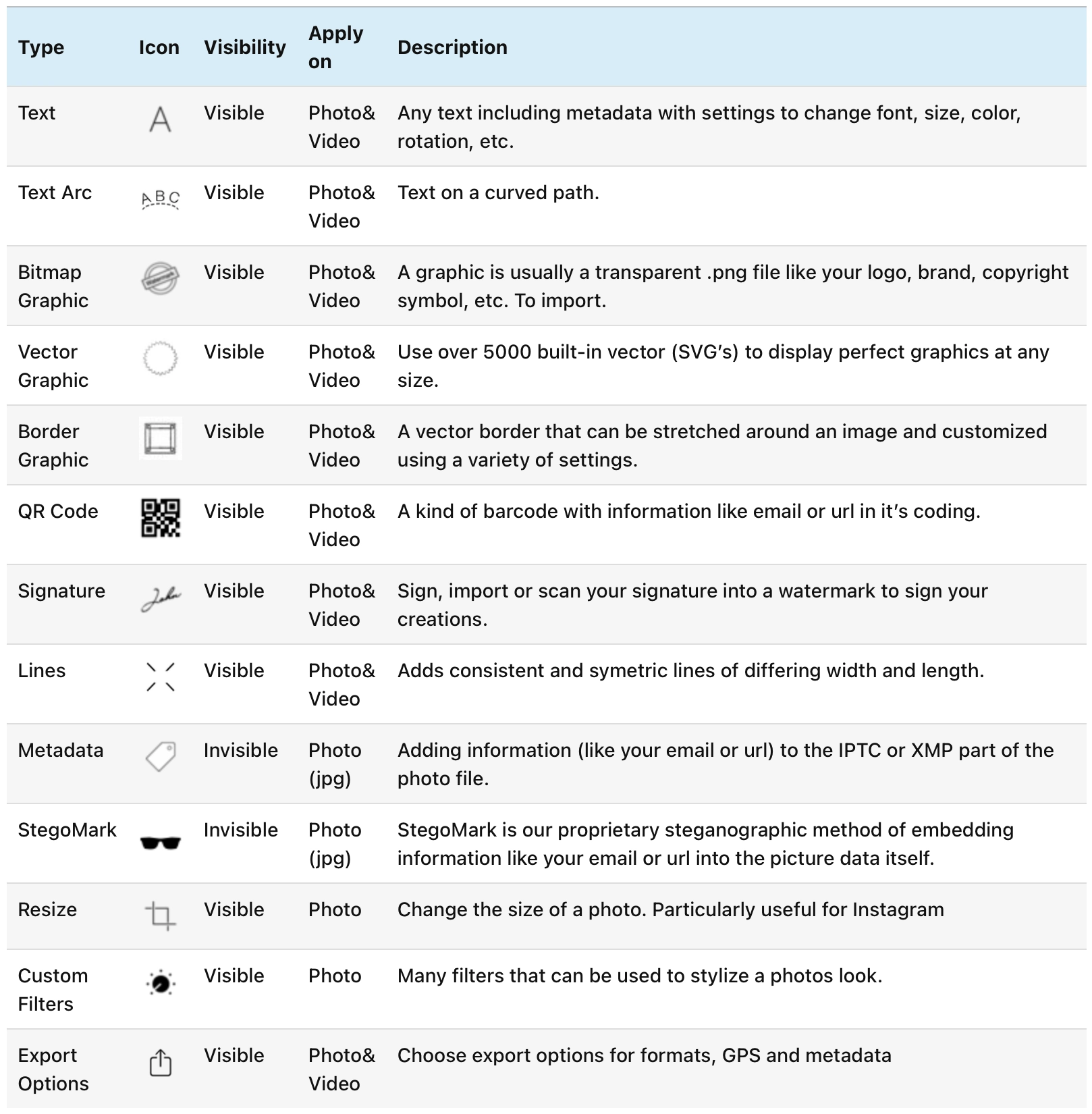
Watermark Types
iWatermark Pro supports 8 different watermark types, each useful for a different purpose. You can use 1 or multiple watermarks simultaneously (unlimited, based on memory).
- Text Watermark – Add custom text with full formatting options (font, size, color, rotation, transparency, shadow, border)
- Text on Arc Watermark – Curved text watermarks for artistic effects
- Text on Banner Watermark – Text with banner backgrounds
- Bitmap/Logo/Graphic Watermark – Add your logo or any graphic image
- Vector Watermark – Scalable vector graphics
- Lines Watermark – Decorative line watermarks
- QR Code Watermark – Create QR codes and use them as watermarks
- Border Watermark – Add decorative borders to your images
- Metadata Watermark – Invisible metadata watermarks (EXIF, IPTC, XMP)
- StegoMark Watermark – Invisible steganographic watermarks

Arc Text Watermark

Lines Watermark

Vector Watermark
Key Features
Batch Processing
Watermark 1 or batch an unlimited number of photos. Process entire folders at high quality while preserving color profiles and EXIF/IPTC data.
High Performance
4x or more faster, 64-bit, multi-threaded. Uses multiple CPU/GPU cores for parallel processing. Optimized for speed and efficiency.
Live Preview
See your watermarks in real-time before applying. Built-in templates, presets and live previews make it easy to brand hundreds or thousands of images.
File Format Support
Input: RAW, JPG, PNG, TIFF, GIF, DNG, PSD. Output: JPG, PNG, TIFF, PSD, BMP, JPEG 2000. Works with all photo browsers.
Metadata Management
XMP, EXIF, IPTC and Google Search metadata. Add or remove metadata, embed metadata in watermarks, and use metadata tags as watermarks.
Advanced Options
Resize photos (6 major options), rename files, create thumbnails, filter input photos by size/resolution/format, and 10 different output settings.
Watermark Drawer
The watermark drawer is the place to keep all your watermarks. Organize, edit, lock, preview, share and use watermarks at a tap. Create custom watermarks, duplicate, delete, display and edit the settings anytime. Export and share watermarks to backup, share to your other devices and friends.
Watermark Customization
Full control over watermark appearance and placement:
- Location: Set by dragging or XY coordinates
- Scale: Actual (relative), horizontal and vertical (absolute percentage)
- Effects: Emboss, engrave, inverse, outlined, black shadow, white shadow
- Background: Color, opacity, scale, border, shadow, rotation
- Text Formatting: Font, size, color, rotation, transparency, shadow, border

Perfect For
iWatermark Pro is trusted by photographers, studios and organizations worldwide to claim copyright and stop image theft. Perfect for:
- Professional photographers protecting their work
- Stock photo sites and agencies
- Etsy, Instagram, and social media sellers
- Client delivery and portfolio protection
- Creative Commons licensing
- Anyone sharing images online who wants to protect their intellectual property
Additional Features
- AppleScriptable (Mac only) – includes scripts and script menu
- Shell Extension for Windows Explorer – right click to apply watermarks directly
- Color Profiles – uses existing and selectable profiles
- Import/Export Watermarks – from Mac or Windows version
- Quick Look Plugin – displays exported watermark info
- Easy to use – seriously, easy
Purchase iWatermark Pro for Mac
Loading PayPal button...
Secure payment via PayPal. After purchase, make sure to download using the download links here. The license key will come via email within 1-2 business days. Thanks for your purchase.
The developer of iWatermark Pro for Mac recently died. He was a wonderful and kind man who loved coding. In his day job he worked at Queens University and lived up in Canada. When he died we lost a good friend and partner. He died before we created the new store. So, we could not adapt the app to the new store.
We are going to create a new version of the app and if you decide to purchase it at this time, you will get the new version free. We expect to finish that in the next six months. iWatermark Pro for Mac works fine as it is, but we want to make something even better and have it work in the new store.
It might take a day or two to get the registration since we have to do it manually.
Feel free to contact us if there is any question.
Thanks,
Julian Miller for Plum Amazing
For more information about iWatermark Pro, please visit the manual page.
Changelog
2.6.3
minor📝 Changes
- 2.6.3
- Min OS is 10.8 or later… including Big Sur 11.0
- Added ways to add image to the graphic watermark editor. Drag an drop of image or logo into the well. Or use the 'select ' button to select an image as before. Or use cmd-G to select image file
- Updated English locations
- Fixed crash on Big Sur 11.0
- v2.6.2: Remove drawer — iCloud menu
- v2.6.2: Fixed file->new - icon for X line.
- v2.6.2: Fixed crash on some watermark missing color.
- v2.6.2: Added check for missing Vector graphic library ~/pictures/iWatermark Vectors Clipart . Will regenerate if missing in the picture folder.
- v2.6.2: Fixed a crash when editing or using Text Graphics with outlines color changing.
- v2.6.2: Cleaned up library in preparation for Apple Silcon support
- Still remaining issues: WebP format not supported. Filter and input scan does not report image file that are not readable (.WebP etc) in log not readable.
✨ New Features
- Added ways to add image to the graphic watermark editor. Drag an drop of image or logo into the well. Or use the 'select ' button to select an image as before. Or use cmd-G to select image file
🔧 Improvements
- Min OS is 10.8 or later… including Big Sur 11.0
- Updated English locations
- v2.6.2: Added check for missing Vector graphic library ~/pictures/iWatermark Vectors Clipart . Will regenerate if missing in the picture folder.
- v2.6.2: Cleaned up library in preparation for Apple Silcon support
🐛 Bug Fixes
- Fixed crash on Big Sur 11.0
- v2.6.2: Fixed file->new - icon for X line.
- v2.6.2: Fixed crash on some watermark missing color.
- v2.6.2: Fixed a crash when editing or using Text Graphics with outlines color changing.
2.6.0
minor📝 Changes
- New watermark templates
- Improved performance
- Better file format support
✨ New Features
- New watermark templates
🔧 Improvements
- Improved performance
- Better file format support
2.5.10
minor📝 Changes
- updated to support back to mac os 10.9
🔧 Improvements
- updated to support back to mac os 10.9
2.5.9
minor📝 Changes
- added tool tips to editor icons (two icon bottom right) for next image and Change background color
- fixed status text not readable in darkmode
- fixed issue with IPTC data not being saved is input metadata was not being copied (reported by user Walter Frieser).
✨ New Features
- added tool tips to editor icons (two icon bottom right) for next image and Change background color
🐛 Bug Fixes
- fixed status text not readable in darkmode
- fixed issue with IPTC data not being saved is input metadata was not being copied (reported by user Walter Frieser).
2.5.8
bugfix📝 Changes
- fixed issue with 1st image not applying offset settings.
🐛 Bug Fixes
- fixed issue with 1st image not applying offset settings.
2.5.7
bugfix📝 Changes
- fixes offset issue
- minor code update to localization
- compiled with latest xcode
- fixes for new complier warnings on new xcode
🔧 Improvements
- minor code update to localization
- compiled with latest xcode
- fixes for new complier warnings on new xcode
🐛 Bug Fixes
- fixes offset issue
Reviews
"iWatermark Pro is a powerful watermarking tool for Mac and Windows that helps protect your images."
User Raves
"Professional watermarking solution with batch processing capabilities."
No tutorials available for this app.
Product Manuals
Product Manuals
Select your platform and app to view the complete manual in a new window.
No previous versions available for this app.