

Windows • वॉटरमार्क • बैच
iWatermark Pro 2 Windows के लिए
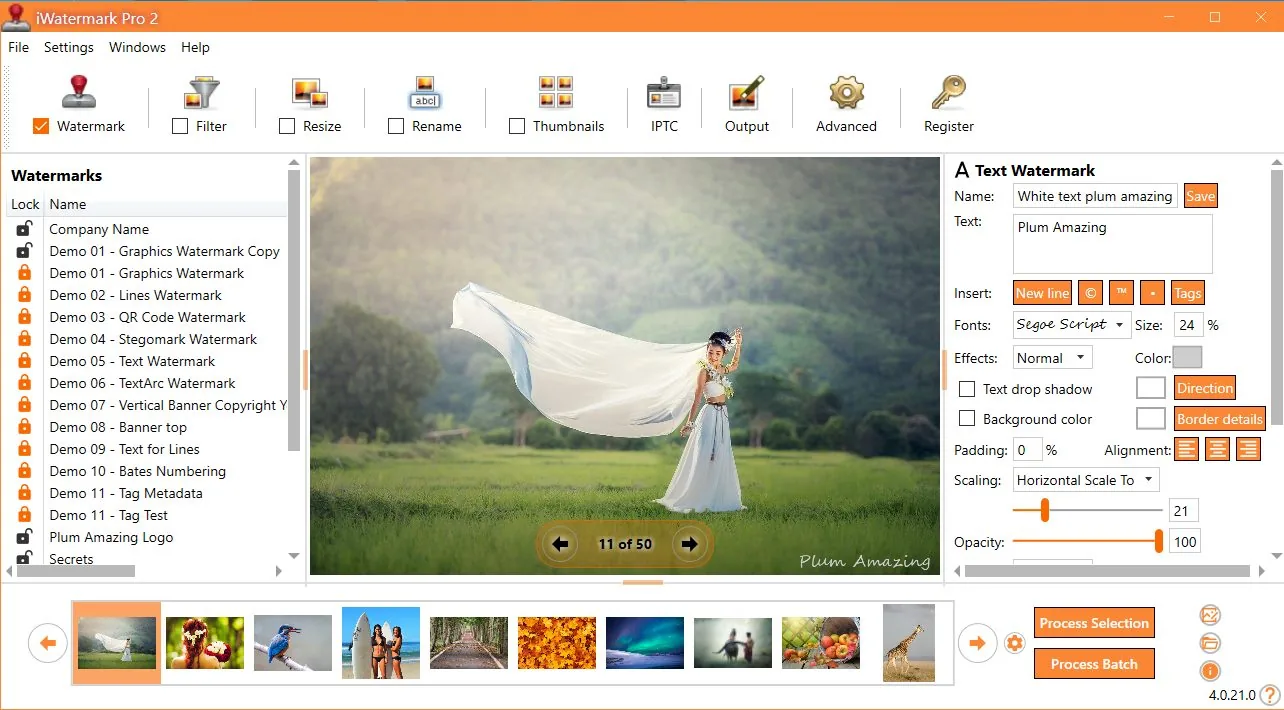
iWatermark Pro 2 से अपनी तस्वीरों की सुरक्षा करें
फ़ोटो और ग्राफ़िक्स के लिए पेशेवर वॉटरमार्किंग — तेज़ बैच वर्कफ़्लो, आधुनिक UI और शक्तिशाली वॉटरमार्क प्रकार।
दृश्यमान और अदृश्य वॉटरमार्क से छवियों की सुरक्षा करें। ऑनलाइन प्रकाशित करने वालों के लिए।
वॉटरमार्क क्यों?
- सुरक्षा कॉपीराइट और स्वामित्व
- ब्रांड सामग्री को लगातार ब्रांड करें
- रोकें बिना श्रेय के पुन: उपयोग
- तेज़ी बैच प्रसंस्करण के साथ
के लिए उपयुक्त
मुख्य विशेषताएँ
बैच वर्कफ़्लो
एक या हजारों फ़ोटो पर वॉटरमार्क।
कई प्रकार
टेक्स्ट, लोगो/PNG, वेक्टर, QR, EXIF/IPTC, StegoMark।
प्रो आउटपुट
JPG/PNG/TIFF और अधिक, नाम बदलें/आकार बदलें।
आधुनिक Windows UI
प्रदर्शन, स्पष्टता और उत्पादकता पर केंद्रित।
मेटाडेटा
श्रेय और विवरण बनाए रखें।
चेंजलॉग
नया और बदला हुआ देखें चेंजलॉग में।
वॉटरमार्क प्रकार

प्रमुख विशेषताएँ
iWatermark Pro 2 for Windows की कुछ प्रमुख विशेषताएँ।
- पूरे फ़ोल्डर पर बैच वॉटरमार्क
- एक साथ कई वॉटरमार्क
- प्रीसेट आयात/निर्यात/साझा
- लगातार आउटपुट आकार
- थंबनेल बनाएं
- टेक्स्ट या PNG/TIFF लोगो
- पारदर्शिता सेट करें
- घुमाएँ, स्केल करें, कहीं भी रखें
- प्रभाव: छाया / एम्बॉस
- मेटाडेटा संरक्षित (EXIF/IPTC/XMP)
- कई प्रारूप
- QR वॉटरमार्क
- निर्देशांक द्वारा पोजिशनिंग
विशेषता सारांश
| वॉटरमार्क प्रकार | टेक्स्ट, लोगो/PNG, QR, मेटाडेटा, अदृश्य |
|---|---|
| वर्कफ़्लो | एकल या बैच, टेम्पलेट/प्रीसेट |
| आउटपुट | आकार बदलें/नाम बदलें |
| मेटाडेटा | EXIF/IPTC/XMP संरक्षित |
| सर्वोत्तम संदर्भ | मैनुअल (स्क्रीनशॉट + पूर्ण वर्कफ़्लो) |
iWatermark Pro 2 में वॉटरमार्क प्रकार
iWatermark कई दृश्यमान और अदृश्य प्रकार प्रदान करता है।
| प्रकार | दृश्यता | के लिए | विवरण |
|---|---|---|---|
| Text | दृश्यमान | फ़ोटो और वीडियो | कोई भी टेक्स्ट; फ़ॉन्ट, आकार, रंग, रोटेशन। |
| Text Arc | दृश्यमान | फ़ोटो और वीडियो | वक्र पथ पर टेक्स्ट। |
| Banner | दृश्यमान | फ़ोटो और वीडियो | आयताकार पट्टी पर टेक्स्ट। |
| Bitmap Graphic | दृश्यमान | फ़ोटो और वीडियो | पारदर्शी PNG लोगो। |
| Lines | दृश्यमान | फ़ोटो और वीडियो | समायोज्य लाइन वॉटरमार्क। |
| QR Code | दृश्यमान | फ़ोटो और वीडियो | URL/ईमेल एन्कोड; स्कैन करें। |
| Metadata | अदृश्य | फ़ोटो और वीडियो | फ़ाइल में IPTC/XMP। |
| StegoMark | अदृश्य | फ़ोटो और वीडियो | छवि डेटा में जानकारी एम्बेड। |
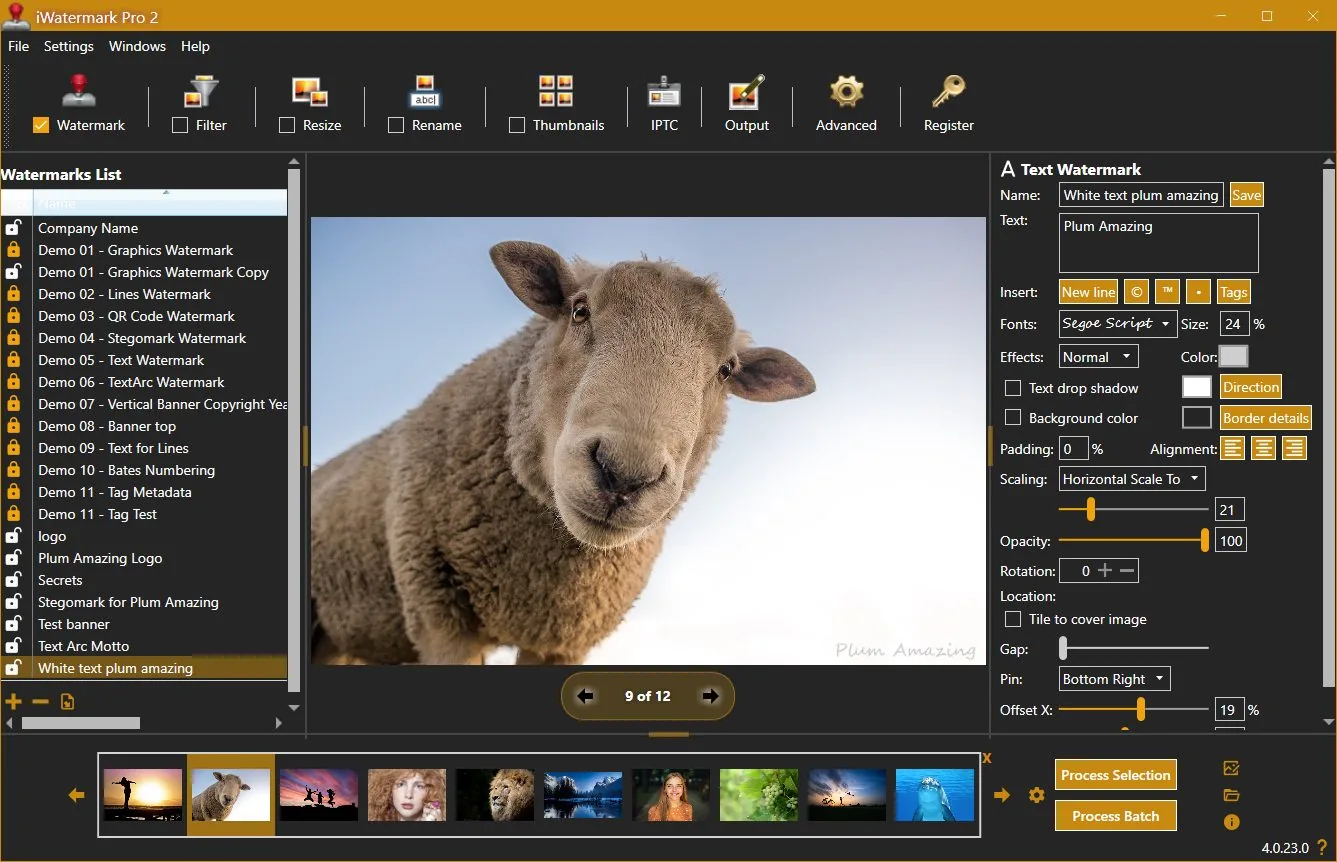
वॉटरमार्किंग के लिए समर्पित UI
समीक्षकों ने क्या कहा
“iWatermark Pro सबसे व्यापक वॉटरमार्क सॉफ़्टवेयर है…”
— Thomas Boldt
“फ़ोटो हैं? कॉपीराइट के लिए वॉटरमार्क लगाएँ।”
— Jeffrey Mincer
“कोई भी इतना व्यापक नहीं…”
— Daniel M. East
उपयोगकर्ता प्रशंसा
“प्लेसमेंट प्रतिशत पर आधारित है… लोगो हमेशा समान।”
— Scott Baldwin
“सबसे अच्छा $20 निवेश…”
— Diane Edmonds
“सबसे आसान और किफ़ायती…”
— Peter Kearns
“बिक्री बढ़ी… आसान उपयोग।”
— Chris
“अनधिकृत उपयोग रोकने में मदद।”
— Jon Wright
“iWatermark से पहले चोरी… अब दूसरा लक्ष्य।”
— Southpaw Steve
चेंजलॉग
4.0.35
update📝 Changes
- Updated new registration area to accept the Lemon Squeezy license key.
🔧 Improvements
- Updated new registration area to accept the Lemon Squeezy license key.
4.0.34
update📝 Changes
- General improvements and fixes.
🔧 Improvements
- General improvements and fixes.
4.0.32
minor📝 Changes
- This version of iWatermark Pro 2 resolves high memory usage issue and minimizes memory after it finishes processing. Optimizing the memory has increased the speed and eliminated previous issues.
- Fixed the 'Failed to process watermark'. message which occured in the previous version in some situations.
- Now the installer is a self contained package. It no longer needs to install .Net Core 3.1.19 separately.
- New item added to the Output Folder Hierarchy drop down menu is US date format for naming the top folder (requested by user) and the current time is used for the name of subfolders.
- Minor refinements in the UI, grammar and spelling
✨ New Features
- New item added to the Output Folder Hierarchy drop down menu is US date format for naming the top folder (requested by user) and the current time is used for the name of subfolders.
🔧 Improvements
- This version of iWatermark Pro 2 resolves high memory usage issue and minimizes memory after it finishes processing. Optimizing the memory has increased the speed and eliminated previous issues.
- Now the installer is a self contained package. It no longer needs to install .Net Core 3.1.19 separately.
- Minor refinements in the UI, grammar and spelling
🐛 Bug Fixes
- Fixed the 'Failed to process watermark'. message which occured in the previous version in some situations.
4.0.0
major📝 Changes
- Next generation watermarking engine
- Advanced AI-powered features
- Professional workflow integration
✨ New Features
- Next generation watermarking engine
- Advanced AI-powered features
- Professional workflow integration
Reviews & articles
Curated links and excerpts adapted from the legacy iWatermark Pro 2 for Windows page.
- Mac Informer Review (6/3/2021)
- Best Photo Watermarking Software 2020
- Top 10 Best Photo Watermarking Software in 2020 — Filmora (1/15/2020)
- Review of iWatermark Pro for Windows — Tarekma (12/9/2019)
- Photo Review: iWatermark Pro 2 released for Windows 10/11
- “The Best Watermarking Software 2018” — Thomas Boldt, SoftwareHow
- Review by GIGA (German) (7/15/2016)
- Compendium of reviews (Pinterest)
- iOS iWatermark reviews (1500+ 5-star reviews)
- “Got Photos? Put A Watermark On Each To Claim Your Copyright” — Jeffrey Mincer
- SlideToMac (Italian magazine)
- SMMUG Review of iWatermark Pro — L. Davenport (PDF)
- Thorough review in Swedish — Henning Wurst
- PC World Review
- ATPM review — Chris Dudar
- Macworld review — Jay Nelson
- Macworld “Mac Gems” — Dan Frakes
- Digital Camera Magazine article (PDF)
- Comparison of Visible (iWatermark) vs Invisible (DigiMark) watermarking
Selected excerpts
“iWatermark Pro is by far the most feature-packed watermarking software I reviewed… QR code watermarks and even steganographic watermarks…”
— Thomas Boldt, SoftwareHow
“It is a good application for its primary purpose… and it accomplishes this job easily and with some great additional features…”
— Chris Dudar, ATPM
“If you need to add watermarks to a lot of images, iWatermark provides a big bang for your buck…”
— Jay Nelson, Macworld
“The beauty of iWatermark is its combination of ease of use and functionality… I’ve yet to see a better solution…”
— Dan Frakes, Macworld
“How can you protect your pictures? … Just drag a single picture or a folder full of pictures… specify the watermark text… or a watermark image…”
— Dave Johnson, PC World
User raves
(These are also featured on the Info tab — keeping them in both places for visibility.)
“One thing I like… placement… is based on a percent of the picture side, not a specific number of pixels…”
— Scott Baldwin
“This program has saved me sooo much time to quickly watermark a folder of photos and send it off…”
— Diane Edmonds, YourWavePics.com
“...yours is without doubt the easiest and most cost effective I have come across…”
— Peter Kearns, pfphotography.co.uk
“...my sales have gone up… great product… best of all EASY to use.”
— Chris, Action Digital Photography
“...It has helped to stop unauthorized use of our work…”
— Jon Wright, J&K Creative
“I list houses on craigslist… got some of my pics hijacked BEFORE I bought iWatermark…”
— Southpaw Steve
No tutorials available for this app.
Product Manuals
Product Manuals
Select your platform and app to view the complete manual in a new window.
No previous versions available for this app.