
स्वामित्व की सुरक्षा
जब काम Instagram, TikTok, Facebook, क्लाइंट गैलरी और वेब पर फैलता है, तो अपना नाम, ब्रांड, URL, कॉपीराइट या अदृश्य प्रमाण संलग्न रखें।

Explore the iWatermark family for iPhone & iPad ↗
iPhone और iPad के लिए पेशेवर वॉटरमार्किंग — दृश्य और अदृश्य चिह्न, लोगो, हस्ताक्षर, QR, मेटाडेटा, फ़ोटो और वीडियो का बैच वॉटरमार्किंग, और पुन: प्रयोज्य टेम्पलेट।
iWatermark+ फ़ोटोजर्नलिस्ट, पेशेवर फ़ोटोग्राफर, इन्फ्लुएंसर, कलाकार और शुरुआती लोगों के लिए पेशेवर वॉटरमार्किंग टूल है जो प्रकाशन प्रक्रिया धीमी किए बिना काम की सुरक्षा चाहते हैं। एक वॉटरमार्क जोड़ें या दृश्य और अदृश्य चिह्नों की परतदार प्रणाली बनाएं जो छवि के साथ हर जगह जाती है।
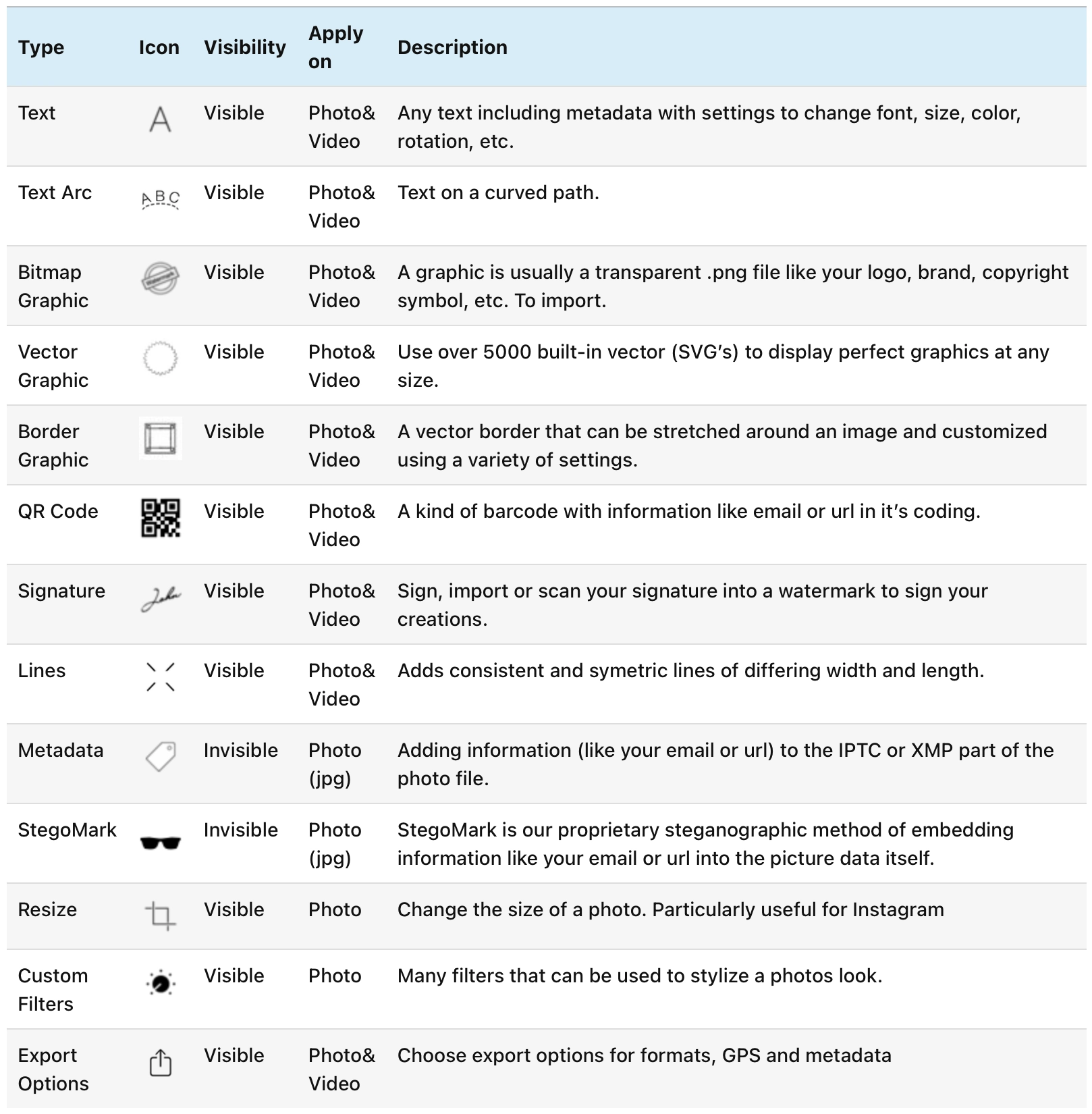
13 वॉटरमार्क और आउटपुट टूल, पुन: प्रयोज्य टेम्पलेट लाइब्रेरी, रियल-टाइम नियंत्रण, और एक मोबाइल वर्कफ़्लो में फ़ोटो और वीडियो दोनों का समर्थन।
जब काम Instagram, TikTok, Facebook, क्लाइंट गैलरी और वेब पर फैलता है, तो अपना नाम, ब्रांड, URL, कॉपीराइट या अदृश्य प्रमाण संलग्न रखें।
एक या कई वॉटरमार्क एक साथ लागू करें, बड़े कार्य कतार में रखें, और अगले शूट, अभियान या डिलीवरी के लिए पुन: प्रयोज्य टेम्पलेट तैयार रखें।
प्रत्येक माध्यम के लिए अलग टूल रखने के बजाय स्टिल और वीडियो के लिए एक ही वॉटरमार्किंग वर्कफ़्लो उपयोग करें।
दृश्य और अदृश्य चिह्न, QR कोड, मेटाडेटा, हस्ताक्षर, वेक्टर, बॉर्डर, लाइन, फ़िल्टर और निर्यात विकल्पों के साथ सूक्ष्म या स्पष्ट रहें।
मोबाइल वर्कफ़्लो गति के लिए बना है: तैयार टेक्स्ट, ग्राफ़िक, हस्ताक्षर और मेटाडेटा चिह्न रखें, फिर निर्यात, पोस्ट या डिलीवरी के समय सही चुनें।


iWatermark+ असामान्य है क्योंकि यह वॉटरमार्किंग को एक बार की ओवरले नहीं, पुन: प्रयोज्य प्रणाली मानता है। अपनी चिह्न लाइब्रेरी बनाएं, एक साथ कई मिलाएं, और अभियान, गैलरी, डिलीवरी और सोशल पोस्ट में पुन: उपयोग करें।
ये वॉटरमार्क प्रकार ऐप को स्टैम्प की बजाय स्टूडियो जैसा महसूस कराते हैं। सूक्ष्म ब्रांडिंग, दस्तावेज़ी मेटाडेटा, दृश्य हस्ताक्षर चिह्न या अदृश्य प्रमाण उपयोग करें ताकि हर साझा छवि या क्लिप अपने निर्माता की स्पष्ट पगडंडी रखे।

नाम, कॉपीराइट नोटिस, ब्रांड या साफ कैप्शन — फ़ॉन्ट, रंग, अपारदर्शिता और प्लेसमेंट नियंत्रण के साथ।

सील, लोगो और अधिक विशिष्ट ब्रांडिंग के लिए टेक्स्ट को वृत्त और चाप में लपेटें।

अपना लोगो, बैज या बिटमैप ग्राफ़िक डालें और कार्यों में पुन: उपयोग करें।

बड़ी छवियों या निर्यात पर गुणवत्ता खोए बिना तीखे वेक्टर चिह्न स्केल करें।

हस्ताक्षर बनाएं, आयात करें या स्कैन करें और स्टूडियो साइन-ऑफ़ की तरह रखें।

छवि को ब्रांडेड बॉर्डर से फ्रेम करें जो स्टैम्प से अधिक संपादकीय लगें।

आंख को निर्देशित करें या सरल रैखिक चिह्नों से कस्टम ग्राफ़िक उपचार बनाएं।

स्कैन करने योग्य QR कोड से वॉटरमार्क को साइट, पोर्टफोलियो, अभियान या संपर्क क्रिया से जोड़ें।

जब वर्कफ़्लो दृश्य मेटाडेटा मांगे, GPS, IPTC और EXIF जानकारी दिखाएं।

अतिरिक्त सुरक्षा परत के लिए छवि के अंदर अदृश्य स्वामित्व प्रमाण एम्बेड करें।
वॉटरमार्किंग के दौरान आउटपुट आकार तैयार करें ताकि डिलीवरेबल साझा या प्रकाशित करने के लिए तैयार हो।

दूसरे ऐप पर जाने के बजाय निर्यात वर्कफ़्लो का हिस्सा बनाकर फ़िनिशिंग समायोजन लागू करें।
iPad iWatermark+ को पूर्वावलोकन, वॉटरमार्क प्रकार बदलने और दोहराए जाने वाले वर्कफ़्लो में जाने से पहले जानबूझकर टेम्पलेट सेट करने के लिए अतिरिक्त जगह देता है।

सबसे अच्छा वॉटरमार्किंग टूल वह है जिसे आप व्यस्त होने पर भी उपयोग करते रहते हैं। iWatermark+ ठीक इसके लिए बना है: त्वरित सेटअप, पुन: प्रयोज्य टेम्पलेट, टच-अनुकूल नियंत्रण, और उन लोगों के लिए पर्याप्त गहराई जो हर दिन पेशेवर रूप से प्रकाशित करते हैं।
स्टिल छवियां और वीडियो एक ही मोबाइल टूल से गुज़र सकते हैं — दुनिया में जाने से पहले दोनों की सुरक्षा के लिए ऐप बदलने की ज़रूरत नहीं।

फ़ोटो तेज़ी से फैलती हैं, खासकर सोशल प्लेटफ़ॉर्म और ब्लॉग पर पहुँचने के बाद। वॉटरमार्किंग छवि के साथ लेखकत्व, क्रेडिट, ब्रांडिंग और संपर्क जानकारी जोड़े रखने का सबसे सरल तरीका है।
टच-आधारित नियंत्रण डिवाइस पर वॉटरमार्क को परिष्कृत करना आसान बनाते हैं — चाहे क्लाइंट के लिए सूक्ष्म हो या व्यापक पुन: पोस्टिंग के लिए मजबूत सुरक्षा।


सबसे मजबूत प्रशंसा सुसंगत है: बैच प्रोसेसिंग, नियंत्रण, अदृश्य गहराई, और यह महसूस होना कि यह सजावटी ऐड-ऑन नहीं बल्कि प्रो टूल है।
यही संयोजन iWatermark+ को इतने समय तक चलाए रखता है। यह शुरुआती लोगों को तेज़ी से शुरू करने में मदद करता है, जबकि पावर उपयोगकर्ताओं को वॉटरमार्क को क्षति की बजाय काम का हिस्सा बनाने की पर्याप्त सीमा देता है।
"अंतिम Instagram टूल।"
"iWatermark+ अब तक iOS पर मैंने देखे गए सबसे अच्छे वॉटरमार्किंग ऐप में से एक है। iOS फ़ोटो संपादन एक्सटेंशन के रूप में अच्छी तरह एकीकृत।"
"बैच प्रोसेसिंग, उभरे वॉटरमार्क, पारदर्शिता नियंत्रण, प्लेसमेंट नियंत्रण, वेरिएशन क्लोनिंग, संपादन, फ़ॉन्ट नियंत्रण। उल्लेख करने के लिए बहुत सारी सुविधाएं। मैंने जो भी आज़माया, काम करता है।"
आज ही आज़माएं। यदि आप त्वरित टेक्स्ट ओवरले से अधिक सक्षम चीज़ से फ़ोटो और वीडियो की सुरक्षा चाहते हैं, तो iWatermark+ गंभीर मोबाइल विकल्प है। गहन वॉकथ्रू, उदाहरण और ट्यूटोरियल के लिए मैनुअल और सहायता पृष्ठ देखें।
"Overall, iWatermark is an app that I feel like recommending: it definitely makes watermarking more accessible, quick and less frustrating."
"iWatermark+ is by far the best watermarking App I've seen to date on iOS. Nicely integrated as an iOS photo editing extension."
"Number 5 of the Top 100 Apps of the year."
"I am a HUGE fan of Plum Amazing, I tell all of my photo students to purchase a license to use iWatermark+ on iPhone and on Mac."
"iWatermark+ Important for Photojournalists"
"#1 essential app for TikTok, Instagram & Snapchat"
"If you want to quickly protect your pictures and videos from plagiarism, then iWatermark will be a must-have tool for you!"
"Don't let your photo work go unrecognized. Get iWatermark+."
"The Best Watermarking App Ever! I looked around quite a bit and this app is The Best. Period! You can spend your time and energy trying to find a free app or even a paid one, but you could be done with excellent watermarking experience in a fraction of that time and effort. To create your image or text watermarks, it is so easy and intuitive that I couldn't believe it when I used it the first time. Once you put the watermark on your image or video at a location, it stays at that location when you bring in a new image/photo or video the next time! You can create and apply multiple watermarks of image or text type. It allows saving your watermarks in the cloud as well. I could go on and on but that wouldn't be productive use of anybody's time."
"Love this app! I use it to watermark my Instagram photos. So many great features and varieties. I especially love the fonts."
"Wonderful. I have this app on my iPad and iPhone and I am really enjoying using it. As one of the best help files I have ever seen. And it does a really great job!"
"Latest update sounds epic! The latest update promises no ads and such. Really admire and appreciate the devs who decided on this approach. Thank you guys! Also support for everything up to 4K, the best! Thanks for that too!"
"The Best Watermark App. I've owned and used this app for over three years. It is by far (in my opinion) the best watermark app available. The features exceed all others out there, the number of options allow you to be more creative and the quality output is far superior."
"Great App. Easy to use. Love convenience of having it on my iPad."
"Simply put. Does a great job watermarking photos I post online. I recco the upgrade if u want a hassle free app that is probably the best out there at what it does. Easy to use as well."
"Love it. Favorite things are: Batch processing, embossed watermarks, transparency controls, placement controls, cloning variations is a breeze, editing and font control is a breeze, Just too many features to mention, everything I have tried works. Keep it going, great software!"
"A+. I am a travel agent that visits tons of resorts and takes photos. This is a great app to watermark my photos before posting on social media. I highly recommend it!"
"Love this app!! I totally recommend this app!!"
"So easy to use. I love this app. So quick and easy to use and be creative with it."
"Easy to use! This app is exactly what I wanted to sign my photos. It's very easy to use and practically does all the work for me!"
"Watermark app. This watermark app is fantastic! So many options to customize your signature or watermark."
"Love, love, love it!. Amazing, awesome product. Easy to use. Works perfectly. The ability to batch is great."
"Love iWatermark+!!!!!. Super easy to use, great for on the go business owners. Worth every cent. I've recommended it to everyone in my professional and personal circles!!!! Cuts my editing time tremendously."
"Excellent 5 Star app!!!. Great recommendation by Tabitha from Smart Phone Marketing School!!! Highly recommend it for a professional and easy way to add your logo to video and photos!!!"
"Perfection!!!. Thank you so much for adding the ability to watermark videos! This truly is the ONLY watermarking app you'll need. 100 stars to you if I could!"
"Excellent watermarking for videos and photos!. Easy-to-use, does the job quickly and the results look very professional. Love it!"
"Great App. 99. It has made it easy to add watermarks on my photos. They have a free version you can try. Highly recommend this app."
"Truly Amazing. All I can say is THANK YOU! So easy. And it makes so much sense in today's time..."
"Amazing App. The best best watermarking app ever. Been using it for a couple of months now and just love it."
"Simple & Amazing. So easy to use to watermark my companies pics & videos!"
"Easy. Thank you. I very love it , used everyday easy to work."
"Love this watermarking app!!. The best I've found. Easy to use. Does what I need very well. I actually enjoy using it. Really."
"exactly what I needed. It's perfect for watermarking all my pictures and videos. Creating the watermarks were easy enough."
"The Best App !!!. The best app and very easy to use with perfect results."
"Ohhhhh Yes!. Finally. An all-inclusive app. I love it. It does so much, that I need to spend some time discovering nuggets. I just watermarked a video. Whoa mama! Thank you!"
"Fab App. Ultra easy, worth paying for! I love it !"
"Perfect for branding!. I absolutely love how easy and how many options I have when protecting/branding my own photos."
"Love it. Highly recommended. All what I need"
"Love the app. I love this app. It's easy to use. I Would recommend it to anyone"
"Easy peasy. Really amazed at how easy to get going with this app, and the amazing amount of options! Great videos to quick start you, and smooth UI."
"Just got it. Worth every penny. png files in my phone to use as watermarks for video projects. Absolutely love it so far"
"Jon Androwski. I'm a volunteer FD Photographer, and love the versatility of this app. I would highly recommend this app to friends."
"Love it. This is a great app for watermarking and also using your custom logo as long as it’s a PNG file it works perfect and I really love the batch export watermarking feature"
"Excellent!. Easy to use, good toolset for creating your watermark, no bugs. Highly recommended."
"Amazing app. I love this for watermarking my colouring pages. Theft of artist’s pictures is quite rampant and this lets me feel some assurance that my art will not be stolen. Easy to use."
"Perfect!. Does everything I needed to do simple to use once you figure it out and I love the batch processing of multiple photos at once!"
"Perfect!. It does exactly what it promises. Glitch-free. Thank you!"
"Great App. Easy to use & allow me to create my own signature to mark & protect my work. 👐"
"Daily user. Very easy to use app. I use it everyday to watermark my company's pictures on Instagram and Facebook."
"Perfect. What more can I say? I absolutely love this app."
"iWatermark for used. The best app for me. Thanks"
"My favorite way to watermark. Love love love this app! Best watermarking app I have found!"
"Exactly what I was looking for. Easy to use. Worth every penny"
"Love it!. Simple to use, the best watermarking app so far!"
"Perfect. I use this pretty much every day. I was looking for something easy and this was, and is, it!"
"Great App!. This app is very easy to work with! Definitely recommend it."
"Perfect!. This app is just perfect for my business needs! Love it."
"Wonderful easy little app. Perfect to quickly add a stylish and flexible watermark"
"Amazing app!. If I only could, I would give this top notch app a million stars! Outstanding quality; ridiculously easy to use."
"Fantastic app!. Really happy with this app, easy to use and so many different features and options. Definitely worth the money!"
"G. M. Fouad. Very great app. I can put watermarks on videos as well. Photos can be watermarked in batch having more than 35 one at one time."
"Excellent!!. Highly recommend this app for adding, watermarks, logos, and copyright info to your images."
"Perfect. This is a great watermarking app, I've been using it for my business photos on social media and it's easy to use and customize."
"A great tool, easy to use, professional. A+++++"
"Excellent. Deserves a ten star. The best watermark. Worth the money."
"The most essential app. iWatermark is the most essential app for photographers using the Internet today I tell all my students. Thank you Plum Amazing for developing and the continued updates."
"Perfecto. Porque puedo poner marcas de agua en foto y video y además te permite crear esa marca de agua a tu gusto"
"Perfect. I love this app. Has more features than the free version and can use multiple watermarks on the same photo."
"iWatermark. Love it. No complexity. So easy to use - on the move."
"Great app!. So easy to use. Just love it! :)"
"Awesome !!. Great for Pros and beginners alike! Great interface and well designed app. Well worth the money! Best App for Watermarking bar none."
"Love this!. This is a fantastic app for watermarking my photos of my work! Best ever!!!"
"Great App. Love this app. Fairly easy to use. I also use it very often for my photos."
"Awesome app.... Great app for watermarking your photos! Super easy to use and works great for all types of photos & videos."
"Easy. Love using this app is to add my logo to my photos for my business!"
"Photographer. Love this watermark. Once you make one and batch perform it is so fast and dependable. My favorite watermark app! Using it for three years. Never lets me down!"
"So easy to use!!. It does exactly what it says it does. Also you can save and file different watermarks. So easy, love it!!"
"Does what it say. Has numerous additions to ensure your photos are clearly marked. Love this app and use it daily."
"Love this!. Once I learned how to use it, it's great! I like being able to load a batch of photos and watermark the whole batch, or do them individually. Love it!"
"Excellent app. I love this app. Absolutely amazing"
"Great app. The best your money can buy!!! Love it!!"
"Works flawlessly. Easy to use, does what it says it does. Totally worth it."
"Easy to use!. Easy to use. Love the app"
"Easy to use. Great little app for watermarking without removing metadata, and can watermark photos singularly or in batches. Easy to use."
"Love Watermark. I love using Watermark on my IPhone. It's quick and easy. I get to post quickly to my FB page once I'm done. Love it!"
"Perfect. Easy to use, lots of options, simply does a great job!"
"Watermark + is a Plus. Excellent app! Easy to use, professional results. Look no further."
"Great app, I love it!!. Easy to create a watermark and use it."
"Love. I love the convenience of this app! Works perfectly every time."
"Worth EVERY Penny!. This app is invaluable for creative folks seeking to share their work in this digital world! Nothing is perfect... I'm a VERY HAPPY artist/user!"
"Works extremely good. Have been using the pro version and I am extremely pleased with the results. Highly recommend using iWaterMark Pro"
"Love this!! Well worth the cost!. This is by far the easiest way to watermark photos before posting to instagram etc. Painless!!!"
"Simple but effective. Great app, really easy to use with professional results"
"Great app. Love it, it's worth every penny. The possibilities are endless."
"So easy to use. Love hat you can process multiple pics at once!"
"Love using this app. I like how intuitive this app is. I use it to add logos, as well as "sign" my original digital artwork. The ability to batch a group of photos is phenomenal."
"Amazing time saver. Awesome functionality - these guys thought of everything. Love it"
"Must have app for all photographers. Best watermark app ever , really helps personalise your photos , love it 👍🏻"
"Great app. I love the ease of this app and how fast I can watermark several cards at one time and save them in one easy step."
"Easy and practical, you no need to have experience this app makes your life easier and beautiful! Just love it!"
"Worth buying - Best in Category. 2015-10-01 - still way ahead and still an app I use every single day. Note to dev- Adding the ability to sync created watermarks to your other iOS devices would merit another star. 2015-08-20 - Best in Category and dev keeps app up-to date with timely and incremental refreshing."
"Worth buying - Best in Category. 2016-09-18 Still Sublime 2015-10-01 - still way ahead and still an app I use every single day. Note to dev- Adding the ability to sync created watermarks to your other iOS devices would merit another star. 2015-08-20 - Best in Category and dev keeps app up-to date with timely…"
"Worth every penny; particularly for posting iPhone photos direct to social media. We all know that sometimes one of the best shots we get of beautiful scenery is from our iPhones. Heck, sometimes it's the ONLY shot if a digital camera is not on hand. This app allows you to put your copyright, signature, etc."
"Great app!! Worth ever penny!!. I’ve used several free apps to watermark photos and they work fine if you want to take the time to set everything up over and over for each picture. I’m glad I found out about this app in a FB group. It does several different kinds of watermarking that you…"
"Watermark made easy. Since I've gotten my iPhone 6S Plus I've been using it extensively for photos and video. I can capture, edit, and upload seamlessly but I haven't been adding a watermark as I did in Photoshop with photos from my DSLR. This application makes it easy to do and I've used it a…"
"awesome app, excellent devs. I grade apps on two criteria, functionality and how responsive a dev is to support inquiries. After purchasing the previous version I made a suggestions to them about being able to batch process images with a numbering sequence. They were so receptive that they implemented it in the next release. That…"
"Awesome, exactly what I need and want. I tried out both the old version and this new one and this one is awesome. com and this ap helps me attach my logo to pictures I make. You need Photoshop first to make a transparent logo but once you got it this ap is super fast…"
"OUTSTANDING APP FOR ADDING DATES OR SPECIAL SYMBOLS TO PHOTOS. I have used this App for more than a year. It easily allows you to place a date in whatever format you choose on photos, allows you to insert special Vector symbols which I use to identify my final photo version of photos I am…"
"Easy to use. This app is easy to use and add a professional look to my posts"
"Just what I was looking for!. Versatile interface with lots of options and control for watermarking my photos and digital art. Works great... and highly recommended!"
"Terrific. I’ve been using their program for years and it’s easy and professional. Great app!!"
"Watermark +. I have had nothing but success with the Watermark+ app. I do large batch processing, and this app is the best I have found by far!"
"Very easy to work with.. Love this app . Easy to use and the watermark looks good."
"Professor watermarks. So easy to use, so many options and it’s super quick. Love it!!!!"
"Loving it. Easy to use, functional. Love it."
"2. I have been using I watermark+ for about a month now. Tried various kinds of watermarks. Haven't had issues. Love it!"
"Great App. Lots of choices, easy to use. I use it regularly"
No tutorials available for this app.
Select your platform and app to view the complete manual in a new window.
No previous versions available for this app.