
iWatermark Pro 2
Desktop-Wasserzeichen-App für Windows: Fotos stapelweise mit Text/Logo/PNG/QR/Vektor, EXIF/IPTC, PDF/TIFF/RAW-Workflows, Größe ändern/umbenennen, sichtbare und unsichtbare (steganografische) Wasserzeichen, Produktivität.
Windows • Wasserzeichen • Stapel
iWatermark Pro 2 für Windows
Schützen Sie Ihre Fotos mit iWatermark Pro 2
Professionelles Wasserzeichen für Fotos und Grafiken — schnelle Stapel-Workflows, moderne Oberfläche und leistungsstarke Wasserzeichen-Typen.
Schützen Sie Ihre Bilder mit sichtbaren und unsichtbaren Wasserzeichen: Text, Logos, QR-Codes, Metadaten und mehr. Entwickelt für Kreative, Fotografen und Unternehmen, die online veröffentlichen.
Warum Wasserzeichen?
- Schützen Urheberrecht und Eigentum
- Markieren Ihre Inhalte einheitlich
- Abschrecken von Wiederverwendung ohne Quellenangabe
- Schnell arbeiten mit Stapelverarbeitung
Ideal für
Hauptfunktionen
Stapel-Workflows
Wasserzeichen für ein Foto oder Tausende, mit konsistenter Platzierung und wiederverwendbaren Einstellungen.
Viele Wasserzeichen-Typen
Text, Logo/PNG, Vektorformen, QR-Codes, EXIF/IPTC und unsichtbare StegoMark-Optionen.
Pro-Ausgabeformate
Für echte Pipelines: JPG/PNG/TIFF und mehr, mit Umbenennen/Größenänderung für die Auslieferung.
Moderne Windows-Oberfläche
Eine Neuentwicklung der nächsten Generation mit Fokus auf Leistung, Klarheit und Produktivität.
Metadaten-Unterstützung
Metadaten hinzufügen oder erhalten, um Zuschreibung und Details im Workflow zu bewahren.
Änderungsprotokoll & Hinweise
Sehen Sie, was neu ist und sich im Laufe der Zeit geändert hat, im Änderungsprotokoll.
Wasserzeichen-Typen

Hauptmerkmale
Nur einige der Hauptmerkmale von iWatermark Pro 2 für Windows.
- Ganze Bildordner auf einmal stapelweise mit Wasserzeichen versehen
- Mehrere Wasserzeichen gleichzeitig verwenden
- Wasserzeichen-Voreinstellungen importieren/exportieren/teilen
- Bilder auf einheitliche Ausgabegröße skalieren
- Vorschaubilder von mit Wasserzeichen versehenen Bildern erstellen
- Text- oder PNG/TIFF-Logo-Wasserzeichen verwenden
- Wasserzeichen-Transparenz einstellen
- Wasserzeichen drehen, skalieren und überall platzieren
- Spezialeffekte: Schatten / Prägung / mehr
- Metadaten erhalten (EXIF/IPTC/XMP)
- Unterstützung verschiedener Bildformate
- QR-Code-Wasserzeichen
- Konsistente Positionierung per Koordinaten bei Bedarf
Funktionsübersicht
| Wasserzeichen-Typen | Text, Logo/PNG, QR, Metadaten, Unsichtbar |
|---|---|
| Workflow | Einzel- oder Stapelverarbeitung, Vorlagen/Presets |
| Ausgabe | Größe ändern/umbenennen, mehrere Bildformate |
| Metadaten | EXIF/IPTC/XMP beim Export erhalten |
| Beste Referenz | Handbuch (Screenshots + vollständiger Workflow) |
Die Wasserzeichen-Typen in iWatermark Pro 2
iWatermark geht über „Text + Logo“ hinaus und umfasst mehrere sichtbare und unsichtbare Wasserzeichen-Typen.
| Typ | Sichtbarkeit | Für | Beschreibung |
|---|---|---|---|
| Text | Sichtbar | Foto & Video | Beliebiger Text einschließlich Metadaten; Schriftart, Größe, Farbe, Drehung usw. |
| Textbogen | Sichtbar | Foto & Video | Text auf einem gekrümmten Pfad. |
| Banner | Sichtbar | Foto & Video | Rechteckiges Band mit Text an beliebiger Seite/oben/unten. |
| Bitmap-Grafik | Sichtbar | Foto & Video | Transparentes PNG-Logo/Marke/Urheberrechtssymbol aus Datei importiert. |
| Linien | Sichtbar | Foto & Video | Einstellbares Linien-Wasserzeichen, verwendet von Bildagenturen. |
| QR-Code | Sichtbar | Foto & Video | URL/E-Mail/andere Infos kodieren; vom Bild scannen. |
| Metadaten | Unsichtbar | Foto & Video | IPTC/XMP-Infos in der Datei hinzufügen (übersteht grundlegende Bearbeitungen). |
| StegoMark | Unsichtbar | Foto & Video | Proprietäre steganografische Methode zum Einbetten von Infos in Bilddaten. |
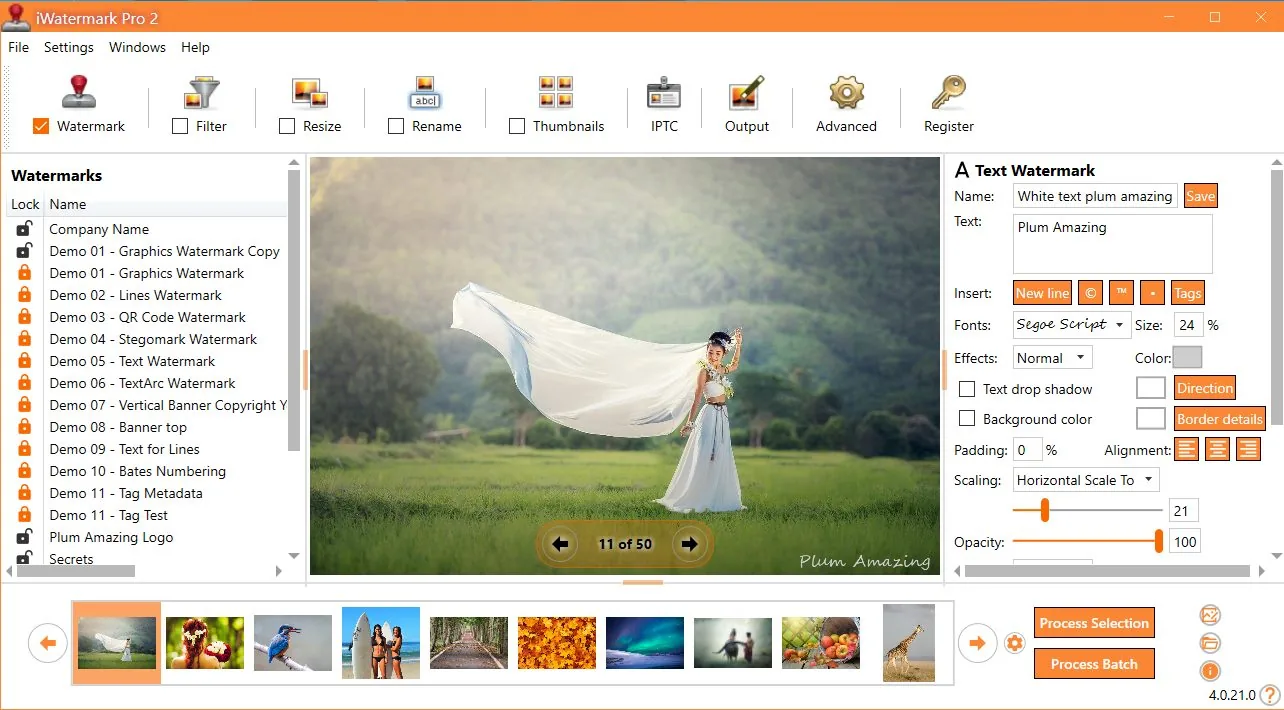
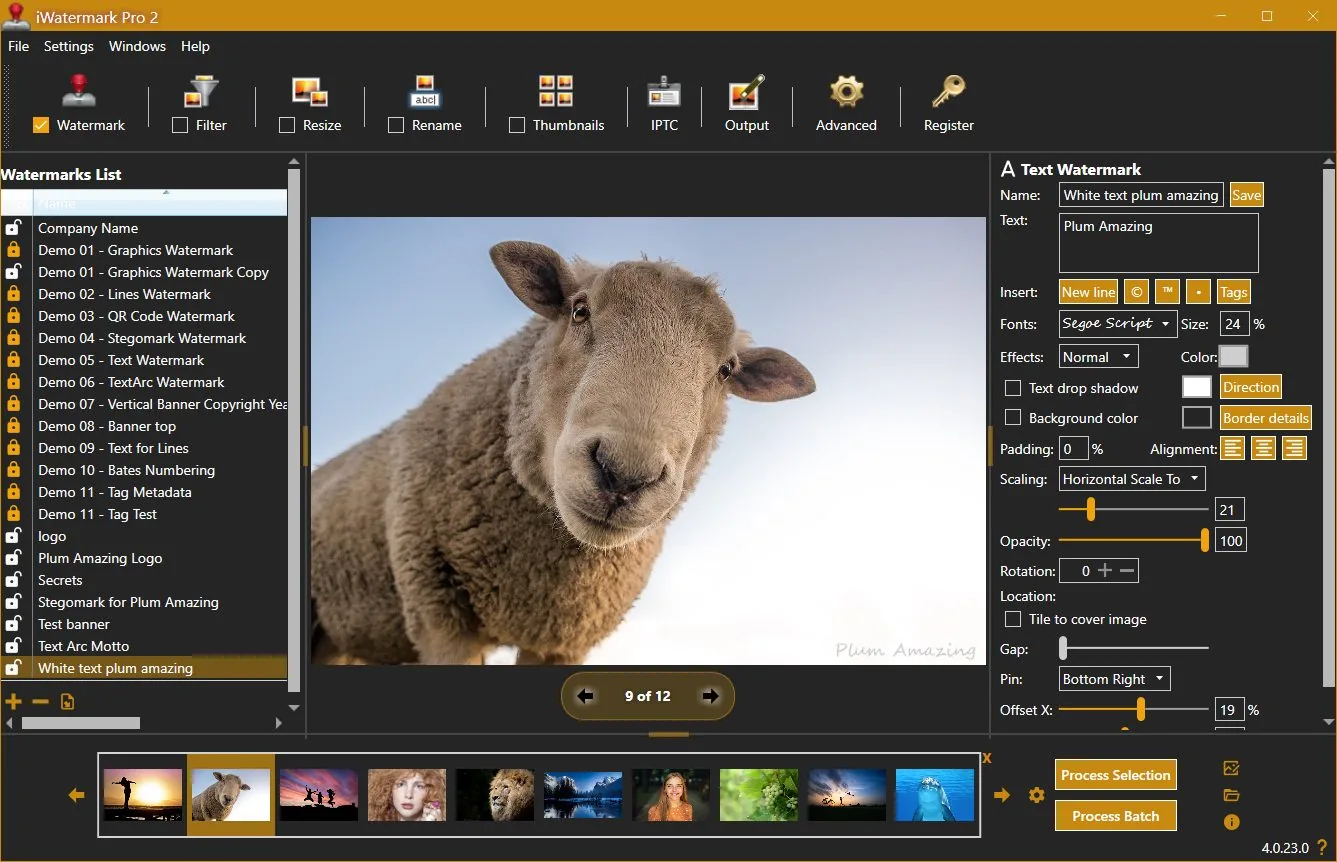
Benutzeroberfläche für Wasserzeichen
Was Rezensenten sagten
„iWatermark Pro ist mit Abstand die funktionsreichste Wasserzeichen-Software, die ich getestet habe…“
— Thomas Boldt (Rezensionsauszug)
„Fotos? Setzen Sie auf jedes ein Wasserzeichen, um Ihr Urheberrecht zu beanspruchen.“
— Jeffrey Mincer, Bohemian Boomer (Auszug)
„Es gibt andere Wasserzeichen-Programme, aber keines ist so umfassend…“
— Daniel M. East, Mac Design Magazine (Auszug)
Nutzerstimmen
„Was mir an Ihrem Produkt gefällt: Die Platzierung des Wasserzeichens basiert auf einem Prozentsatz der Bildseite, nicht auf einer festen Pixelanzahl… die Logo-Platzierung bleibt immer gleich.“
— Scott Baldwin
„Als Profi-Surf-Fotografin… iWatermark war die besten 20 $, die ich je ausgegeben habe… Dieses Programm hat mir so viel Zeit gespart, schnell einen Ordner mit Fotos zu wasserzeichen und zu versenden…“
— Diane Edmonds, YourWavePics.com
„Ich habe Stunden mit verschiedener Software verbracht… Ihre ist zweifellos die einfachste und kostengünstigste, die ich gefunden habe…“
— Peter Kearns, pfphotography.co.uk
„Ich nutze iWatermark… meine Verkäufe sind gestiegen… tolles Produkt, toller Preis und vor allem EINFACH zu bedienen.“
— Chris, Action Digital Photography
„Ihr Programm war mir eine große Hilfe… Es hat geholfen, die unbefugte Nutzung unserer Arbeit zu stoppen…“
— Jon Wright, J&K Creative
„Ich inseriere Häuser auf craigslist… einige meiner Fotos wurden gestohlen, BEVOR ich iWatermark kaufte. Jetzt wählen die Betrüger ein anderes Ziel…“
— Southpaw Steve
Änderungsprotokoll
4.0.35
update📝 Changes
- Updated new registration area to accept the Lemon Squeezy license key.
🔧 Improvements
- Updated new registration area to accept the Lemon Squeezy license key.
4.0.34
update📝 Changes
- General improvements and fixes.
🔧 Improvements
- General improvements and fixes.
4.0.32
minor📝 Changes
- This version of iWatermark Pro 2 resolves high memory usage issue and minimizes memory after it finishes processing. Optimizing the memory has increased the speed and eliminated previous issues.
- Fixed the 'Failed to process watermark'. message which occured in the previous version in some situations.
- Now the installer is a self contained package. It no longer needs to install .Net Core 3.1.19 separately.
- New item added to the Output Folder Hierarchy drop down menu is US date format for naming the top folder (requested by user) and the current time is used for the name of subfolders.
- Minor refinements in the UI, grammar and spelling
✨ New Features
- New item added to the Output Folder Hierarchy drop down menu is US date format for naming the top folder (requested by user) and the current time is used for the name of subfolders.
🔧 Improvements
- This version of iWatermark Pro 2 resolves high memory usage issue and minimizes memory after it finishes processing. Optimizing the memory has increased the speed and eliminated previous issues.
- Now the installer is a self contained package. It no longer needs to install .Net Core 3.1.19 separately.
- Minor refinements in the UI, grammar and spelling
🐛 Bug Fixes
- Fixed the 'Failed to process watermark'. message which occured in the previous version in some situations.
4.0.0
major📝 Changes
- Next generation watermarking engine
- Advanced AI-powered features
- Professional workflow integration
✨ New Features
- Next generation watermarking engine
- Advanced AI-powered features
- Professional workflow integration
Reviews & articles
Curated links and excerpts adapted from the legacy iWatermark Pro 2 for Windows page.
- Mac Informer Review (6/3/2021)
- Best Photo Watermarking Software 2020
- Top 10 Best Photo Watermarking Software in 2020 — Filmora (1/15/2020)
- Review of iWatermark Pro for Windows — Tarekma (12/9/2019)
- Photo Review: iWatermark Pro 2 released for Windows 10/11
- “The Best Watermarking Software 2018” — Thomas Boldt, SoftwareHow
- Review by GIGA (German) (7/15/2016)
- Compendium of reviews (Pinterest)
- iOS iWatermark reviews (1500+ 5-star reviews)
- “Got Photos? Put A Watermark On Each To Claim Your Copyright” — Jeffrey Mincer
- SlideToMac (Italian magazine)
- SMMUG Review of iWatermark Pro — L. Davenport (PDF)
- Thorough review in Swedish — Henning Wurst
- PC World Review
- ATPM review — Chris Dudar
- Macworld review — Jay Nelson
- Macworld “Mac Gems” — Dan Frakes
- Digital Camera Magazine article (PDF)
- Comparison of Visible (iWatermark) vs Invisible (DigiMark) watermarking
Selected excerpts
“iWatermark Pro is by far the most feature-packed watermarking software I reviewed… QR code watermarks and even steganographic watermarks…”
— Thomas Boldt, SoftwareHow
“It is a good application for its primary purpose… and it accomplishes this job easily and with some great additional features…”
— Chris Dudar, ATPM
“If you need to add watermarks to a lot of images, iWatermark provides a big bang for your buck…”
— Jay Nelson, Macworld
“The beauty of iWatermark is its combination of ease of use and functionality… I’ve yet to see a better solution…”
— Dan Frakes, Macworld
“How can you protect your pictures? … Just drag a single picture or a folder full of pictures… specify the watermark text… or a watermark image…”
— Dave Johnson, PC World
User raves
(These are also featured on the Info tab — keeping them in both places for visibility.)
“One thing I like… placement… is based on a percent of the picture side, not a specific number of pixels…”
— Scott Baldwin
“This program has saved me sooo much time to quickly watermark a folder of photos and send it off…”
— Diane Edmonds, YourWavePics.com
“...yours is without doubt the easiest and most cost effective I have come across…”
— Peter Kearns, pfphotography.co.uk
“...my sales have gone up… great product… best of all EASY to use.”
— Chris, Action Digital Photography
“...It has helped to stop unauthorized use of our work…”
— Jon Wright, J&K Creative
“I list houses on craigslist… got some of my pics hijacked BEFORE I bought iWatermark…”
— Southpaw Steve
No tutorials available for this app.
Product Manuals
Product Manuals
Select your platform and app to view the complete manual in a new window.
No previous versions available for this app.