Official Plum Amazing Manual for Android
SpeechMaker for Android
Broadcast Teleprompting, Dynamic Stage Direction, On-Device Voice Follow, and Rehearsal Performance Diagnostics. Anyone Can Experience Relaxed Speech On Or Off Stage.
Testing beta 2.0.0 (Build 15) Updated October 19, 2026
SpeechMaker Digital Stage Studio Architecture
Rebuilt in Kotlin and Jetpack Compose for Android 8.0 and later. Android 15 is covered by the handoff report; Android 17 compatibility is expected and awaits testing.
The guide to speech writing, broadcast teleprompting, stage direction, voice-follow scrolling, and rehearsal performance diagnostics on Android. Anyone Can Experience Relaxed Speech On Or Off Stage.
Public testing beta: 2.0.0, build 15. Download the Android beta or visit the SpeechMaker Android page. This debug-signed test app installs separately from the Google Play edition. Android 8.0 is the minimum; the supplied test report covers Android 15. Compatibility with Android 16, Android 17 and later is expected but not independently verified. This is a beta for feedback, not a Google Play production update.
1. Overview & Architectural Philosophy#
1.1 Welcome to SpeechMaker Generation 2#
SpeechMaker for Android is an all-in-one professional speechwriting suite, broadcast-grade teleprompter, stage direction engine, rehearsal studio, and real-time audience engagement system. Re-engineered natively from the ground up in Kotlin and Jetpack Compose for Android 8.0 and later, with Android 17 compatibility expected and awaiting device testing, SpeechMaker bridges the gap between raw text composition and confident, captivating public presentation.
Whether you are delivering a corporate keynote, leading a university lecture, defending a thesis, performing a dramatic theater monologue, reciting poetry, singing lyrics on stage, or delivering a wedding toast, SpeechMaker provides the exact technical instrumentation needed to practice your timing, build speaking confidence, and maintain eye contact with your listeners.
flowchart LR
    A["Speech Creation\n• Script Editor\n• Structured Templates\n• AI Speechwriter"] --> B["Stage Direction\n• 3-Row Stage Cues\n• 5 Genre Presets\n• Readability Metrics"]
    B --> C["Delivery Studio\n• Frame-Synced Prompter\n• Slim SpeedRail\n• On-Device Voice Follow"]
    C --> D["Rehearsal Analytics\n• Audio/Video Takes\n• AI Pacing Diagnostics\n• Audience Q&A Simulator"]
    C --> E["Live Audience Link\n• Local Wi-Fi Hub\n• QR Code Connection\n• Real-Time Rubric Scoring"]
1.2 The Core Philosophy: Natural Delivery Over Robotic Reading#
Traditional teleprompters treat speakers like automated text readers: a motor scrolls words across a screen at a fixed mechanical speed, forcing the human being to accelerate or decelerate unnaturally to keep up with the machine. If the speaker pauses for emphasis, laughs at an audience reaction, or takes an extra breath, the script scrolls away into the distance, leaving the speaker lost and anxious.
SpeechMaker overturns this paradigm through three foundational design principles:
- Speaker-Centric Temporal Control: The prompter must adapt to the speaker, not the reverse. Through our On-Device Voice Follow Engine, SpeechMaker listens to your spoken acoustics in real-time, advancing the script sentence by sentence as words leave your lips. If you pause, the prompter pauses. If you ad-lib or explain a slide in greater depth, the prompter waits patiently for you to return to the script.
- Explicit Stage Direction Integration: Great speaking is not just words; it is cadence, physical gestures, eye contact, and strategic silence. SpeechMaker embeds Stage Cues directly into the script as non-spoken visual badges (
[Look Up],[Smile],[Pause (2s)],[Emphasize],[Guitar Solo]). These cues alert you to perform stage actions without disrupting the flow of the text. - Local-First Privacy & Zero Cloud Dependency: Your private speeches, confidential business pitches, personal memoirs, and rehearsal recordings belong exclusively to you. Speeches, recordings, script analysis and guided drafting are handled locally. Voice Follow uses Android's on-device recognizer when available on Android 12 or later, and otherwise uses the configured system recognition service. That fallback may require a connection and may process audio through its provider. Confirm the device's speech-service settings before using confidential material. Sharing, Android backup and Audience Link can move data beyond this device.
1.3 Architectural Overview & Native Android Foundation#
SpeechMaker 2.0.0 represents a modern, modular native Android architecture:
- UI Architecture: Declarative Jetpack Compose using Material Design 3 guidelines, dynamic color theming, adaptive multi-pane tablet layouts, and hardware-accelerated drawing pipelines.
- Concurrency & State: Kotlin Coroutines and reactive
StateFlowstreams decoupled cleanly into Model-View-ViewModel (MVVM) layers. - Local Persistence: SQLite Room Database with ACID compliance, automated schema migrations from legacy editions, and asynchronous Android Jetpack DataStore preferences.
- Audio & Media Engine: AndroidX Media3 (
ExoPlayer) for low-latency rehearsal playback, low-level AndroidAudioRecordfor live VU metering, and JetpackCameraXfor hardware-stabilized 1080p front-camera selfie rehearsal. - Acoustic Intelligence: Android's native
SpeechRecognizerrunning offline language packs with sliding-window fuzzy token matching for responsive Voice Follow.
2. System Requirements & Hardware Specifications#
2.1 Software & Operating System Compatibility#
| Parameter | Minimum Specification | Recommended Specification |
|---|---|---|
| Android OS Version | Android 8.0 (API Level 26 "Oreo") | Android 12 and later; Android 15 is covered by the supplied test report. Android 16/17 compatibility needs testing |
| Google Play Services | Optional (Used for In-App Billing) | Installed & Updated |
| Speech Recognition Engine | Android System Recognition Service | Google Speech Recognition Services (with offline language packs downloaded) |
| PDF Extraction / Rendering | Built-in native Android PdfDocument |
Built-in native Android PdfDocument |
2.2 Hardware Specifications#
- Processor: 64-bit ARMv8 processor (Qualcomm Snapdragon 600-series or higher, Google Tensor G1–G4, Samsung Exynos, or MediaTek Dimensity).
- RAM: 3 GB minimum; 4 GB to 8 GB recommended for seamless 1080p camera rehearsal video recording while running the frame-synced teleprompter.
- Camera: Front-facing selfie camera (720p or 1080p) required for video rehearsal mode.
- Microphone: Built-in device microphone or external USB-C / 3.5mm lavalier microphone for audio takes and Voice Follow speech recognition.
- Display: High-resolution OLED or IPS display with responsive multi-touch. Tablets and foldables automatically engage the wide-screen two-pane studio view.
2.3 On-Device Speech Recognition Hardware Support#
On-device speech recognition is fully supported natively on modern Android devices:
- Pixel Devices (Pixel 6, 7, 8, 9 series): On-device recognition availability depends on the phone, Android version, installed recognition service and language model. Recognition consumes power; test your device before a long presentation.
- Qualcomm Snapdragon Devices (Android 11+): Supported via Google Speech Recognition Services with the offline English (or localized) voice pack downloaded in Android Settings.
- Network Independence: Manual teleprompting, local recording and PDF export are designed to work offline. Voice Follow works offline only when a compatible recognizer and language model are available. Test it in airplane mode before depending on it.
3. Quick Start: Your First 5-Minute Speech#
Follow this step-by-step walkthrough to write, cue, and deliver your first speech with SpeechMaker in less than five minutes:
Step 1: Open the Library and Select a Speech#
- Launch SpeechMaker from your Android app drawer.
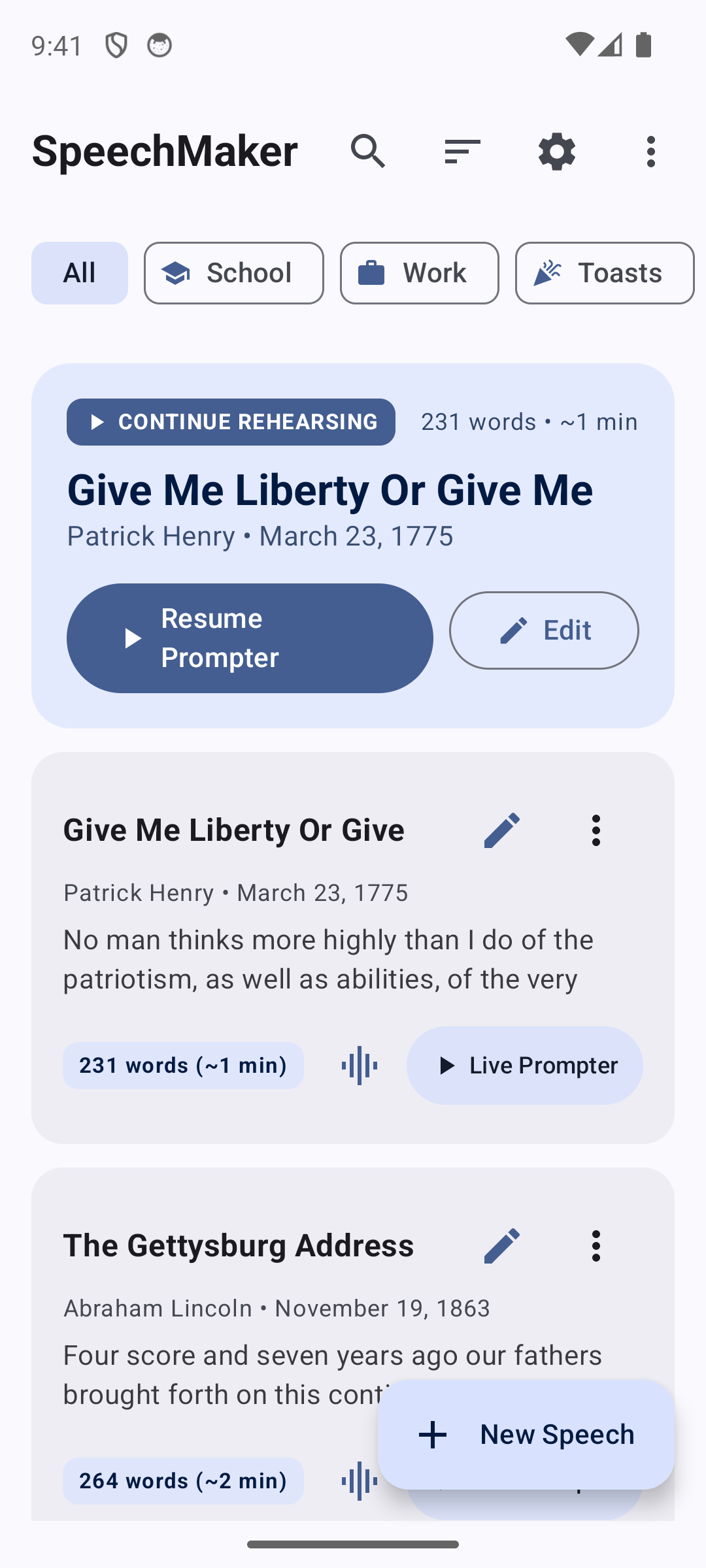
- The Speeches Library appears, presenting your catalog of pre-loaded classic speeches, poems, sermons, and comedy routines.
- Tap on the sample speech titled "Everyday Grocery Store Comedy Routine" (or tap the floating
+ New Speechbutton in the bottom right corner to begin with a blank canvas).
Step 2: Insert Stage Cues in the Script Editor#
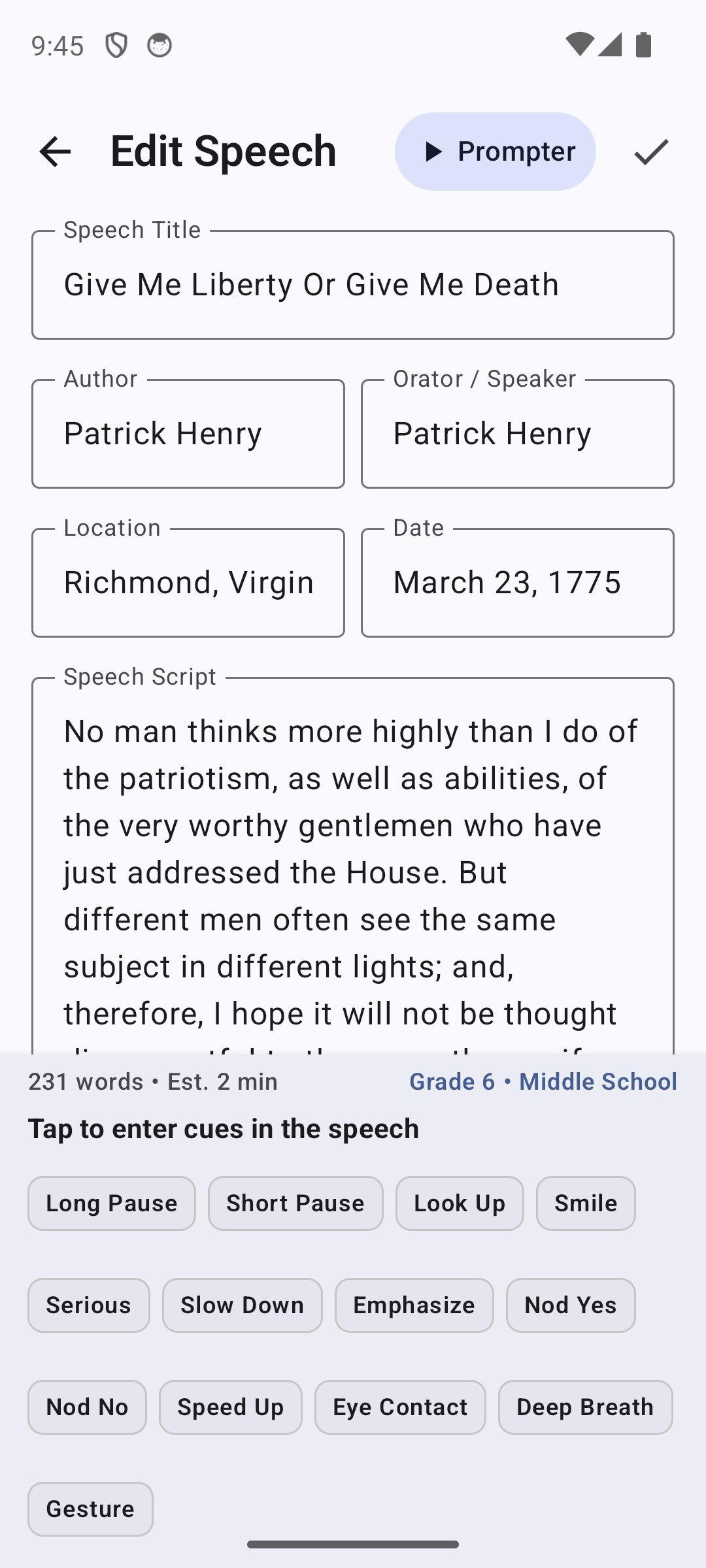
- In the Script Editor, examine the script text. Notice how stage cues appear enclosed in brackets, such as
[LOOK UP],[SMILE], and[PAUSE 1s]. - Place your cursor after the opening sentence: "Have you ever noticed how people act in grocery stores?"
- Look directly beneath the script field at the 3-row quick-tap Stage Cue buttons.
- Tap the
[Smile]button, then tap[Long Pause]. SpeechMaker inserts[Smile] [Long Pause]directly at your cursor position.
Step 3: Launch the Broadcast Teleprompter#
- Tap the Checkmark icon in the top-right app bar to save your edits.
- In the Speeches Library (or from the editor top bar), tap Live Prompter on your speech card.
- The prompter loads instantly in OLED Dark Theme, displaying your script in crisp, high-contrast typography with your stage cues illuminated as distinct visual badges.
Step 4: Master Pacing with the SpeedRail#
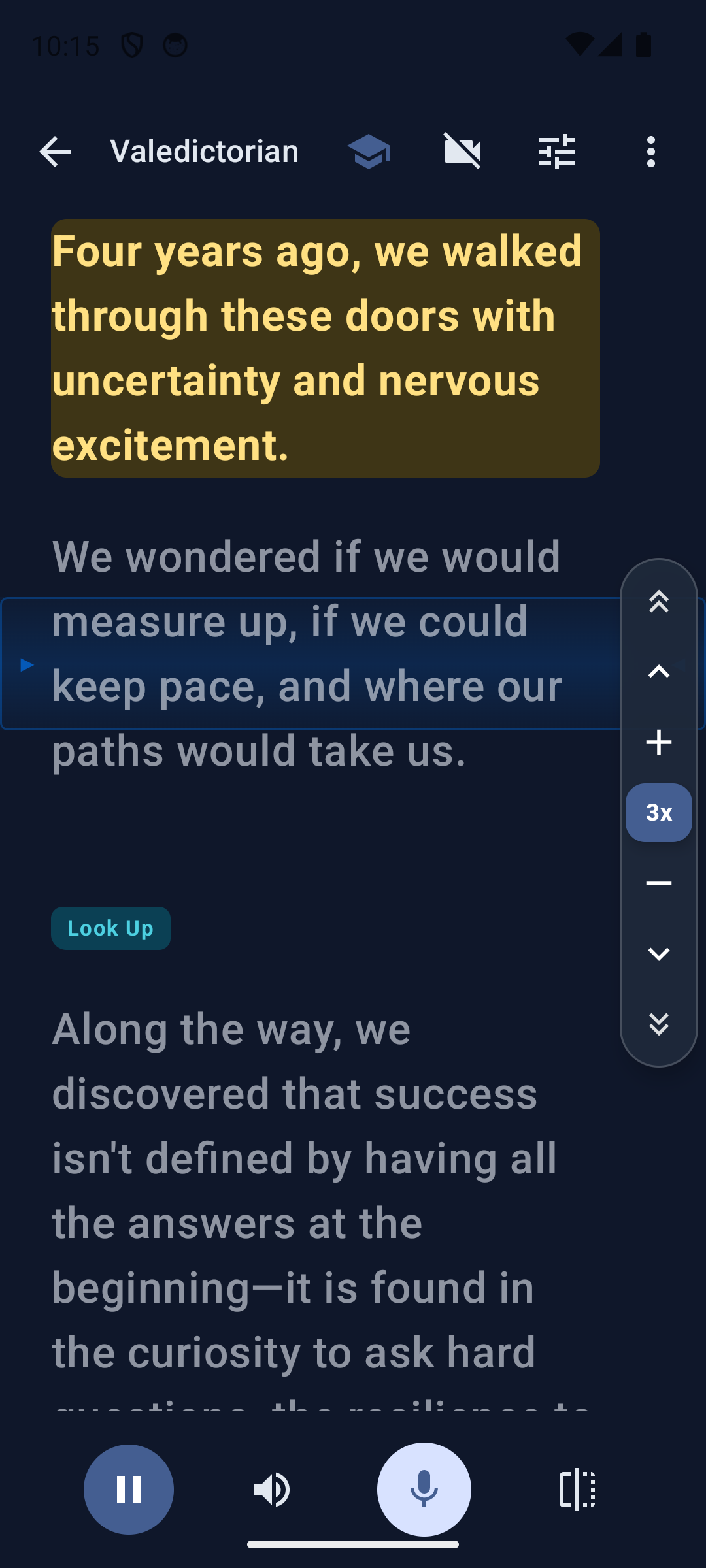
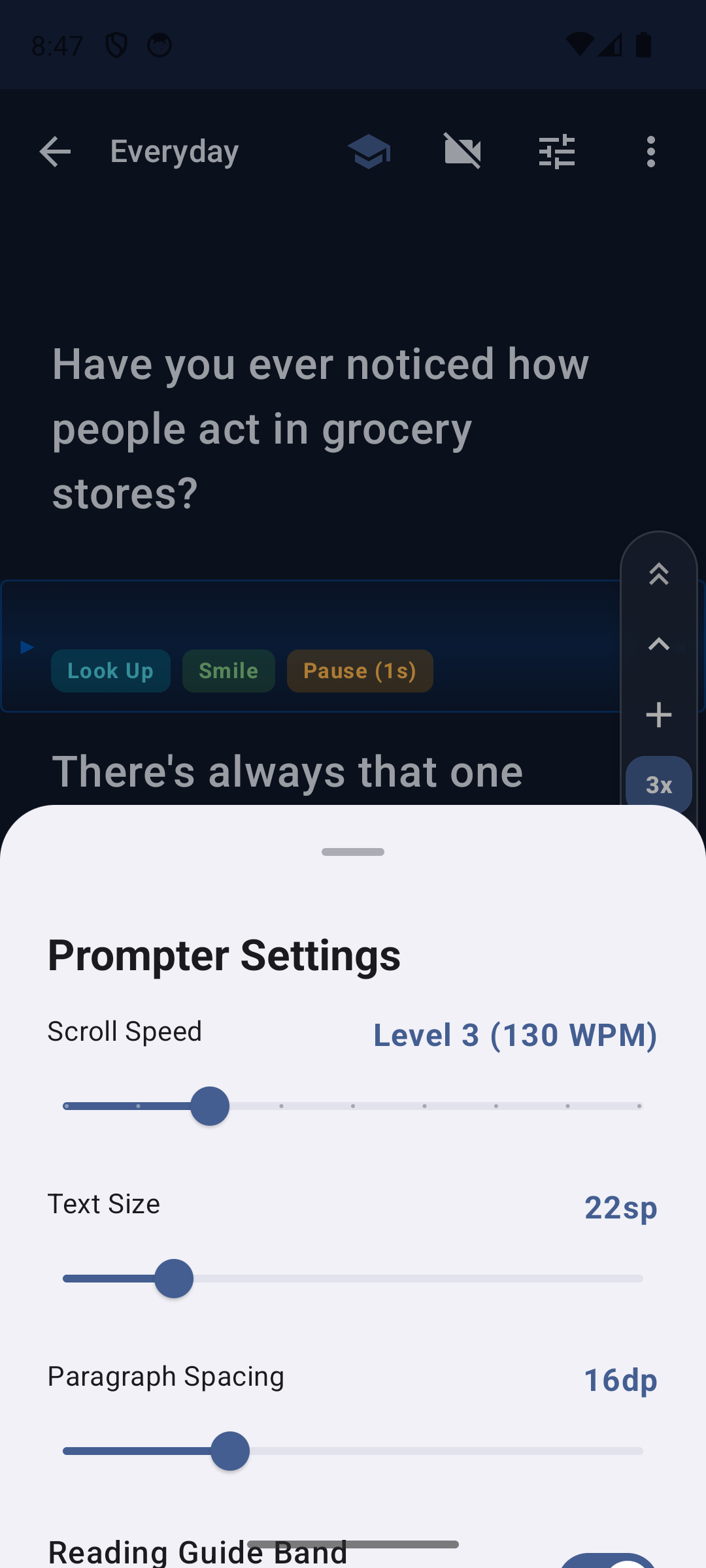
- Tap the central Play button in the bottom controls bar. The text begins scrolling smoothly upward at Level 3 (~130 words per minute).
- Notice the horizontal Reading Guide Band highlighting the active reading area (~32% down the screen). Keep your eyes focused inside this band to maintain consistent eye contact.
- To speed up, tap the
+button on the right-hand SpeedRail. To slow down, tap-. - To scrub forward or backward instantly, press and hold your thumb on the Jog Shuttle center indicator and drag upward or downward. Dragging farther increases scrub velocity; releasing your thumb instantly pauses the prompter right where you stopped.
Step 5: Engage Voice-Follow Scrolling#
- Tap the Voice Follow microphone icon (next to the play button in the bottom bar).
- Grant the Android microphone permission prompt if requested.
- The microphone icon illuminates in Electric Emerald Green.
- Begin speaking the words aloud: "Have you ever noticed how people act in grocery stores..."
- SpeechMaker tracks your voice in real time, auto-advancing the script smoothly as you speak!
4. Speeches Library & Catalog Navigation#
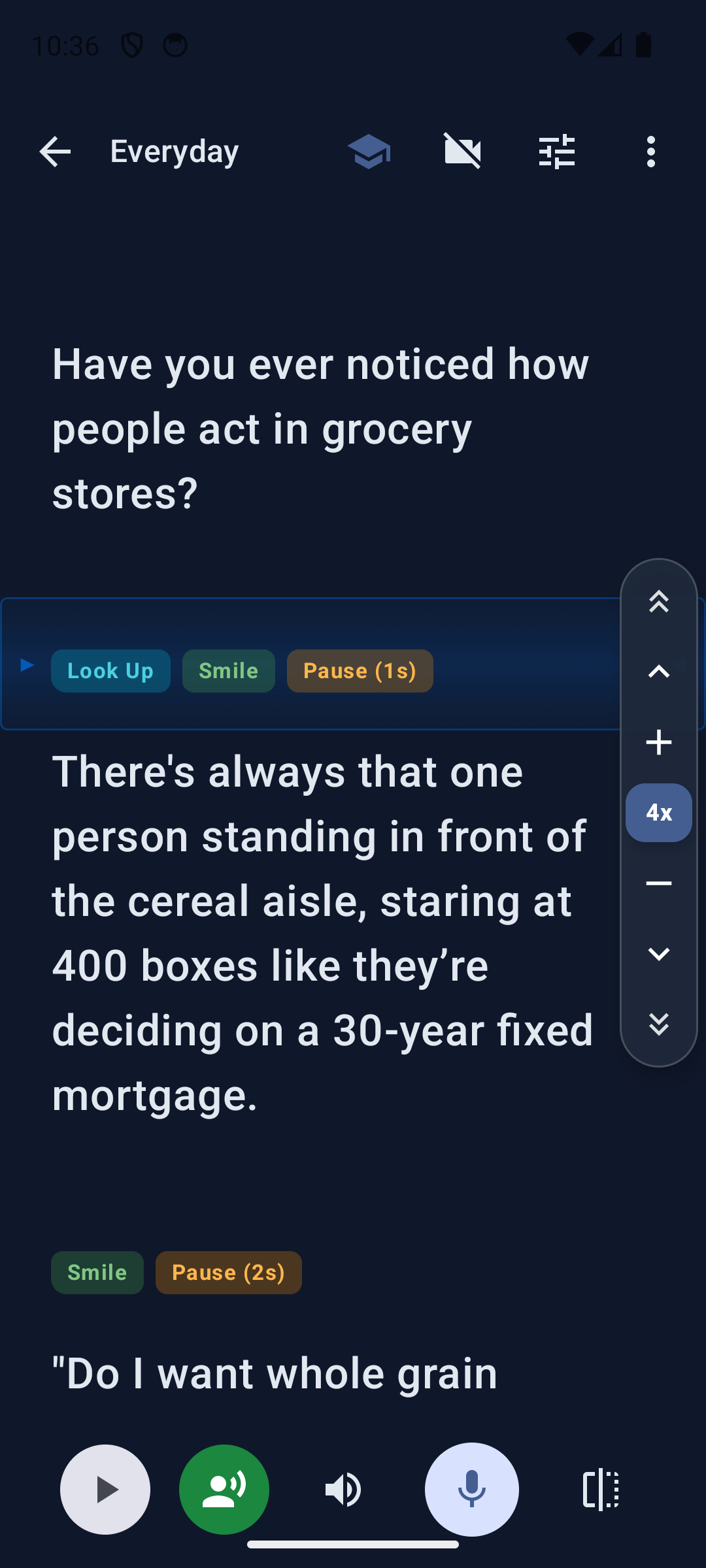
The Speeches Library is your central organization hub for all speaking material, performance scripts, and rehearsal sessions.
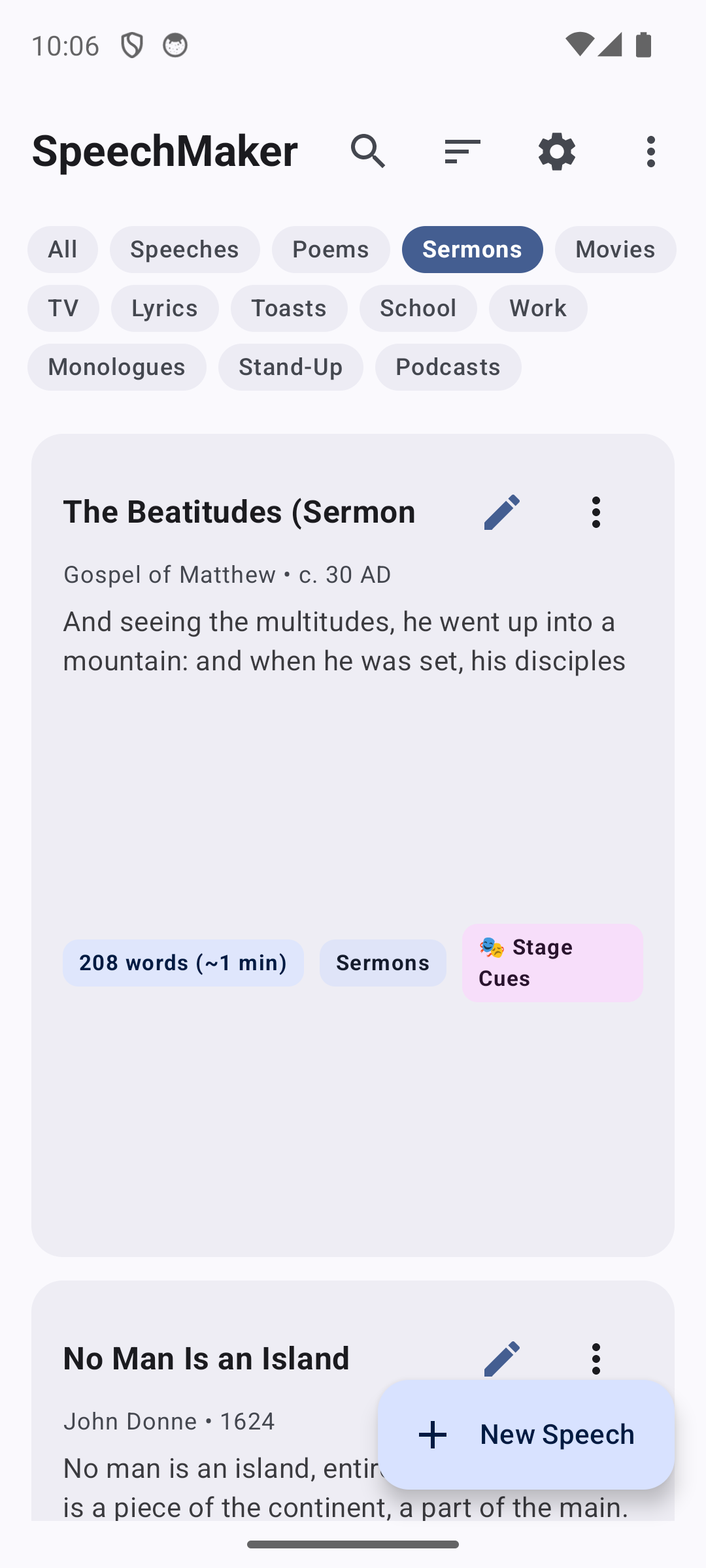
4.1 The 13 Category Filter Tabs#
At the top of the Speeches Library sits a compact, multi-line category filter bar designed to organize all forms of vocal performance:
- All: Displays your entire speech and script collection.
- Speeches: Keynotes, corporate presentations, political addresses, and lectures.
- Poems: Classic poetry, modern verses, and spoken word.
- Sermons: Faith-based messages, homilies, and religious readings.
- Movies: Classic movie monologues and cinematic dialogues.
- TV: Television monologues, scenes, and anchor scripts.
- Lyrics: Song lyrics, verses, choruses, and musical performance charts.
- Toasts: Wedding toasts, best man speeches, retirement honors, and awards.
- School: Classroom presentations, debate arguments, and student council campaigns.
- Work: Executive briefings, sales pitches, all-hands addresses, and status updates.
- Monologues: Dramatic audition monologues and theater pieces.
- Stand-Up: Stand-up comedy routines, joke bits, and storytelling sets.
- Podcasts: Podcast introductions, interview segment notes, and sponsor reads.
4.2 Search & Sorting Capabilities#
- Real-Time Universal Search: Tap the Search magnifying glass in the top bar to filter speeches instantly by title, author name, or any keyword contained inside the script body.
- Multi-Factor Sorting: Tap the Sort icon in the top bar to order speeches by:
- Date Modified (Newest First)
- Title (Alphabetical A–Z)
- Word Count (Shortest or Longest)
- Estimated Duration (Fastest to Longest)
4.3 Continue Rehearsing Hero Card#
Whenever you return to SpeechMaker, the top of the library prominently displays the Continue Rehearsing Hero Card for your most recently accessed speech. This card displays the title, current word count, estimated speaking duration, and one-tap buttons to immediately Resume Prompter or open the Script Editor.
4.4 Swipe-to-Delete with Instant Undo#
To remove a speech from your library, swipe the speech card from right to left. The background illuminates in red with a trash can icon. Upon release, the speech is archived and an Android Snackbar appears with an "Undo" button, allowing you to restore the speech with a single tap if deleted accidentally.
5. Script Editor & The Stage Cues Engine#
The Script Editor is a precision writing environment built specifically for spoken language.
5.1 Live Spoken Metrics#
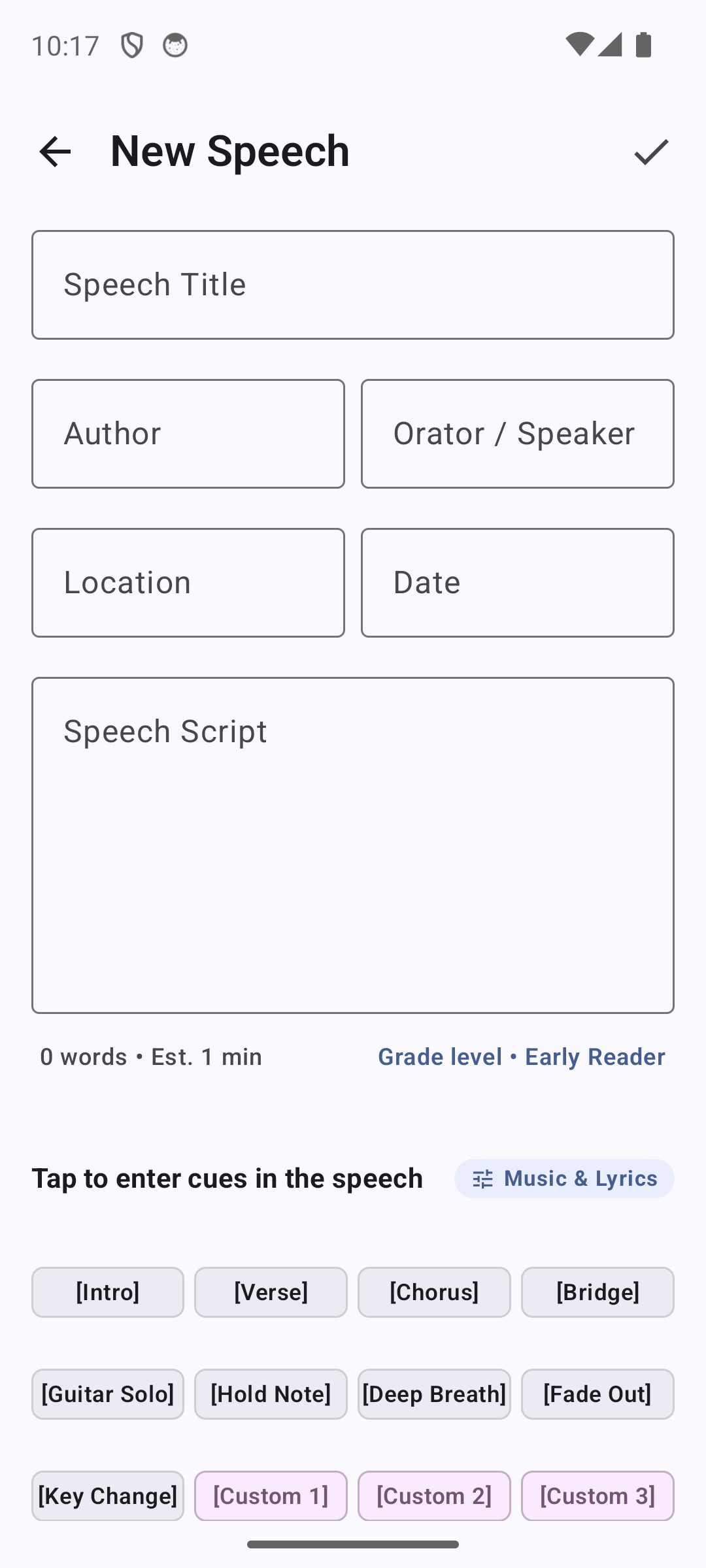
As you type in the script field, SpeechMaker continuously computes three live acoustic metrics in real time:
- Word Count: Total words in the speech (excluding stage cue metadata).
- Estimated Reading Time: Computed using your configured target words-per-minute rate (default: 130 WPM). A 650-word speech indicates
~5 min. - Readability Grade Level: Computed using the Flesch-Kincaid Grade Level formula:
\text{Grade Level} = 0.39 \left( \frac{\text{total words}}{\text{total sentences}} \right) + 11.8 \left( \frac{\text{total syllables}}{\text{total words}} \right) - 15.59 Displayed in the bottom-right corner as a clear label (e.g., Grade 6.8 · Conversational).
5.2 The 3-Row Quick-Tap Stage Cues#
Positioned directly beneath the speech script field are three rows of compact stage cue buttons. Tapping any button immediately inserts the corresponding bracketed cue at your current cursor position:
| Row | Default Cue Buttons | Purpose & Action |
|---|---|---|
| Row 1 | [Long Pause] [Short Pause] [Look Up] [Smile] |
Fundamental breathing, cadence, and eye-contact reminders. |
| Row 2 | [Serious] [Slow Down] [Emphasize] [Nod Yes] |
Emotional tone, vocal deceleration, and affirmative physical gestures. |
| Row 3 | [Nod No] [Custom 1] [Custom 2] [Custom 3] |
Negative emphasis and user-defined custom stage actions. |
5.3 The Stage Cue Customizer Modal & 5 Genre Presets#
Tapping the [Custom] button opens the Stage Cue Customizer Dialog, where you can edit any cue name or load tailored presets across five distinct performance genres:
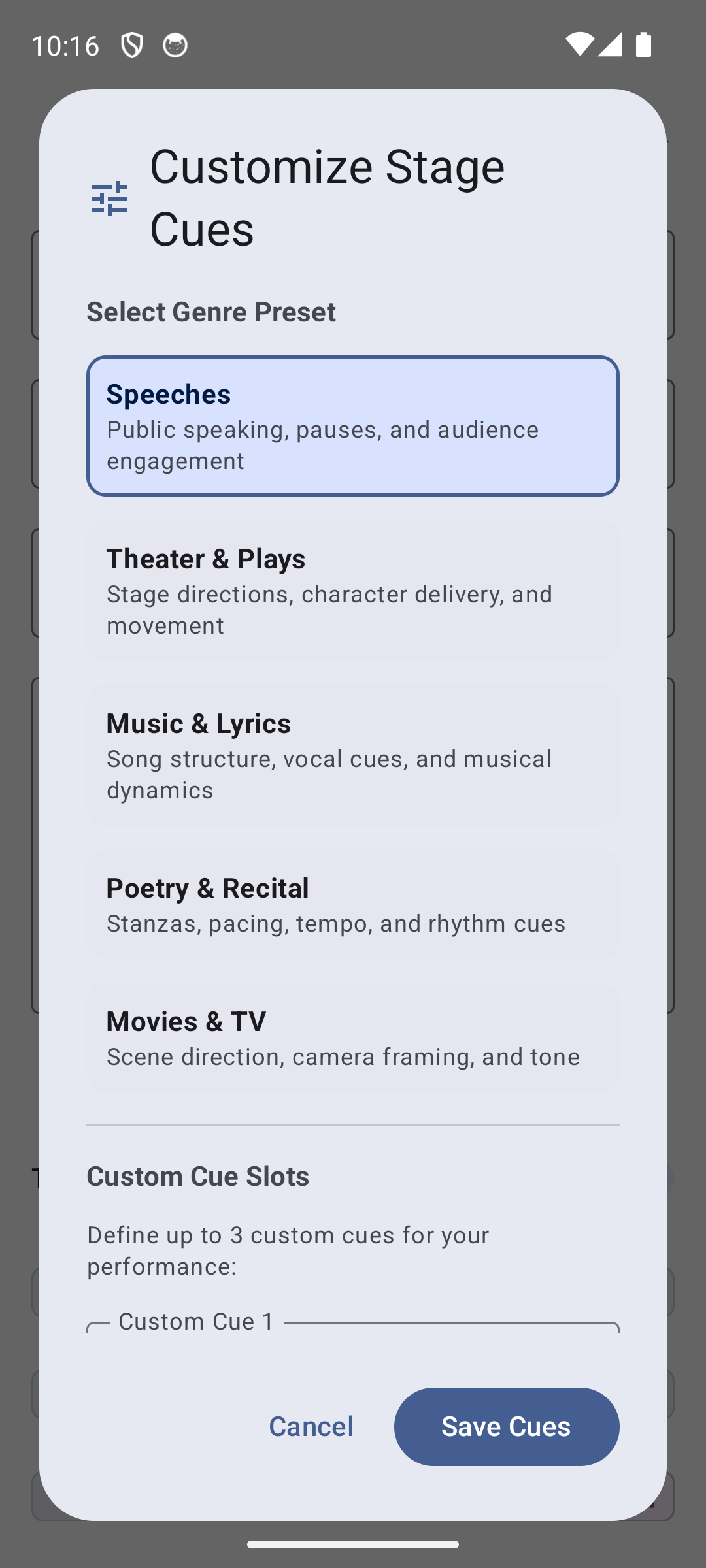
- Speeches & Presentations (Default):
[Look Up],[Smile],[Long Pause],[Short Pause],[Slow Down],[Emphasize],[Nod Yes],[Nod No],[Breathe],[Eye Contact],[Hand Gesture],[Next Slide].
- Theater & Dramatic Plays:
[Exit Stage Left],[Cross Stage Right],[Whisper],[Shout],[Weep],[Laugh],[Draw Sword],[Pause Dramatically],[Aside to Audience],[Look Down],[Freeze],[Curtain].
- Music, Lyrics & Songwriting:
[Intro],[Verse 1],[Chorus],[Verse 2],[Bridge],[Guitar Solo],[Drum Fill],[Drop],[Key Change],[Outro],[Fade Out],[Vamp].
- Poetry & Spoken Word:
[Stanza Break],[Slow Cadence],[Softly],[Loudly],[Rhythmic Pause],[Inhale],[Exhale],[Beat],[Crescendo],[Decrescendo],[Silence],[Echo].
- Movies & TV Screenplays:
[FADE IN],[CLOSE UP],[PAN LEFT],[VOICEOVER],[BEAT],[SARCASTIC],[WHISPER],[INTERRUPTING],[TURNS AWAY],[PAUSE],[FADE TO BLACK],[SCENE END].
5.4 Tablet & Foldable Two-Pane Studio Mode#
When running SpeechMaker on a tablet, Chromebook, or foldable device (screen width \ge 720\text{dp}), the editor automatically unlocks a Two-Pane Split Layout:
- Left Pane: Script details, metadata fields, and full text editing with stage cue buttons.
- Right Pane: A Live Prompter Preview that parses and formats your text in real time, rendering stage cues as colored pill badges and displaying the reading guide band.
6. Broadcast Teleprompter & SpeedRail Controls#
The Teleprompter Screen transforms your Android device into a professional broadcast studio display.
6.1 Frame-Synced Auto-Scroll Engine#
SpeechMaker's scrolling engine synchronizes directly with your display's refresh rate (60Hz, 90Hz, or 120Hz) via Jetpack Compose's continuous choreography clock. Smoothness depends on the device, display and other work running at the same time.
6.2 The Slim SpeedRail#
Located on the right edge of the teleprompter screen, the SpeedRail provides comprehensive navigation and speed control while occupying minimal screen width:
┌───────┐
│  ^^   │  Jump to Beginning (Top)
├───────┤
│   ^   │  Page Up (Previous Screen)
├───────┤
│   +   │  Speed Up (+1 Level / +15 WPM)
├───────┤
│  4x   │  Current Speed Level Indicator
├───────┤
│   -   │  Slow Down (-1 Level / -15 WPM)
├───────┤
│   v   │  Page Down (Next Screen)
├───────┤
│  vv   │  Jump to End of Script
└───────┘
The Freeform Jog Shuttle Gesture
In addition to tapping the buttons, the center Speed indicator functions as an interactive Jog Shuttle:
- Press and hold your finger on the center indicator.
- Drag upward to scrub backward through the text; dragging higher accelerates scrub speed.
- Drag downward to scrub forward through the text; dragging lower accelerates forward scrub speed.
- Release your finger: The prompter instantly pauses at that exact point in your script.
6.3 Teleprompter Speed Reference Table#
| Speed Level | Words Per Minute (WPM) | Recommended Application |
|---|---|---|
| Level 1 | 85 WPM | Dramatic poetry, ceremonial eulogies, meditation readings. |
| Level 2 | 105 WPM | Complex technical presentations, academic lectures, ESL audiences. |
| Level 3 | 130 WPM | Standard Conversational Pace (Recommended default). |
| Level 4 | 145 WPM | Dynamic corporate keynotes, enthusiastic business pitches. |
| Level 5 | 160 WPM | Fast-paced storytelling, energetic stand-up comedy bits. |
| Level 6 | 175 WPM | Broadcast news delivery, commercial voiceover pacing. |
| Level 7 | 190 WPM | Rapid debate arguments, sports commentary drills. |
| Level 8 | 205 WPM | High-velocity cadence practice. |
| Level 9 | 220 WPM | Maximum speed reading and auctioneer cadence training. |
6.4 The Reading Guide Band#
A subtle, horizontal focus band rests at approximately 32% from the top of the display. By reading words precisely as they enter this band, your eyes remain focused directly adjacent to your device's front camera lens (or beam-splitter mirror glass), creating the natural impression that you are looking straight into the eyes of your audience.
6.5 Hardware Teleprompter Mirroring#
When mounting your Android tablet inside a professional teleprompter hood equipped with a 70/30 beam-splitter glass mirror, the glass physically reverses the reflection. Tap the Mirror icon in the bottom controls bar to flip the text horizontally and vertically, ensuring the reflection reads correctly in the mirror.
6.6 Teleprompter Color Themes#
Tap the Tune icon in the top bar to open the Prompter Settings Sheet, where you can select between four curated display themes:
- OLED True Dark: Pure
#000000pitch black background with#FFFFFFcrisp text. Perfect for teleprompter glass hoods to prevent backlight reflection bleed. - Charcoal Studio: Professional
#121212charcoal background with soft white text, minimizing eye fatigue during multi-hour rehearsal sessions. - Midnight Navy: Rich deep
#0A192Fnavy with sky-blue accents. - Warm Cream: High-contrast
#FFFDF7warm cream background with#1A1A1Acharcoal text for outdoor daytime reading in direct sunlight.
7. On-Device Voice-Follow Teleprompter#
The Voice Follow Engine is SpeechMaker's crown-jewel technological achievement.
7.1 How On-Device Acoustic Voice Follow Works#
When Voice Follow is engaged, SpeechMaker asks Android for partial recognition results. It selects an on-device recognizer on Android 12 or later when one is available; otherwise it falls back to the system recognizer. The offline preference is requested on Android 13 or later, but the provider determines fallback behavior:
- As you speak into the microphone, Android's selected recognition service produces partial word results.
- SpeechMaker's token-matching algorithm matches these spoken words against a sliding window of sentences in your script.
- Upon matching key phonetic tokens, SpeechMaker computes the exact pixel offset required to bring the current spoken sentence into the Reading Guide Band.
- The scroll position animates smoothly to the target offset.
7.2 Handling Pauses, Ad-Libs, and Off-Script Explanations#
- Pausing for Dramatic Effect: If you pause at a
[Long Pause]stage cue or stop speaking to take a sip of water, the voice recognition stream stops emitting tokens. SpeechMaker holds the script stationary. - Ad-Libbing & Audience Questions: If you digress to answer an audience member or explain a diagram in your own words, the spoken tokens do not match the script window. SpeechMaker remains in its current position until you resume reading the actual text.
- Manual Override: You can swipe the screen or use the SpeedRail at any time while Voice Follow is active. Manual gestures temporarily pause the acoustic listener, resuming automatic tracking as soon as you let go.
7.3 Offline Language Pack Setup#
To prepare offline recognition, use your device's speech-service settings. The names and path vary by manufacturer:
- Open your Android device's system Settings.
- Navigate to System > Languages & Input > Speech > Speech Recognition Services.
- Select Offline Speech Recognition and tap the Installed tab.
- Ensure your primary language (e.g., English (US)) is downloaded for offline use.
8. Practice Recording Studio & Video Rehearsal#
Rehearsal transforms good speakers into great speakers. SpeechMaker provides a complete multimedia recording and analysis studio.
8.1 Audio Rehearsals with Live VU Metering#
- In the teleprompter bottom controls bar, tap the red Record button (or enable Auto-record Rehearsals in Global Settings).
- The teleprompter displays a prominent AUDIO REC banner along with a live, real-time dynamic VU Waveform Meter that dances to your vocal volume.
- When you complete your speech, tap the red square Stop button.
- SpeechMaker automatically saves your rehearsal take into the encrypted local SQLite database.
8.2 Selfie Video Rehearsal via CameraX#
- In the teleprompter top bar, tap the Camera icon (
Videocam). - A high-definition front-facing selfie camera preview surfaces directly inside the teleprompter interface.
- By positioning the camera preview immediately adjacent to the scrolling text lines, you can monitor your facial expressions, head tilt, and posture without looking away from the script.
8.3 Practice Takes Studio Management#
Navigate to the Practice Takes screen (via the prompter overflow menu or speech card icon):
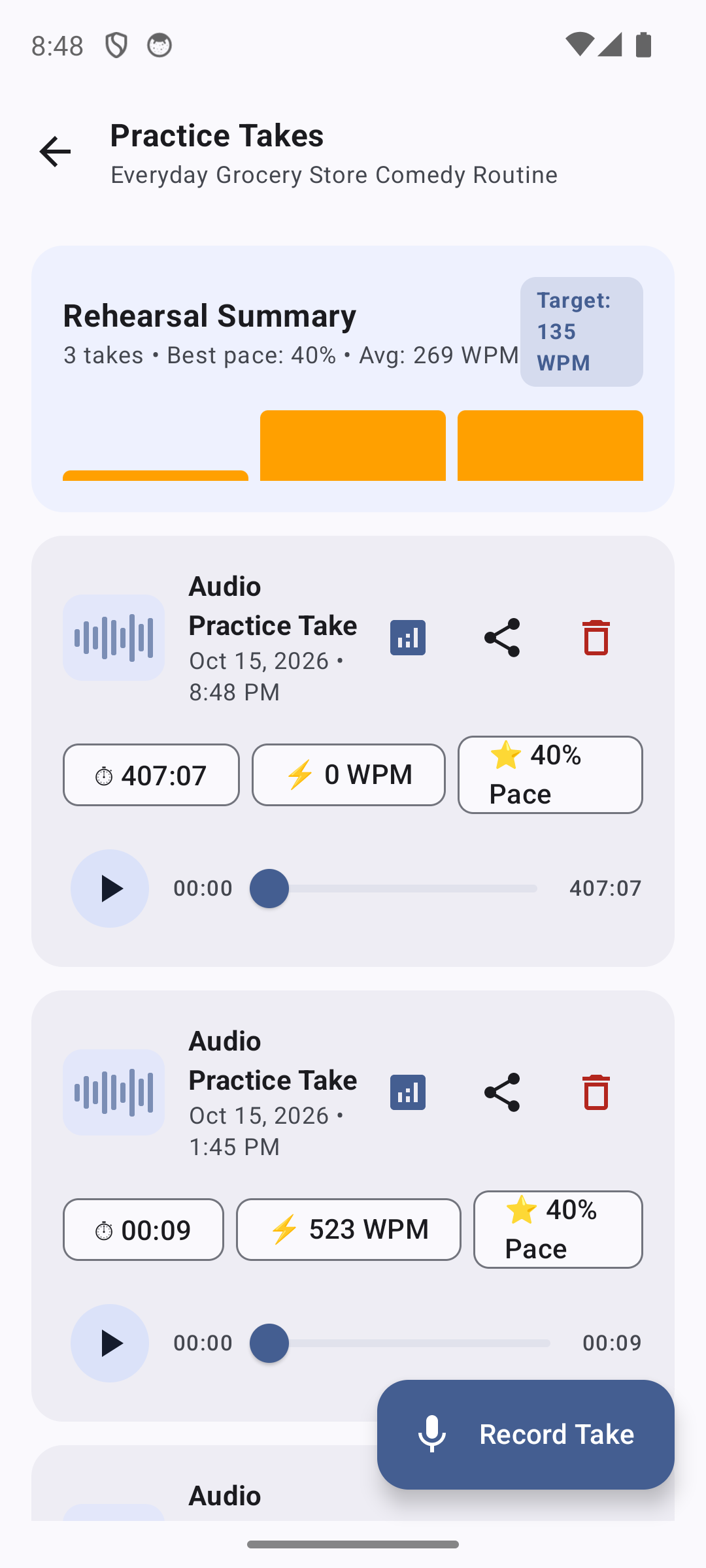
- Rehearsal Summary: Displays total takes recorded, your best pacing score, average WPM, and comparison against your target pace.
- Interactive Take Cards: Each recorded take features an audio waveform icon, recording timestamp, duration badge (e.g.,
04:07), actual speaking speed badge (e.g.,130 WPM), and pacing accuracy percentage. - Media3 Playback: Tap the Play button on any take to listen with precise waveform scrubbing.
- Critique & Share: Tap the Analytics icon to view the AI Coach Critique, tap Share to export the audio file, or tap Delete to discard the take.
9. AI Speech Performance Diagnostics (Coach Critique)#
SpeechMaker's Speech Performance Analyzer offers rehearsal suggestions using the script and the recording duration. In this beta it does not transcribe a recording or analyze vocal tone, pauses or expression. Treat its scores as practice prompts, not a professional assessment.
9.1 Pacing Score & Cadence Analysis#
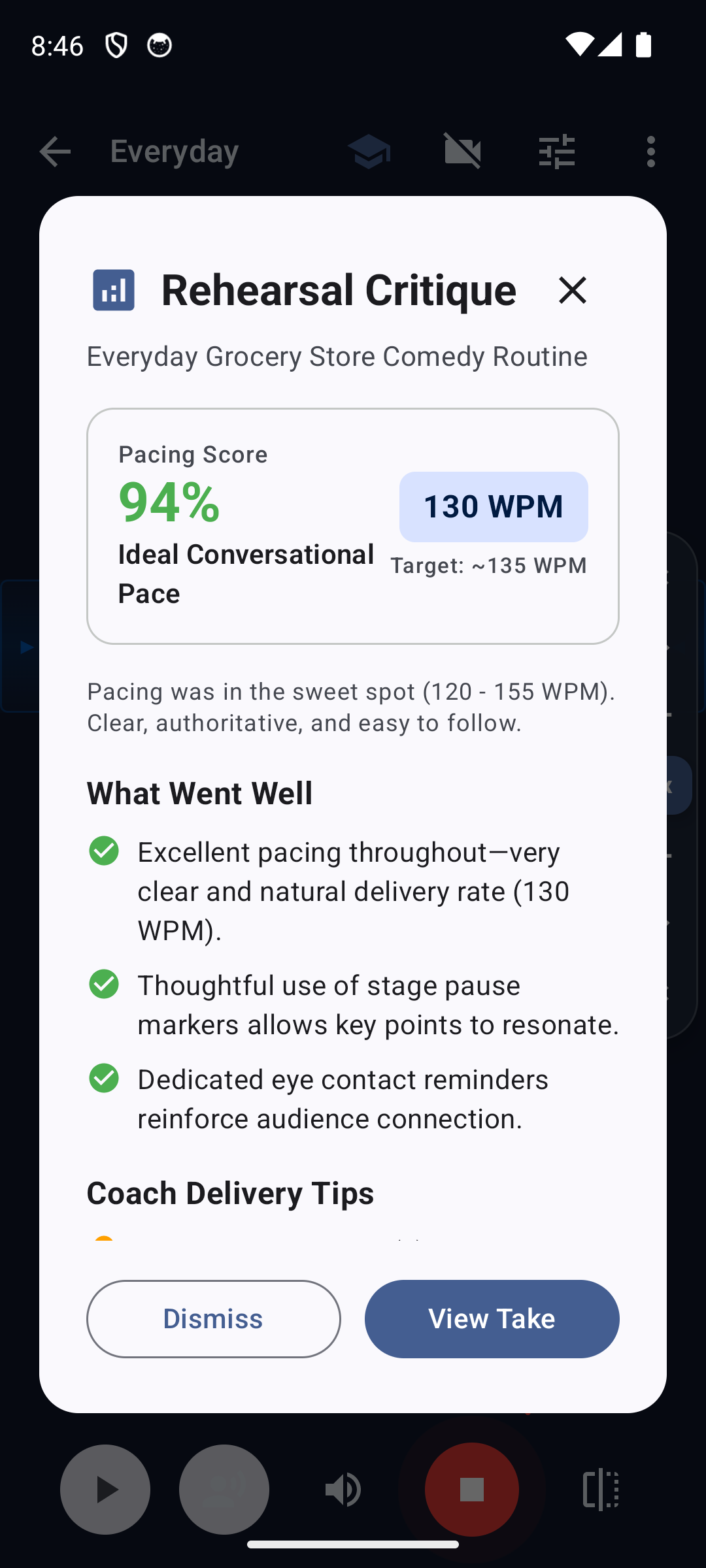
The analyzer estimates average WPM by dividing the script word count by the recorded duration. Skipping text, ad-libbing or including long pauses changes how useful that estimate is:
- Pacing Score (0–100%): Uses a heuristic centered on 135 WPM. It does not measure moment-to-moment consistency.
- Target Comparison: Compares your measured WPM against your speech's designated target rate.
- Delivery Classification: Classifies your delivery as Too Rushed, Brisk & Energetic, Ideal Conversational Pace, Measured & Deliberate, or Too Slow.
9.2 Filler Word Detection#
The analyzer scans the written script, not a spoken transcript, for common filler phrases:
- Count and frequency of "um", "uh", "like", "you know", "actually", "basically", and "sort of".
- Use the counts to review the wording in your script. Filler sounds added while speaking are not detected by this analysis.
9.3 "What Went Well" & Coach Delivery Tips#
- Strengths Breakdown: Identifies areas of vocal excellence, such as consistent speed, thoughtful utilization of stage pause markers, and steady cadence.
- Targeted Coaching Tips: Provides tailored recommendations for your next rehearsal (e.g., "Slow down by approximately 15 WPM during the opening hook to allow your central thesis to land with greater authority").
10. Audience Link Hub & Live Peer Review#
Public speaking should never be an echo chamber. Audience Link is an innovative peer-to-peer feedback system operating over your local Wi-Fi network without requiring internet access or cloud accounts.
10.1 Starting an Audience Link Session#
- In the teleprompter top bar, tap the Graduation Cap icon (
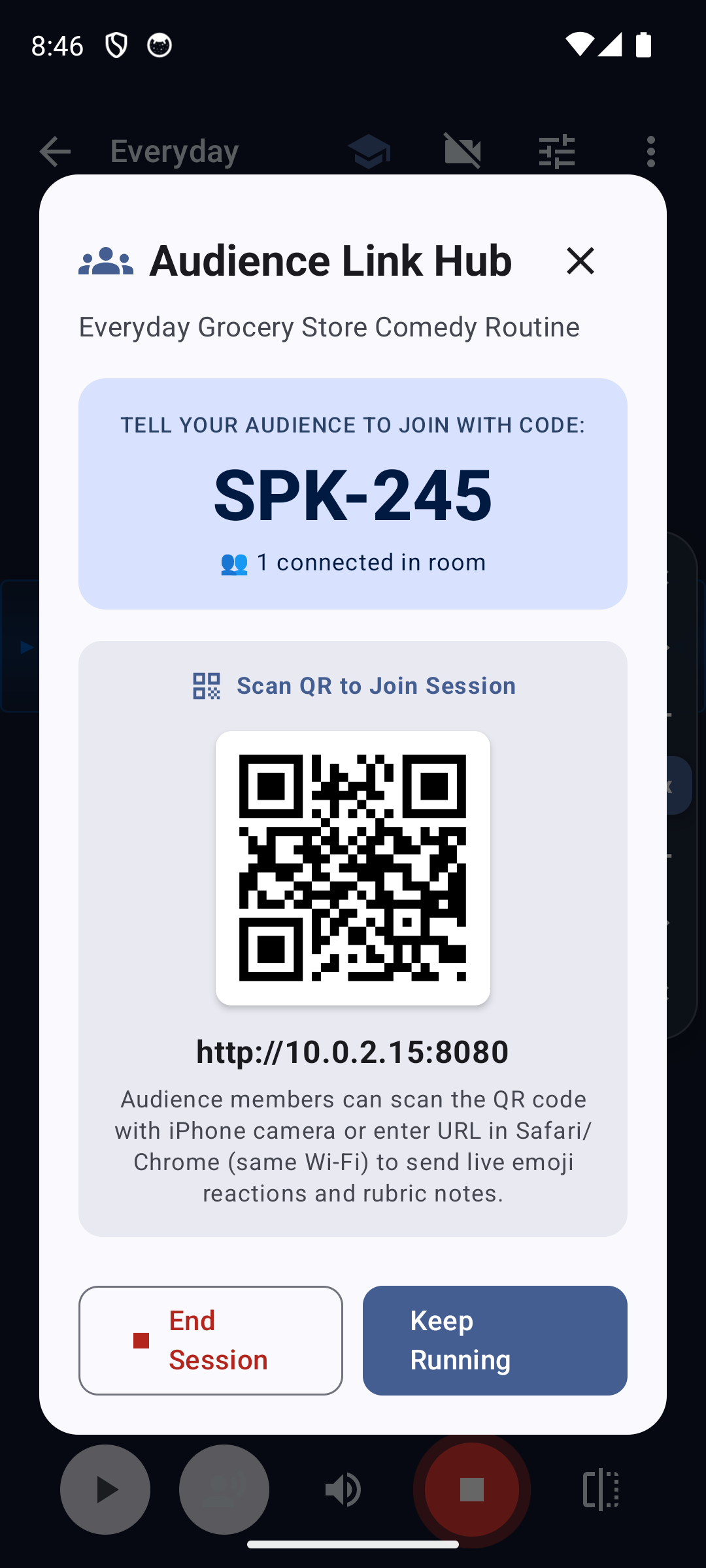
Rehearsal Tools) and select Audience Link Hub. - SpeechMaker spins up a secure, lightweight embedded HTTP server on port 8080.
- The screen presents a unique 4-character Session Code (e.g.,
SPK-245) and an auto-generated QR Code.
10.2 How Audience Members Connect#
Audience members or rehearsal colleagues can join using any device (iPhone, iPad, Android phone, Mac, or PC) connected to the same Wi-Fi network:
- Scan QR Code: Open the iPhone or Android Camera app and point it at the speaker's screen. Tapping the link opens the mobile peer review web app instantly in Safari or Chrome.
- Direct URL: Enter the displayed local IP address (e.g.,
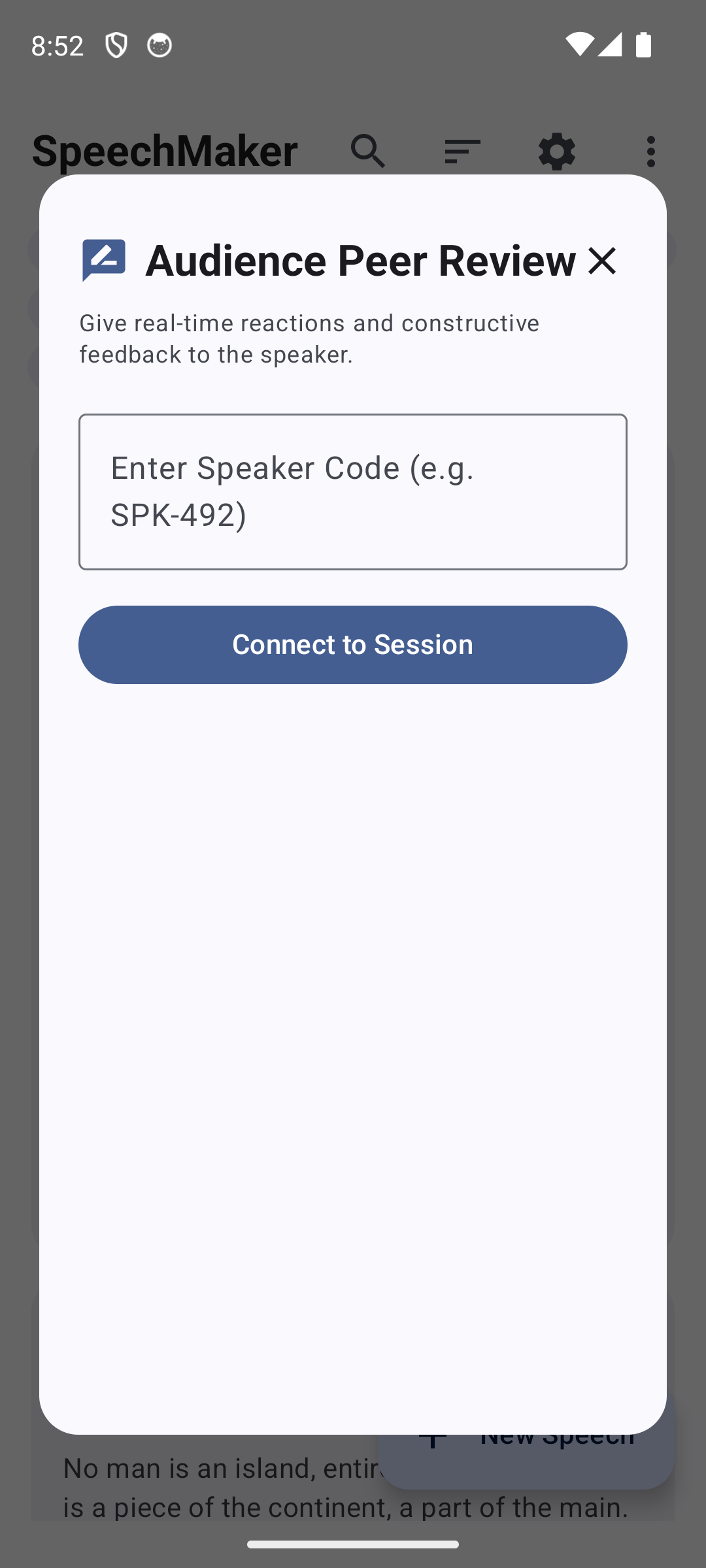
http://10.0.2.15:8080) into any web browser. - In-App Reviewer: Fellow SpeechMaker Android users can tap Join Audience Link in their library menu and type the session code.
10.3 Real-Time Reactions & Rubric Scoring#
During your speech, connected audience members can tap real-time reaction buttons and submit structured rubric scores:
- Live Reaction Emoticons:
👏 Applause,🐢 Slow Down,🐇 Speed Up,💡 Great Point,❓ Clarify. - 4-Category Rubric Scoring (1–5 Stars):
- Content & Structure: Clarity of message, evidence, and logical progression.
- Vocal Delivery: Pacing, volume, inflection, and cadence.
- Stage Presence: Eye contact, confidence, and posture.
- Q&A Readiness: Handling of questions and audience engagement.
- All feedback tallies appear in real time directly on the speaker's prompter HUD.
11. Audience Q&A Simulator#
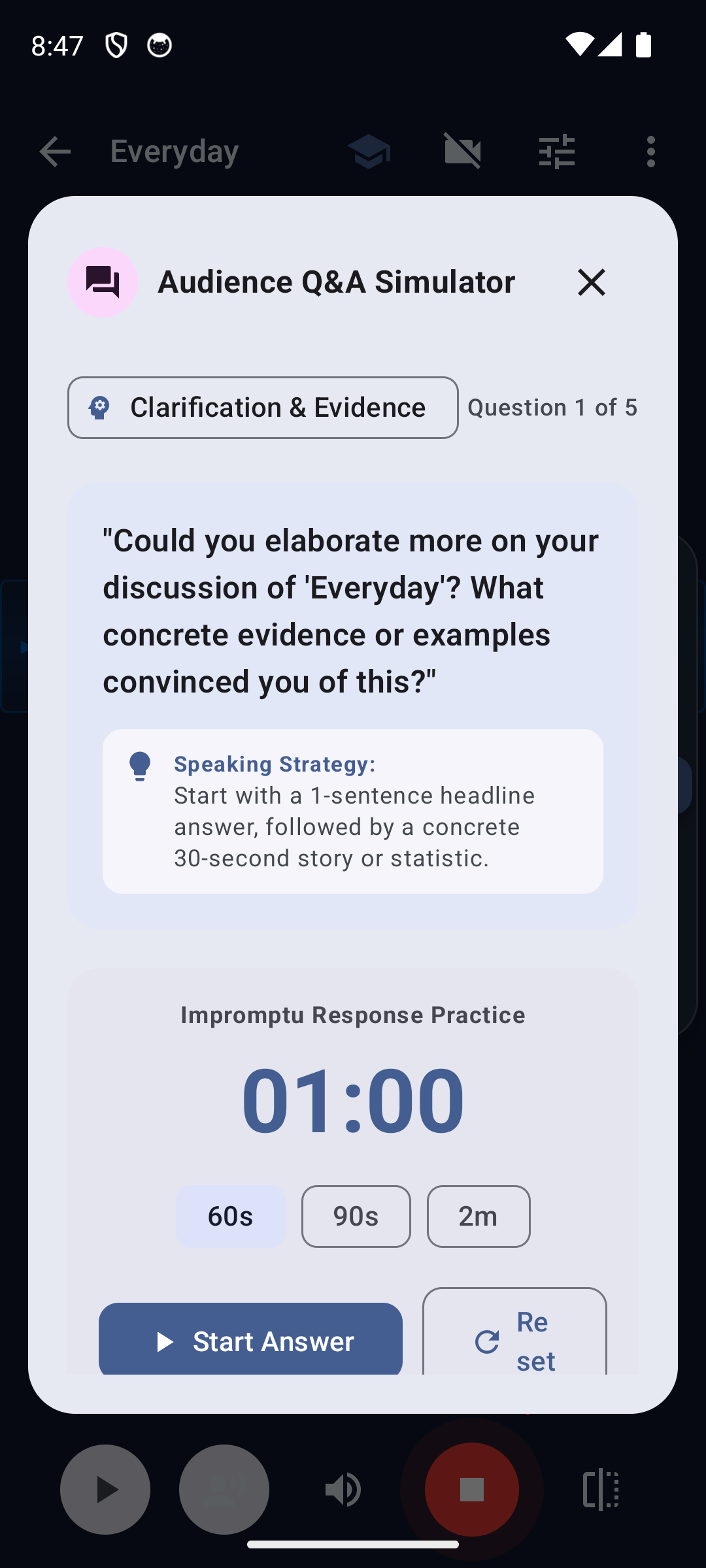
Handling unexpected questions with poise and authority is the hallmark of a master orator. The Audience Q&A Simulator tests your impromptu speaking capabilities.
11.1 Simulated Question Archetypes#
Tap the Rehearsal Tools icon on the teleprompter and choose Audience Q&A Simulator. SpeechMaker analyzes your speech topic and generates 5 challenging practice questions categorized across five archetypes:
- Clarification & Evidence: Requests concrete data, statistics, or real-world examples proving your assertions.
- Skeptical & Critical Counterpoint: Challenges your core premise from an opposing perspective.
- Deep Dive & Implementation Details: Inquires about logistics, budget, timeline, or operational execution.
- Practical Application & Next Steps: Asks what immediate actions the audience should take based on your talk.
- Future Outlook & Strategic Vision: Probes the long-term implications of your ideas over the next 5 to 10 years.
11.2 Strategic Speaking Advice & Response Timers#
- Speaking Strategy: Each question includes structured advice on how to answer effectively (e.g., "Lead with a 1-sentence headline answer, followed by a concrete 30-second supporting story, then conclude by restating your primary point").
- Impromptu Response Practice: Select a countdown timer preset (60s, 90s, or 2m), tap Start Answer, and deliver your response aloud under realistic time constraints.
12. Speech Templates Catalog & AI Speechwriter Studio#
Staring at a blank page is the hardest part of speech preparation. SpeechMaker offers two powerful drafting tools:
12.1 The Speech Templates Catalog#
Tap the More Options icon (3 vertical dots) in the library top bar and select Speech Templates. Browse dozens of proven rhetorical structures:
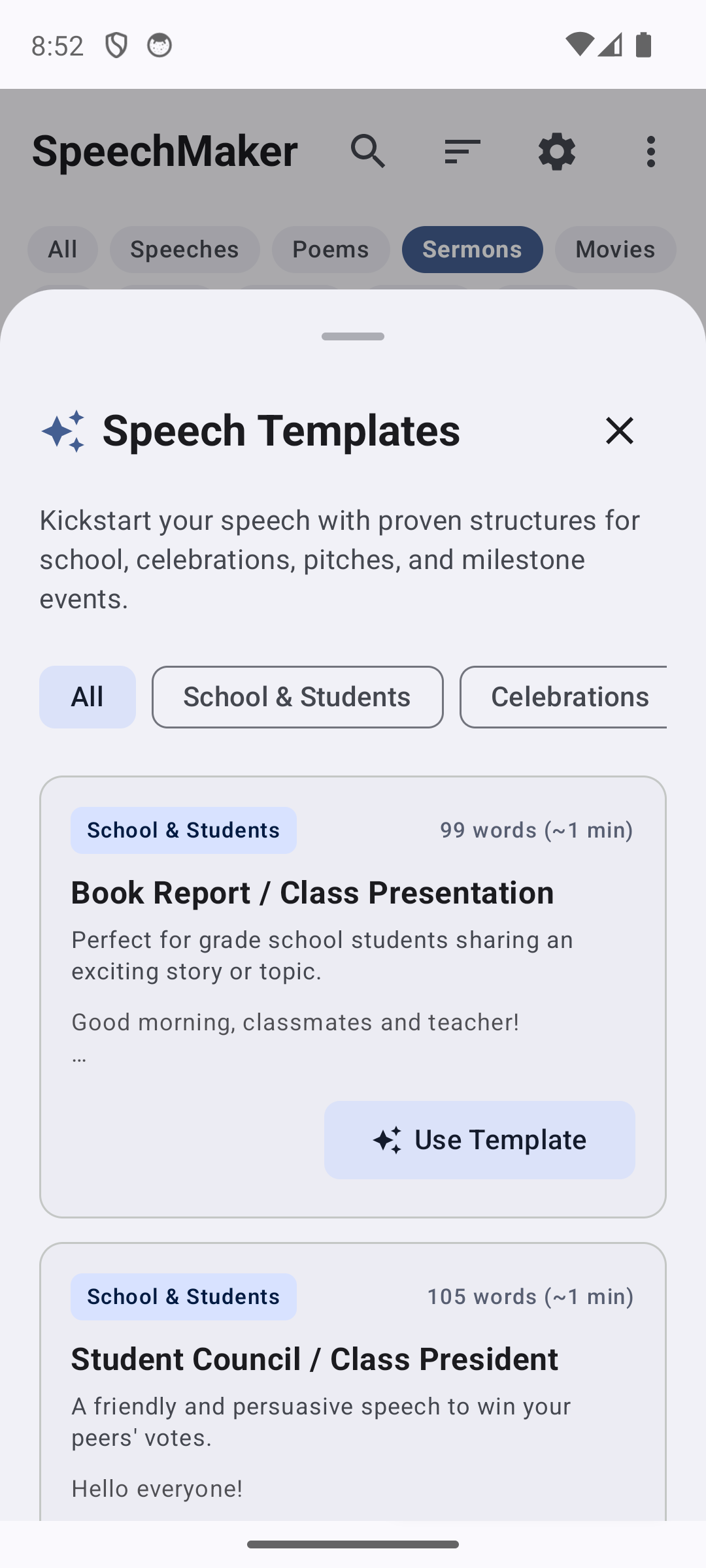
- School & Students: Book Report / Class Presentation, Student Council Election Campaign, Science Fair Project Defense, Graduation Valedictorian Address.
- Celebrations & Milestones: Wedding Best Man / Maid of Honor Toast, Retirement Honor Celebration, Anniversary Tribute, Birthday Milestone Toast.
- Business & Leadership: Elevator Investor Pitch, Product Launch Keynote, Quarterly All-Hands Company Briefing, Conference Opening Address.
- Tapping Use Template instantly instantiates the template with placeholder brackets into your Script Editor.
12.2 AI Speechwriter Studio#
Tap AI Speechwriter in the library menu to open the guided speechwriter studio:
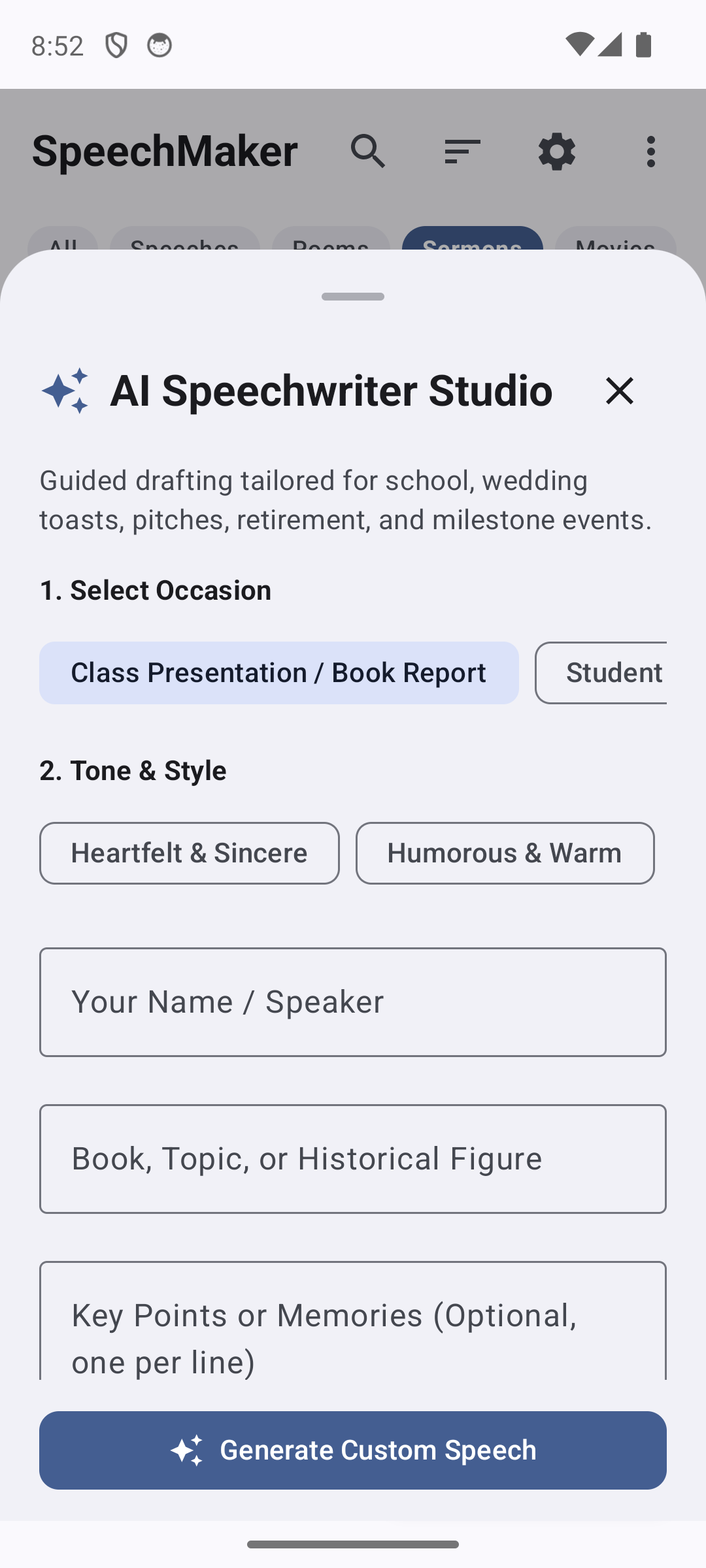
- Select Occasion: Choose from Class Presentation, Wedding Toast, Business Pitch, Eulogy, or Stand-Up.
- Choose Tone & Style: Select Heartfelt & Sincere, Humorous & Warm, Inspiring & Motivational, or Authoritative & Formal.
- Provide Key Details: Enter your name, topic or honoree, and bullet points of key memories or arguments.
- Generate Custom Speech: SpeechMaker constructs a complete, formatted speech draft with introductory hook, supporting body paragraphs, built-in stage cues, and a memorable conclusion.
13. Document Import, Export & PDF Generation#
SpeechMaker integrates seamlessly with external document formats.
13.1 Importing Scripts#
Tap Import (PDF, TXT, MD) from the library menu:
- PDF Documents: SpeechMaker utilizes embedded
pdfbox-androidlibraries to extract clean text streams from multi-page PDF files, stripping headers, footers, and page numbers. - Plain Text (
.txt) & Markdown (.md): Preserves paragraph breaks and automatically converts bracketed markdown notations into stage cues. - HTML Files: Strips HTML tags and imports clean text.
13.2 Formatted Multi-Page PDF Export#
SpeechMaker Pro includes a native PDF Export Engine that generates publication-grade printable stage scripts:
- Header Metadata: Displays speech title, author, date, venue, word count, estimated speaking duration, and Flesch-Kincaid grade level.
- Stage Cue Formatting: Stage cues are printed in distinctive bold callout boxes.
- Large Print Typography: Formatted in high-legibility 16pt serif typeface with generous line leading, making it easy to read from a lectern under poor stage lighting.
- Sharing: Dispatches immediately through Android's system share sheet (
ACTION_SEND) to Google Drive, Gmail, WhatsApp, or local network printers.
14. Global Settings & Personalization#
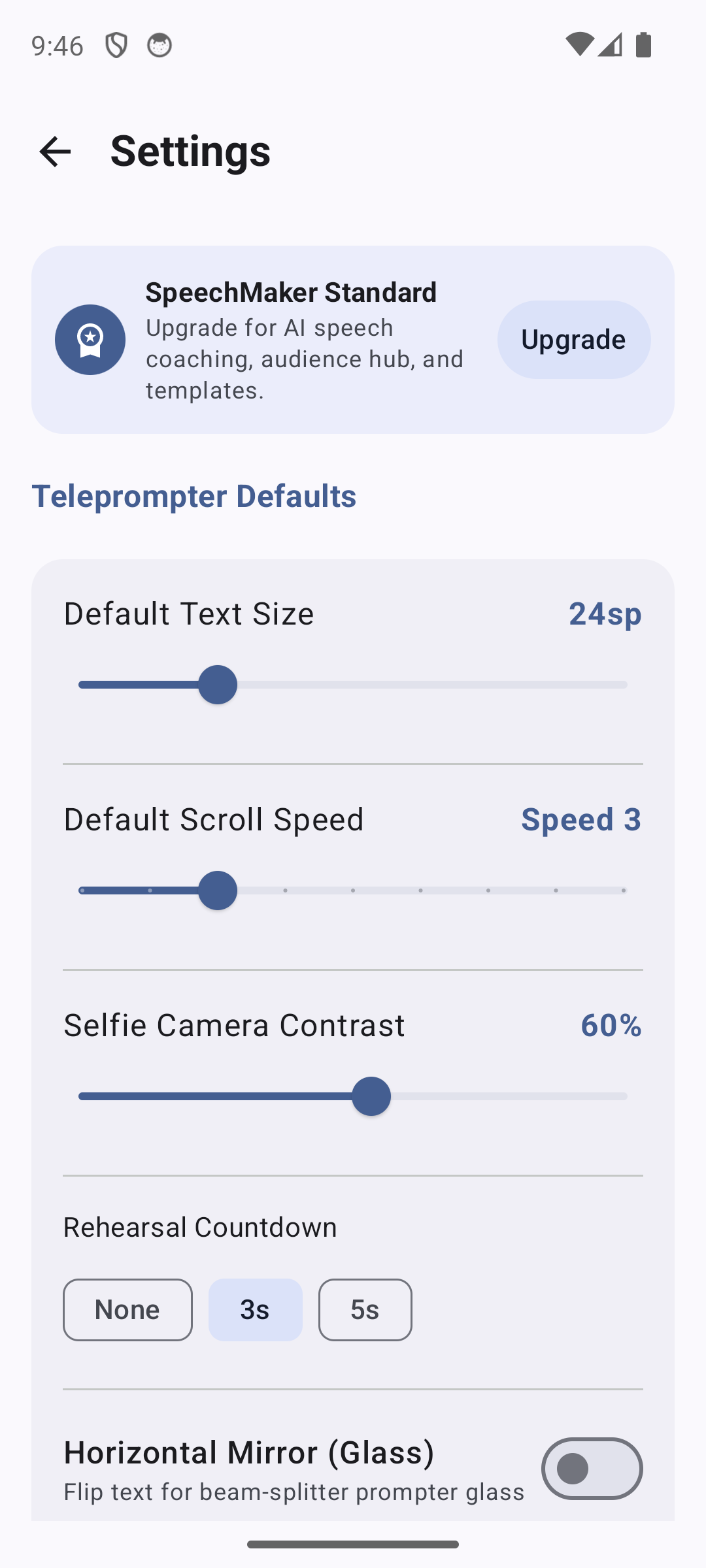
Tap the Settings gear icon in the Speeches Library top bar to customize application-wide preferences:
14.1 Typography & Font Selection#
Select from four high-legibility font families tailored for different performance disciplines:
- Default Sans (Roboto): Clean, modern, highly legible at any distance.
- Serif (Noto Serif): Traditional literary feel, excellent for classic poetry and speeches.
- Monospace (Roboto Mono): Fixed-character width, ideal for song lyrics, music charts, and comedy timing.
- Cursive (Caveat / Script): Personal handwriting feel for informal notes and storytelling sets.
14.2 Default Teleprompter Preferences#
- Default Scroll Speed: Configure your standard starting speed (Levels 1–9, default: Level 3 ~130 WPM).
- Auto-Record Rehearsals: When enabled, the teleprompter automatically begins recording audio takes the moment you tap Play.
- Keep Screen Awake (
FLAG_KEEP_SCREEN_ON): Automatically prevents the device display from dimming or sleeping while the teleprompter is active. - Default Startup Speech: Choose which speech opens automatically whenever you launch the app.
15. SpeechMaker Standard vs. Pro (Licensing & Purchasing)#
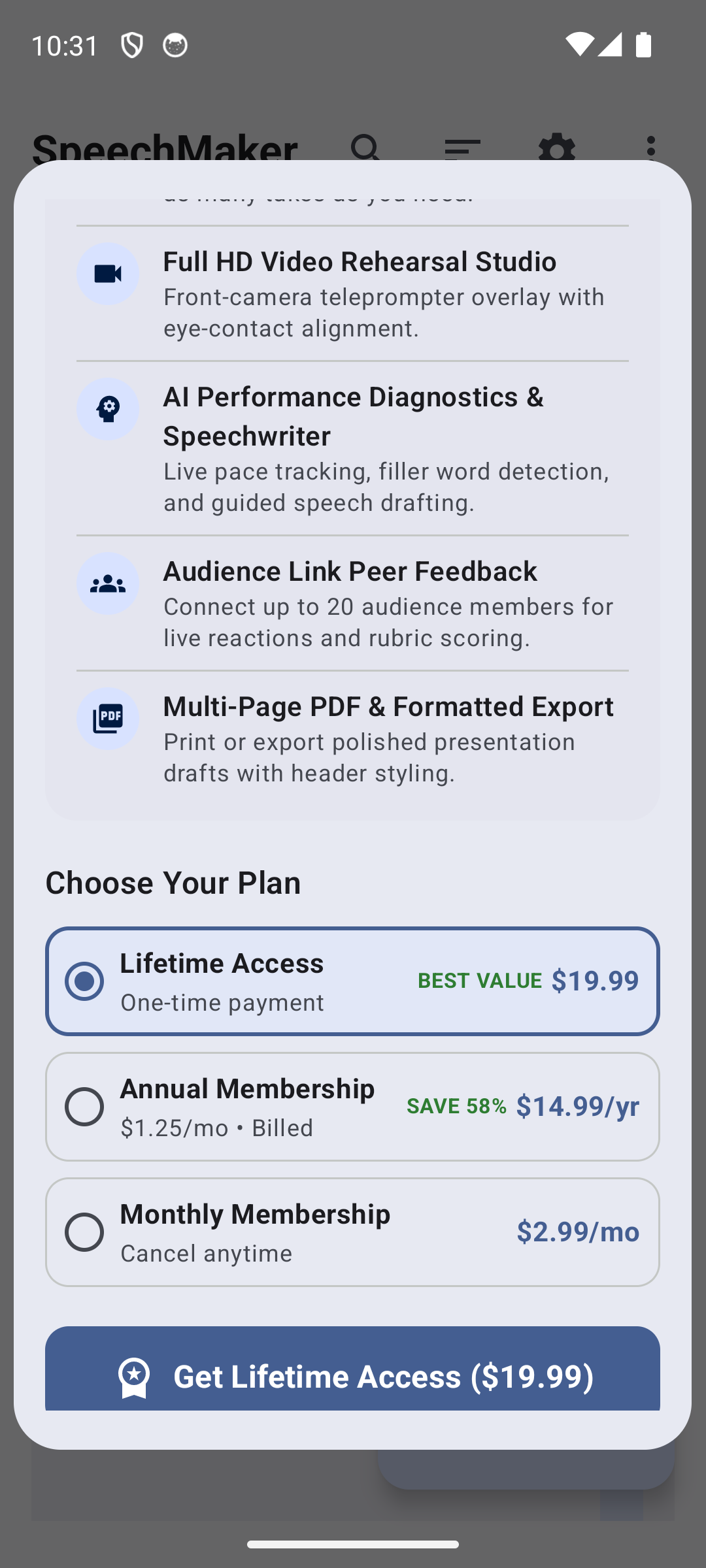
The beta provides a 15-day full-access trial. The app includes proposed Lifetime, Annual and Monthly purchase choices, but purchases and restoration are not verified for this direct-download debug beta. Lifetime is a one-time purchase; Annual and Monthly are subscriptions, not perpetual licenses.
15.1 15-Day Full-Access Free Trial & Data Preservation Policy#
When you first install and launch SpeechMaker, a 15-Day Unrestricted Full-Access Trial begins automatically:
- During the 15-Day Trial: You have 100% full access to create unlimited custom speeches, record unlimited audio and video rehearsal takes, utilize on-device Voice-Follow teleprompting, apply custom stage cues, customize fonts, colors, and prompter themes, and utilize PDF exports.
- After 15 Days (If Unpurchased):
- Zero Data Loss: The trial-expiry logic preserves custom data in local storage while restricting access and showing the sample catalog. This is not a backup: uninstalling, clearing app data or device failure can remove local files. Export material you want to keep.
- Clean Default Mode: The app launches into its clean default state showing the bundled sample catalog and default teleprompter settings.
- Instant Recovery: An active entitlement restores access to preserved custom data. In this debug beta, Settings includes trial and Pro simulation controls for testing without payment. Cancellation of renewal and the actual entitlement expiry are different events; check the provider's end date for a real subscription.
15.2 Feature Comparison Matrix#
| Feature / Capability | Free Beta Trial (Days 1–15) | Post-Trial Default Mode | SpeechMaker Pro (Active) |
|---|---|---|---|
| Custom User Speeches | Unlimited | Safely preserved (Read catalog) | Unlimited |
| Speech Library & Takes Storage | Full read & write | Safely preserved on device | Full read & write |
| Sample Catalog Access | Full access (13 categories) | Full access (13 categories) | Full access (13 categories) |
| Manual Teleprompter & SpeedRail | Included (Levels 1–9) | Included (Levels 1–9, default theme) | Included (Levels 1–9, custom themes) |
| 3-Row Stage Cues Engine | Included (All 5 Genre Presets) | Included (Standard cues) | Included (All 5 Genre Presets) |
| On-Device Voice-Follow Scrolling | Included (Device-dependent) | — | Included (Device-dependent) |
| Selfie Video Rehearsal (CameraX) | Included (1080p Front Camera) | — | Included (1080p Front Camera) |
| Audio Takes Rehearsal Studio | Included | Included | Included |
| AI Speech Performance Coach Critique | Included (Pacing & Fillers) | — | Included (Pacing & Fillers) |
| Audience Link Hub & Q&A Simulator | Included | Included | Included |
| Multi-Page Formatted PDF Export | Included (Lectern PDF) | — | Included (Lectern PDF) |
Plain Text (.txt) Export & Sharing |
Included | Included | Included |
| Advertisements / User Tracking | Zero Ads | Zero Ads | Zero Ads |
15.3 Pricing & Subscription Plans#
The upgrade screen illustrates Lifetime, Annual and Monthly plans. Any prices in a screenshot are examples from that capture, not a verified offer. Use the actual store confirmation for current prices, taxes, currency and renewal terms. Do not make a real purchase to test this beta.
15.4 Purchasing, Store Channels & Purchase Restoration#
- Direct-download beta: use the free trial or the debug trial/Pro controls in Settings. A Plum web-store license-key activation flow is not implemented in this APK.
- Google Play edition: the source contains Play Billing purchase and restoration logic. That edition's products, eligibility and transactions require separate verification. This debug package uses a different application ID and does not replace the installed Play app or automatically import its purchases.
- Plum Amazing Store: Browse the Plum Amazing Store. This general store link is not an activation checkout for the SpeechMaker Android beta.
- Restoring Purchases: use the Google account that purchased the matching Play edition and its Restore Purchases control when that release is available. The provided beta has not established a successful real purchase or restore.
16. Privacy, Permissions & Security#
SpeechMaker is built upon a strict Local-First Privacy Architecture:
16.1 Android Permissions Transparency#
| Permission | Exact Manifest Declaration | Why SpeechMaker Requires It |
|---|---|---|
| Microphone | android.permission.RECORD_AUDIO |
Used for Voice Follow and audio recording. On-device recognition is preferred where available; a fallback system recognition provider may process audio remotely. |
| Camera | android.permission.CAMERA |
Required exclusively for the optional selfie video rehearsal mode. Video frames are displayed live and saved locally to your device storage. |
| Local Network / Internet | android.permission.INTERNET |
Required for hosting the local Wi-Fi Audience Link peer-to-peer server and verifying Google Play billing receipts. |
| In-App Billing | com.android.vending.BILLING |
Required for processing secure Google Play subscriptions and lifetime licenses. |
16.2 Zero Cloud Processing & Data Retention#
- Voice Follow recognition privacy depends on the recognizer Android provides. On-device support and language packs vary; verify offline behavior before using confidential text.
- SpeechMaker contains zero remote telemetry, zero analytics SDKs, and zero third-party tracking libraries.
- App data is normally stored in app-private storage. Explicit sharing, exports, Audience Link and Android backup can create copies elsewhere. The manifest enables Android backup; review the device's backup settings.
17. Troubleshooting, FAQ & Technical Support#
17.1 Frequently Asked Questions & Solutions#
Q1: Voice Follow does not seem to advance the script when I speak.
- Cause 1: The microphone permission was denied. Open Android Settings > Apps > SpeechMaker > Permissions and ensure Microphone is set to Allow.
- Cause 2: The offline speech recognition language pack is not installed. Open Android Settings > System > Languages & Input > Offline Speech Recognition and ensure your language (e.g. English US) is downloaded.
- Cause 3: Ambient background noise is excessive. Use a wired or Bluetooth lavalier microphone for noisy environments.
Q2: The teleprompter scrolls too quickly or too slowly for my natural cadence.
- Solution: Adjust the speed in the SpeedRail by tapping
+or-, or use the center Jog Shuttle to scrub freely. Standard conversational speaking speed is Level 3 (~130 WPM).
Q3: Audience members cannot connect to the Audience Link Hub.
- Cause: The audience members' devices are on a different Wi-Fi network, cellular data, or connected to a corporate guest network with AP Client Isolation enabled.
- Solution: Ensure both the presenter's Android device and the audience devices are connected to the exact same Wi-Fi network or enable your phone's personal Wi-Fi Mobile Hotspot and have attendees connect directly to your hotspot.
Q4: Will SpeechMaker be available for Mac and iOS?
- Answer: SpeechMaker has a rich history on Apple platforms. SpeechMaker for Android Generation 2 shares architectural paradigms with Plum Amazing's Mac and iOS apps, with cross-platform synchronization planned for future releases.
17.2 Customer Support & Feedback#
If you encounter any unexpected behavior or have ideas for new features, our engineering team is eager to help:
- Email Support: [email protected]
- Official Website: https://plumamazing.com
- Proposed Online Manual: https://plumamazing.com/manual/speechmaker-android
When submitting a support inquiry, please include:
- SpeechMaker version and build:
v2.0.0 (Build 15) - Device model and manufacturer (e.g., Google Pixel 8 Pro, Samsung Galaxy S24)
- Android OS version (e.g., Android 14 or 15)
- A clear description of the steps taken and observed behavior.
18. Technical Reference & Terminology#
18.1 Glossary of Terms#
- Beam-Splitter Glass: A specialized optical glass treated with a 70/30 dielectric coating that reflects teleprompter text toward the speaker while remaining transparent to the camera lens behind it.
- Flesch-Kincaid Grade Level: A mathematical readability formula calculating the United States school grade level required to comprehend written text based on sentence length and syllable count.
- Jog Shuttle: A dual-action mechanical or gestural control allowing both variable-velocity directional scrubbing and instant positional locking upon release.
- On-Device Acoustic Model: A neural network speech recognition engine embedded locally within the device operating system that transcribes microphone audio waveforms into text strings with zero network connectivity.
- Reading Guide Band: A highlighted horizontal focal band on a teleprompter screen positioned at approximately 32% vertical depth to maintain optimal eye-to-lens alignment.
- SpeedRail: SpeechMaker's proprietary slim navigation and velocity control bar anchored along the right display border.
- Stage Cue: An inline non-spoken bracketed directive informing a speaker to perform an action, pause, or adopt a vocal inflection during delivery.
- VU Meter (Volume Unit Meter): A visual representation of real-time acoustic signal amplitude, indicating vocal presence and recording signal health.
- WPM (Words Per Minute): The standard international metric quantifying speech delivery velocity.
19. Revision History#
| Version | Date | Changes & Milestones |
|---|---|---|
| Manual revision | 2026-10-19 | Added beta download/install scope, relaxed-speech tagline and measured compatibility wording; corrected screenshot mapping, recognition privacy, coaching limits and purchasing instructions. |
| 2.0.0 | 2026-10-15 | Ground-up native Android rewrite in Kotlin & Jetpack Compose. Introduced On-Device Voice Follow Teleprompter, slim gesture SpeedRail with Jog Shuttle, 3-row Stage Cues Engine with 5 genre presets, Rehearsal Studio with front-camera selfie video, AI Speech Coach diagnostics, Audience Link Hub local Wi-Fi server, Audience Q&A Simulator, AI Speechwriter Studio, and multi-page lectern PDF export. |
| 1.5.0 | 2024-03-12 | Legacy hybrid edition; archived at https://plumamazing.com/legacy/speechmaker. |