

CopyPaste Pro – 파워 유저를 위한 강력한 클립보드
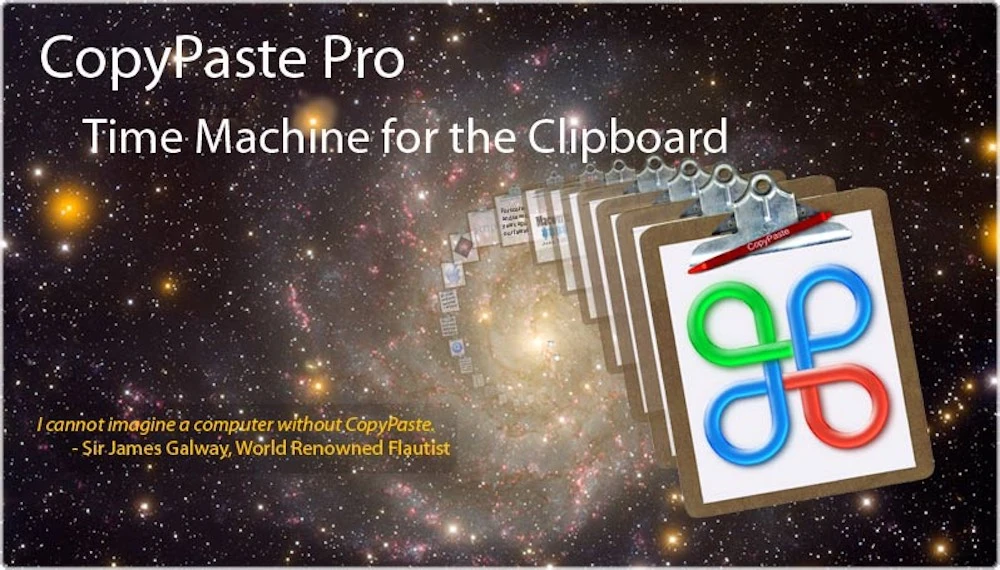
CopyPaste Pro는 파워 OS X 사용자를 위한 강력한 클립보드입니다. 더 빠르고 훨씬 효율적인 편집을 원하시나요? OS X용 CopyPaste Pro가 필요합니다. 반복 편집 시 속도 향상은 놀랍습니다. 파워 유저를 위한 파워 도구입니다.
CopyPaste Pro/Classic과 새 CopyPaste 앱을 비교하고 계신가요? 비교 페이지에서 차이점, 업그레이드 경로, 각 클립보드 워크플로에 맞는 버전을 설명합니다.
CopyPaste 버전 비교CopyPaste Pro는 백그라운드에서 대기하며 복사하거나 잘라낸 모든 것을 충실히 수집·저장하고, 원하는 곳에 붙여넣을 준비를 합니다. 강력한 기능이 많아도 기본만으로 시작할 수 있고 설정과 사용이 쉽습니다.
누군가 CopyPaste Pro를 "클립보드용 타임머신"이라고 불렀습니다. Time Machine처럼 보이지는 않지만 Mac에서 복사할 수 있는 거의 모든 것을 캡처·저장해 언제든 붙여넣을 수 있게 합니다.
클립보드용 타임머신
CopyPaste로 컴퓨터의 가장 강력한 기능인 복사 및 붙여넣기를 사용해 보세요. 매일 수십 번 사용되며 클립보드는 하나뿐입니다. CopyPaste는 최초이자 가장 인기 있는 멀티 클립보드 유틸리티입니다.
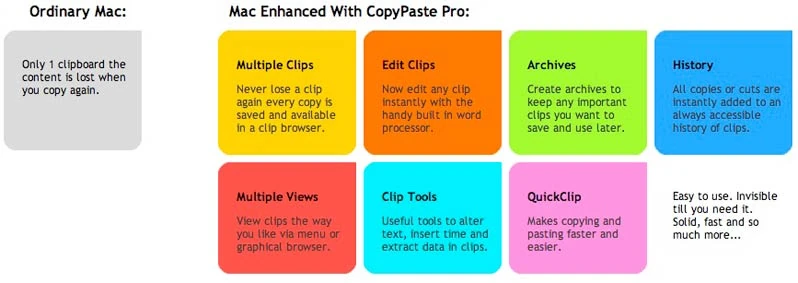
복사 기록이나 더 영구적인 클립 보관소의 모든 클립을 보고 편집하세요. 재시작 후에도 여러 클립보드를 저장합니다. 믿을 수 없을 만큼 유용하며 모든 Mac 사용자에게 시간을 절약해 줍니다.
오리지널 멀티 클립보드 관리자
CopyPaste는 오리지널이자 유일한 수상 경력의 멀티 클립보드 편집기 및 보관 유틸리티입니다. 1997년 출시, 여러 클립보드를 표시·보관·편집한 최초의 도구입니다.
모두에게 필수
CopyPaste는 초보자, 작가, 편집자, 그래픽 디자이너, 변호사, 학생, 홈 비즈니스, 디지털 사진작가 등 클립보드를 쓰는 모든 이에게 필수입니다. 클립보드 자료와 다양한 데이터의 디지털 허브입니다. 사용이 쉽고 시간을 절약하며 더 적게 하고 더 많이 성취할 수 있습니다.
주요 기능
- 다중 클립보드: 100개 클립보드로 복사 항목 저장 및 정리
- 클립 기록: 복사한 모든 항목을 완전한 기록 추적으로 확인
- 클립 보관: 정리된 보관소에 클립 영구 저장
- 클립 편집: 붙여넣기 전 모든 클립 편집
- 검색 및 필터: 필요한 클립을 빠르게 찾기
- 영구 저장: 재시작 및 시스템 업데이트 후에도 클립 유지
- 다양한 데이터 유형: 텍스트, 이미지, 파일 등 처리
- 플로팅 팔레트: 편리한 플로팅 창에서 클립 접근
리뷰어 평가
비디오 리뷰
이 비디오 리뷰와 데모에서 CopyPaste Pro를 확인하세요:
MacUpdate 비디오 리뷰
추가 비디오 리뷰
무료 체험
무료로 체험해 클립보드 관리자가 얼마나 필수인지 확인하세요. CopyPaste Pro는 이미 훌륭하게 작동하며, 우리는 계속 개선하고 있습니다.
CopyPaste Pro에 대한 자세한 내용은 매뉴얼 페이지를 방문하세요.
변경 기록
3.8.4
minor📝 Changes
- Updated for Mac OS 26
- Compiled with the latest Xcode
- Now uses Lemon Squeezy licensing (in Preferences)
- Lemon Squeezy is the new store for sales and licensing questions
- Updates to manual
✨ New Features
- Now uses Lemon Squeezy licensing (in Preferences)
🔧 Improvements
- Updated for Mac OS 26
- Compiled with the latest Xcode
- Lemon Squeezy is the new store for sales and licensing questions
- Updates to manual
3.8
minor📝 Changes
- histy and archive palettes preview fixed to show full line length to the width of the window. also fixed for all other languages like french, japanese, spanish etc.
🔧 Improvements
- hisotry and archive palettes preview fixed to show full line length to the width of the window. also fixed for all other languages like french, japanese, spanish etc.
3.7.99
bugfix📝 Changes
- fixed the archive preview of a clips first line of text to be resizable with the window to fill it's width.
- fixed the image browser by removing the orange frame around the magnified clip. image browser is opened with command (held down) v v and tap a clip to paste. or move clips right or left the command key (still held down) and tap right or up arrow key to move the focus right to the next clip and tap left or down key to move the focus left to the next clip
🔧 Improvements
- fixed the archive preview of a clips first line of text to be resizable with the window to fill it's width.
- fixed the image browser by removing the orange frame around the magnified clip. image browser is opened with command (held down) v v and tap a clip to paste. or move clips right or left the command key (still held down) and tap right or up arrow key to move the focus right to the next clip and tap left or down key to move the focus left to the next clip
3.7.98
bugfix📝 Changes
- this is a fix for the previous version from this morning which was not universal. this one is a universal binary. that means copypaste finally runs native on intel or apple silicon (m1, m2, m3 etc...) depending on the processor you have.
✨ New Features
- this one is a universal binary. that means copypaste finally runs native on intel or apple silicon (m1, m2, m3 etc...) depending on the processor you have.
3.7.97
minor📝 Changes
- universal binary. that means copypaste finally runs native on intel or apple silicon (m1, m2, m3 etc...) depending on the processor you have.
- updated sparkle
✨ New Features
- universal binary. that means copypaste finally runs native on intel or apple silicon (m1, m2, m3 etc...) depending on the processor you have.
🔧 Improvements
- updated sparkle
3.7.96
minor📝 Changes
- updated via xcode 15.0.1
- fixed issue button to 'show preferences file in finder' in system preferences not working in Mac os 13.0.
- also fixed 'show clip sets folder'
- updated the provisioning profile
- updated deployment target to 11.0 to fix compilation errors for newer mac os version
🔧 Improvements
- updated via xcode 15.0.1
- updated the provisioning profile
- updated deployment target to 11.0 to fix compilation errors for newer mac os version
🐛 Bug Fixes
- fixed issue button to 'show preferences file in finder' in system preferences not working in Mac os 13.0.
- also fixed 'show clip sets folder'
Reviews
"CopyPaste Pro: A power clipboard for the power OS X user. Want faster and far more efficient editing? You need CopyPaste Pro for OS X. The improvement in speed when you have repetitive edits to do is amazing. This is definitively a power tool for the power user and gets a Gearhead rating of 5 out of 5."
"Take a look at one of my favorite Mac utilities. It's called CopyPaste Pro. It's a multiple clipboard manager. That means anything you cut or copy gets stored in a library so it can be pasted again later without having to find it and copy it again. That is a huge time saver."
"CopyPaste Pro just sits in the background, waiting to be used, faithfully collecting and storing whatever you've copied or cut, ready to paste the items wherever you want. Despite the lengthy list of power features, the basics are enough to get you started and it's easy to setup and use. Someone called CopyPaste Pro Time Machine for your clipboard. While it doesn't look like Time Machine, it captures and stores pretty much anything you can copy on your Mac and makes it available any time in the future to be pasted."
"If You Could Only Have One Productivity Tool For Your Mac Then Choose CopyPaste Pro."
"CopyPaste Pro is probably the most useful tool that you never knew you needed. Its indispensable features truly enhance the productivity of your day-to-day work."
"CopyPaste Pro the best clipboard app for the Mac. CopyPaste Pro è l'utility più flessibile e potente tra quelle a disposizione sul mercato per fare anche l'impossibile con il copia e incolla: gestisce clip multiple, crea archivi di clip di testo anche editabili, fornisce access agli elenchi con palette flottanti, accetta il trascinamento direttamente da safari, non perde la memoria neppure dopo il riavvio del Mac."
TRANSLATION: "CopyPaste Pro is the most flexible and powerful utility available on the market to do even the impossible with copy and paste: manages multiple clips, creates archives of editable text clips, provides access to lists with floating palettes, accepts drag and drop directly from Safari, doesn't lose memory even after Mac restart."
"CopyPaste Pro is an example of a very flexible application because, unlike other productivity applications, it has so many different uses. The developers have improved on such a basic computer function and the results are genius. The developer of CopyPaste Pro, Plum Amazing, seems to demonstrate this in its other programs – taking simple system programs and pumping them full of oomph and extra features. CopyPaste Pro has really helped me save time and it is a joy to use – simplistic and feature-rich. Some people may think, however, that the retail price of $30 for the program is a little too much to spend on just a simple utility but you'll discover that once you get it, you'll wonder how you ever did without it."
"Essential utility for your Mac. Each time you copy something to paste somewhere else, the item you copy is held in the Clipboard. The problem with the Clipboard inside Mac OS X is it is build to handle just one item at once: wouldn't it be useful if you could pop several items in there, so you could paste them all into the same document or other project file without swapping between apps? With CopyPaste Pro, you can."
"For those who do any kind of writing, CopyPaste-X is an invaluable tool that is easy to learn, and once you start using it, you'll wonder how you ever got along without it."
"CopyPaste: A Godsend For Power Users & Novices Alike. This is a handy-dandy little program. It offers much for the experienced user, but there are aspects of it that would be very helpful to the novice."
"The only utility to which I've remained true is the ever-lovely CopyPaste from the wonderful folks at Script Software (now Plum Amazing). CopyPaste when fired up, offers you 100 clipboards to which you can paste essential bits and pieces of documents, URLs you need and just about anything you want to store and then use again. For an editor working on a Mac it's a little bit of heaven for a mere $21 US."
"I curse Apple for not enabling me to copy more than one item at a time." But praise be to generous programmers. On Shareware.com, I discovered an application that expands my copying capabilities tenfold. CopyPaste's nifty text-processing tools let you shift case, tab, or insert text files, pictures, and sounds into a clipboard – the floating palette keeps track of what's where. Even neater is the clip archive, which drops copied items into a folder on your desktop – fabulously convenient for online researchers."
"You'll find that CopyPaste is wonderfully tiny and, like most of my favorite shareware utilities, it has a shy personality — you can send it away and it will discreetly return at your beck and call."
"Every so often a piece of shareware comes along that makes us wonder how we lived without it -- such is CopyPaste-X, the turbo clipboard utility on steroids."
"CopyPaste X rapidly becomes indispensable"
"MacWorld 4 mice June 2003"
User Raves
"CopyPaste has made my life so much easier and I cannot imagine a computer without it. If you are writing a lot on the keyboard and are cutting and pasting this is the right tool for the job. Store all sorts of things like letter headers and addresses to insert at the touch of a key. Very simple to use."
"This (CopyPaste) app is 100% AMAZING and I use its numerous features thousands of times daily – literally. It has been a time-saver, increased work-flow efficiency, and so much more."
"CopyPaste Pro is a true workhorse for me, and my oldest app in constant, heavy use."
"Ich muss mich eigentlich fast selbst über mich selbst wundern, dass ich diese Software noch nicht eher gefunden und im Einsatz hatte. Mittlerweile kann ich mir schon gar nicht mehr vorstellen, wie ein Mac ohne diese App „funktionieren" soll. Also ich gehe jetzt mal von meinem „Arbeits-Mac" aus, an dem ich den ganzen Tag sitze und erst da spiel die Software ihren Nutzen so richtig aus. Im Gegenzug dazu hab ich noch ein etwas älteres MacBook Pro und da fehlt mit die Software überhaupt nicht. Seltsam nicht. 😉 Aber wie in der Überschrift schon angedeutet: „CopyPaste Pro ist sowas ähnliches wie eine TimeMachine für die Zwischenablage." Ich glaube dieser Satz beschreibt kurz und bündig, was die Software leisten kann."
TRANSLATION: "I actually have to wonder about myself that I haven't found and used this software earlier. By now I can't even imagine how a Mac should "function" without this app. I'm talking about my "work Mac" where I sit all day and that's where the software really shows its value. On the other hand, I also have an older MacBook Pro and there I don't miss the software at all. Strange, isn't it. 😉 But as already indicated in the headline: 'CopyPaste Pro is something like a TimeMachine for the clipboard.' I think this sentence describes briefly and concisely what the software can do."
"There is not a day goes by that I do not make use of Copy Paste. Thanks again for a superb utility."
No tutorials available for this app.
Product Manuals
Product Manuals
Select your platform and app to view the complete manual in a new window.
Previous Versions
- Version 3.7.96 - this may be the last version to work on Mac OS 12 Monterey
- Version 3.7.95
- Version 3.7.9 - works fine with Mac OS 10.13-12.0
- Version 4.6.6
- Version 3.7.7
- Version 3.7.6
- Version 3.7.5
- Version 3.7.4 - works with Mac OS Sierra 10.12
- Version 3.7.2 - known to work with TextExpander
- Version 3.7.1
- Version 3.5.9
- Version 3.5.7
- Version 3.5.5
- Version 3.5.3
- Version 3.3.3
- Version 3.0 - last to work with Mac OS 10.4