

CopyPaste Pro – パワーユーザー向けパワークリップボード
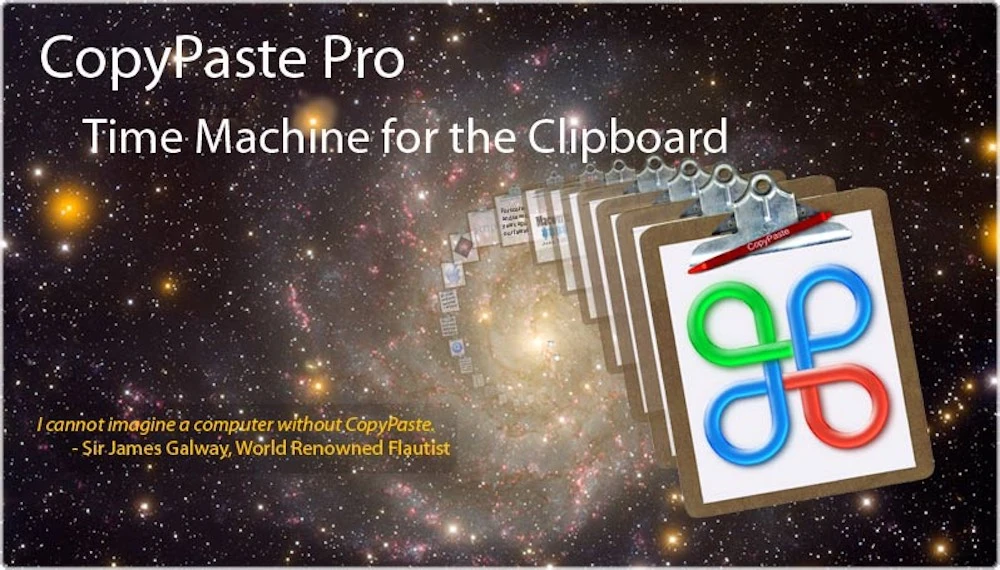
CopyPaste Pro はパワー OS X ユーザー向けのパワークリップボードです。 より速く、はるかに効率的な編集をお望みですか?OS X 向け CopyPaste Pro が必要です。繰り返し編集する際の速度向上は驚くべきものです。パワーユーザーのためのパワーツールです。
CopyPaste Pro/Classic と新しい CopyPaste アプリを比較していますか?比較ページで違い、アップグレードパス、各クリップボードワークフローに最適なバージョンを説明しています。
CopyPaste バージョンを比較CopyPaste Pro はバックグラウンドで待機し、コピーやカットしたものを忠実に収集・保存し、いつでもどこにでもペーストできる状態にします。多くのパワー機能がある一方、基本だけで始められ、セットアップと使用は簡単です。
誰かが CopyPaste Pro を"クリップボードのタイムマシン"と呼びました。Time Machine のようには見えませんが、Mac でコピーできるほぼすべてをキャプチャして保存し、将来いつでもペーストできるようにします。
クリップボードのタイムマシン
CopyPaste でコンピュータの最も強力な機能、コピー&ペーストの使用を始めましょう。毎日何十回も使われ、しかもクリップボードは1つだけ。CopyPaste は最初にして最も人気のマルチクリップボードユーティリティです。
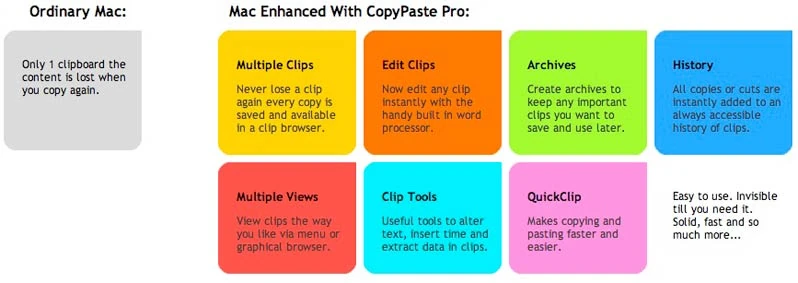
コピー履歴やより永続的なクリップアーカイブ内の任意のクリップを表示・編集できます。再起動後も複数のクリップボードを保存。信じられないほど便利で、すべての Mac ユーザーにとって時間の節約になります。
オリジナルのマルチクリップボードマネージャー
CopyPaste はオリジナルで唯一の受賞歴あるマルチクリップボードエディター&アーカイブユーティリティです。1997年リリース、複数クリップボードの表示・アーカイブ・編集を行った最初のツールです。
すべての人に必須
CopyPaste は初心者、作家、編集者、グラフィックデザイナー、弁護士、学生、在宅ビジネス、デジタルフォトグラファー、クリップボードを使うすべての人に必須です。クリップボード素材や多様なデータのデジタルハブです。使いやすく時間を節約し、少ない労力でより多くを達成できます。
主な機能
- 複数クリップボード: 100のクリップボードでコピー項目を保存・整理
- クリップ履歴: コピーしたすべてを完全な履歴追跡で表示
- クリップアーカイブ: 整理されたアーカイブにクリップを永続保存
- クリップ編集: ペースト前に任意のクリップを編集
- 検索とフィルター: 必要なクリップを素早く検索
- 永続ストレージ: 再起動やシステム更新後もクリップを保持
- 複数データタイプ: テキスト、画像、ファイルなどに対応
- フローティングパレット: 便利なフローティングウィンドウからクリップにアクセス
レビュアーの声
ビデオレビュー
これらのビデオレビューとデモで CopyPaste Pro の動作をご覧ください:
MacUpdate によるビデオレビュー
追加のビデオレビュー
無料でお試し
無料でお試しいただき、クリップボードマネージャーがいかに不可欠かを実感してください。CopyPaste Pro はすでに優秀ですが、常に改善を続けています。
CopyPaste Pro の詳細については、 マニュアルページをご覧ください。
変更履歴
3.8.4
minor📝 Changes
- Updated for Mac OS 26
- Compiled with the latest Xcode
- Now uses Lemon Squeezy licensing (in Preferences)
- Lemon Squeezy is the new store for sales and licensing questions
- Updates to manual
✨ New Features
- Now uses Lemon Squeezy licensing (in Preferences)
🔧 Improvements
- Updated for Mac OS 26
- Compiled with the latest Xcode
- Lemon Squeezy is the new store for sales and licensing questions
- Updates to manual
3.8
minor📝 Changes
- histy and archive palettes preview fixed to show full line length to the width of the window. also fixed for all other languages like french, japanese, spanish etc.
🔧 Improvements
- hisotry and archive palettes preview fixed to show full line length to the width of the window. also fixed for all other languages like french, japanese, spanish etc.
3.7.99
bugfix📝 Changes
- fixed the archive preview of a clips first line of text to be resizable with the window to fill it's width.
- fixed the image browser by removing the orange frame around the magnified clip. image browser is opened with command (held down) v v and tap a clip to paste. or move clips right or left the command key (still held down) and tap right or up arrow key to move the focus right to the next clip and tap left or down key to move the focus left to the next clip
🔧 Improvements
- fixed the archive preview of a clips first line of text to be resizable with the window to fill it's width.
- fixed the image browser by removing the orange frame around the magnified clip. image browser is opened with command (held down) v v and tap a clip to paste. or move clips right or left the command key (still held down) and tap right or up arrow key to move the focus right to the next clip and tap left or down key to move the focus left to the next clip
3.7.98
bugfix📝 Changes
- this is a fix for the previous version from this morning which was not universal. this one is a universal binary. that means copypaste finally runs native on intel or apple silicon (m1, m2, m3 etc...) depending on the processor you have.
✨ New Features
- this one is a universal binary. that means copypaste finally runs native on intel or apple silicon (m1, m2, m3 etc...) depending on the processor you have.
3.7.97
minor📝 Changes
- universal binary. that means copypaste finally runs native on intel or apple silicon (m1, m2, m3 etc...) depending on the processor you have.
- updated sparkle
✨ New Features
- universal binary. that means copypaste finally runs native on intel or apple silicon (m1, m2, m3 etc...) depending on the processor you have.
🔧 Improvements
- updated sparkle
3.7.96
minor📝 Changes
- updated via xcode 15.0.1
- fixed issue button to 'show preferences file in finder' in system preferences not working in Mac os 13.0.
- also fixed 'show clip sets folder'
- updated the provisioning profile
- updated deployment target to 11.0 to fix compilation errors for newer mac os version
🔧 Improvements
- updated via xcode 15.0.1
- updated the provisioning profile
- updated deployment target to 11.0 to fix compilation errors for newer mac os version
🐛 Bug Fixes
- fixed issue button to 'show preferences file in finder' in system preferences not working in Mac os 13.0.
- also fixed 'show clip sets folder'
Reviews
"CopyPaste Pro: A power clipboard for the power OS X user. Want faster and far more efficient editing? You need CopyPaste Pro for OS X. The improvement in speed when you have repetitive edits to do is amazing. This is definitively a power tool for the power user and gets a Gearhead rating of 5 out of 5."
"Take a look at one of my favorite Mac utilities. It's called CopyPaste Pro. It's a multiple clipboard manager. That means anything you cut or copy gets stored in a library so it can be pasted again later without having to find it and copy it again. That is a huge time saver."
"CopyPaste Pro just sits in the background, waiting to be used, faithfully collecting and storing whatever you've copied or cut, ready to paste the items wherever you want. Despite the lengthy list of power features, the basics are enough to get you started and it's easy to setup and use. Someone called CopyPaste Pro Time Machine for your clipboard. While it doesn't look like Time Machine, it captures and stores pretty much anything you can copy on your Mac and makes it available any time in the future to be pasted."
"If You Could Only Have One Productivity Tool For Your Mac Then Choose CopyPaste Pro."
"CopyPaste Pro is probably the most useful tool that you never knew you needed. Its indispensable features truly enhance the productivity of your day-to-day work."
"CopyPaste Pro the best clipboard app for the Mac. CopyPaste Pro è l'utility più flessibile e potente tra quelle a disposizione sul mercato per fare anche l'impossibile con il copia e incolla: gestisce clip multiple, crea archivi di clip di testo anche editabili, fornisce access agli elenchi con palette flottanti, accetta il trascinamento direttamente da safari, non perde la memoria neppure dopo il riavvio del Mac."
TRANSLATION: "CopyPaste Pro is the most flexible and powerful utility available on the market to do even the impossible with copy and paste: manages multiple clips, creates archives of editable text clips, provides access to lists with floating palettes, accepts drag and drop directly from Safari, doesn't lose memory even after Mac restart."
"CopyPaste Pro is an example of a very flexible application because, unlike other productivity applications, it has so many different uses. The developers have improved on such a basic computer function and the results are genius. The developer of CopyPaste Pro, Plum Amazing, seems to demonstrate this in its other programs – taking simple system programs and pumping them full of oomph and extra features. CopyPaste Pro has really helped me save time and it is a joy to use – simplistic and feature-rich. Some people may think, however, that the retail price of $30 for the program is a little too much to spend on just a simple utility but you'll discover that once you get it, you'll wonder how you ever did without it."
"Essential utility for your Mac. Each time you copy something to paste somewhere else, the item you copy is held in the Clipboard. The problem with the Clipboard inside Mac OS X is it is build to handle just one item at once: wouldn't it be useful if you could pop several items in there, so you could paste them all into the same document or other project file without swapping between apps? With CopyPaste Pro, you can."
"For those who do any kind of writing, CopyPaste-X is an invaluable tool that is easy to learn, and once you start using it, you'll wonder how you ever got along without it."
"CopyPaste: A Godsend For Power Users & Novices Alike. This is a handy-dandy little program. It offers much for the experienced user, but there are aspects of it that would be very helpful to the novice."
"The only utility to which I've remained true is the ever-lovely CopyPaste from the wonderful folks at Script Software (now Plum Amazing). CopyPaste when fired up, offers you 100 clipboards to which you can paste essential bits and pieces of documents, URLs you need and just about anything you want to store and then use again. For an editor working on a Mac it's a little bit of heaven for a mere $21 US."
"I curse Apple for not enabling me to copy more than one item at a time." But praise be to generous programmers. On Shareware.com, I discovered an application that expands my copying capabilities tenfold. CopyPaste's nifty text-processing tools let you shift case, tab, or insert text files, pictures, and sounds into a clipboard – the floating palette keeps track of what's where. Even neater is the clip archive, which drops copied items into a folder on your desktop – fabulously convenient for online researchers."
"You'll find that CopyPaste is wonderfully tiny and, like most of my favorite shareware utilities, it has a shy personality — you can send it away and it will discreetly return at your beck and call."
"Every so often a piece of shareware comes along that makes us wonder how we lived without it -- such is CopyPaste-X, the turbo clipboard utility on steroids."
"CopyPaste X rapidly becomes indispensable"
"MacWorld 4 mice June 2003"
User Raves
"CopyPaste has made my life so much easier and I cannot imagine a computer without it. If you are writing a lot on the keyboard and are cutting and pasting this is the right tool for the job. Store all sorts of things like letter headers and addresses to insert at the touch of a key. Very simple to use."
"This (CopyPaste) app is 100% AMAZING and I use its numerous features thousands of times daily – literally. It has been a time-saver, increased work-flow efficiency, and so much more."
"CopyPaste Pro is a true workhorse for me, and my oldest app in constant, heavy use."
"Ich muss mich eigentlich fast selbst über mich selbst wundern, dass ich diese Software noch nicht eher gefunden und im Einsatz hatte. Mittlerweile kann ich mir schon gar nicht mehr vorstellen, wie ein Mac ohne diese App „funktionieren" soll. Also ich gehe jetzt mal von meinem „Arbeits-Mac" aus, an dem ich den ganzen Tag sitze und erst da spiel die Software ihren Nutzen so richtig aus. Im Gegenzug dazu hab ich noch ein etwas älteres MacBook Pro und da fehlt mit die Software überhaupt nicht. Seltsam nicht. 😉 Aber wie in der Überschrift schon angedeutet: „CopyPaste Pro ist sowas ähnliches wie eine TimeMachine für die Zwischenablage." Ich glaube dieser Satz beschreibt kurz und bündig, was die Software leisten kann."
TRANSLATION: "I actually have to wonder about myself that I haven't found and used this software earlier. By now I can't even imagine how a Mac should "function" without this app. I'm talking about my "work Mac" where I sit all day and that's where the software really shows its value. On the other hand, I also have an older MacBook Pro and there I don't miss the software at all. Strange, isn't it. 😉 But as already indicated in the headline: 'CopyPaste Pro is something like a TimeMachine for the clipboard.' I think this sentence describes briefly and concisely what the software can do."
"There is not a day goes by that I do not make use of Copy Paste. Thanks again for a superb utility."
No tutorials available for this app.
Product Manuals
Product Manuals
Select your platform and app to view the complete manual in a new window.
Previous Versions
- Version 3.7.96 - this may be the last version to work on Mac OS 12 Monterey
- Version 3.7.95
- Version 3.7.9 - works fine with Mac OS 10.13-12.0
- Version 4.6.6
- Version 3.7.7
- Version 3.7.6
- Version 3.7.5
- Version 3.7.4 - works with Mac OS Sierra 10.12
- Version 3.7.2 - known to work with TextExpander
- Version 3.7.1
- Version 3.5.9
- Version 3.5.7
- Version 3.5.5
- Version 3.5.3
- Version 3.3.3
- Version 3.0 - last to work with Mac OS 10.4