

Windows • Watermarking • Batch
iWatermark Pro 2 for Windows
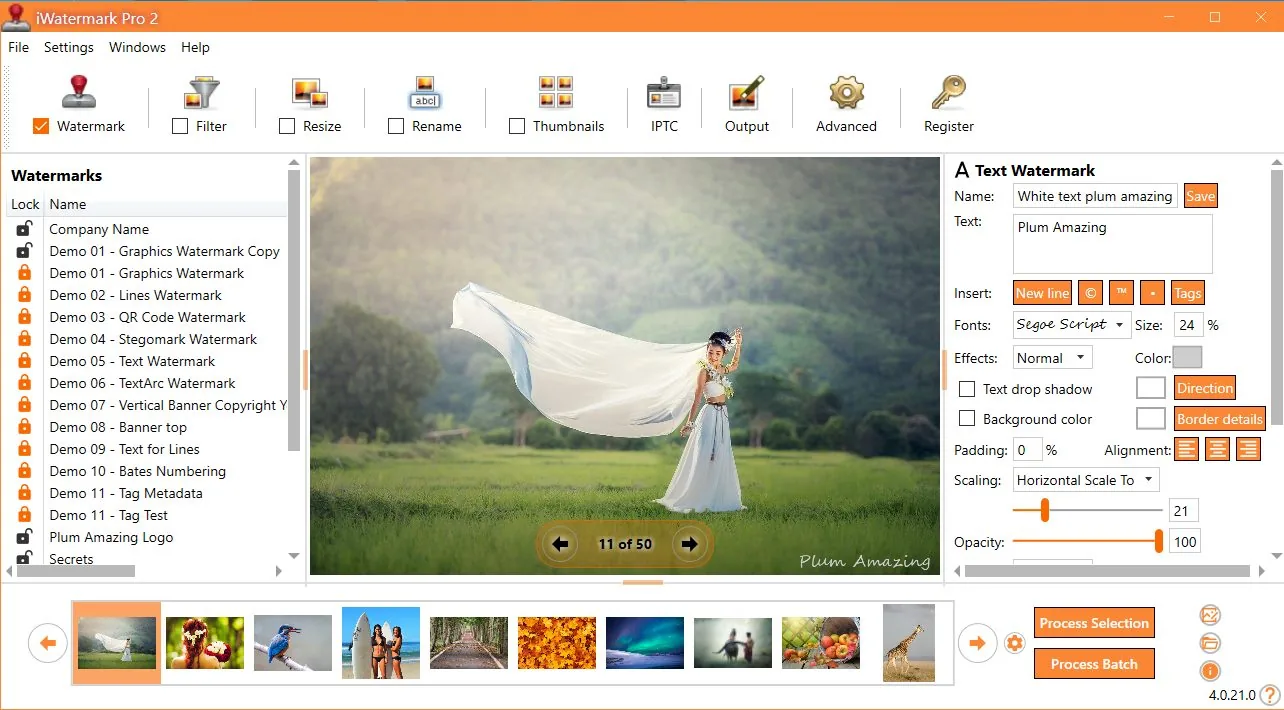
Protect Your Photos With iWatermark Pro 2
Professional watermarking for photos and graphics — fast batch workflows, modern UI, and powerful watermark types.
Protect your images with visible and invisible watermarks: text, logos, QR codes, metadata, and more. Designed for creators, photographers, and businesses who publish online.
Why watermark?
- Protect copyright & ownership
- Brand your content consistently
- Discourage reuse without attribution
- Work fast with batch processing
Great for
Key features
Batch workflows
Watermark one photo or thousands, with consistent placement and settings you can reuse.
Many watermark types
Text, logo/PNG, vector shapes, QR codes, EXIF/IPTC, and invisible StegoMark-style options.
Pro output formats
Designed for real-world pipelines: JPG/PNG/TIFF and more, with rename/resize options for delivery.
Modern Windows UI
A next-generation rewrite focused on performance, clarity, and productivity.
Metadata support
Add or preserve metadata to maintain attribution and details across your workflow.
Changelog & notes
See what's new and what changed over time in the changelog.
Watermark Types

Major features
Just a few of the major features in iWatermark Pro 2 for Windows.
- Batch watermark entire folders of images at once
- Use multiple watermarks simultaneously
- Import/export/share watermark presets
- Scale images to a consistent output size
- Create thumbnails of watermarked images
- Use text or PNG/TIFF logo watermarks
- Set watermark transparency
- Rotate, scale, and place watermarks anywhere
- Special effects: shadow / emboss / more
- Preserve metadata (EXIF/IPTC/XMP)
- Support a variety of image formats
- QR code watermarks
- Consistent positioning by coordinates when needed
Feature snapshot
| Watermark types | Text, Logo/PNG, QR, Metadata, Invisible |
|---|---|
| Workflow | Single or batch processing, templates/presets |
| Output | Resize/rename options, multiple image formats |
| Metadata | Preserve EXIF/IPTC/XMP when exporting |
| Best reference | Manual (screenshots + full workflow) |
The watermark types in iWatermark Pro 2
iWatermark goes beyond “text + logo” and includes multiple visible and invisible watermark types.
| Type | Visibility | For | Description |
|---|---|---|---|
| Text | Visible | Photo & video | Any text including metadata; font, size, color, rotation, etc. |
| Text Arc | Visible | Photo & video | Text on a curved path. |
| Banner | Visible | Photo & video | Rectangle band with text on any side/top/bottom. |
| Bitmap Graphic | Visible | Photo & video | Transparent PNG logo/brand/copyright mark imported from file. |
| Lines | Visible | Photo & video | Adjustable line watermark used by stock image companies. |
| QR Code | Visible | Photo & video | Encode URL/email/other info; scan from the image. |
| Metadata | Invisible | Photo & video | Add info to IPTC/XMP inside the file (can survive basic edits). |
| StegoMark | Invisible | Photo & video | Proprietary steganographic method to embed info in image data. |
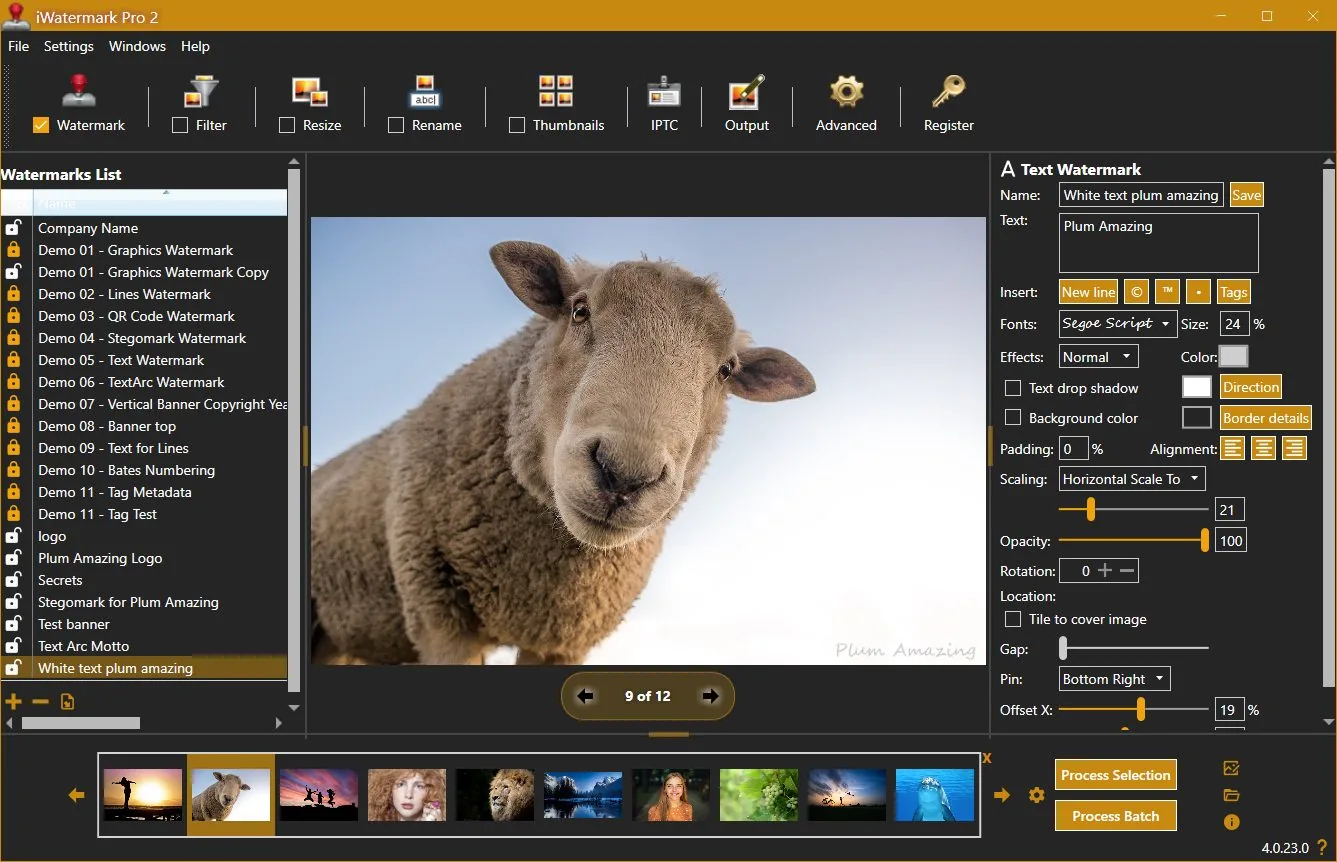
User Interface Dedicated To Watermarking
What reviewers said
“iWatermark Pro is by far the most feature‑packed watermarking software I reviewed…”
— Thomas Boldt (review excerpt)
“Got photos? Put a watermark on each to claim your copyright.”
— Jeffrey Mincer, Bohemian Boomer (excerpt)
“There are other watermarking shareware items out there, but none are this comprehensive…”
— Daniel M. East, Mac Design Magazine (excerpt)
User raves
“One thing I like about your product is that the placement of the watermark is based on a percent of the picture side, not a specific number of pixels… the placement of the logo will always be the same.”
— Scott Baldwin
“As a pro surf photographer… iWatermark has been the best $20 I have ever spent… This program has saved me sooo much time to quickly watermark a folder of photos and send it off…”
— Diane Edmonds, YourWavePics.com
“I have spent ages trying various software… yours is without doubt the easiest and most cost effective I have come across…”
— Peter Kearns, pfphotography.co.uk
“I have been using iWatermark… my sales have gone up… great product, great price and best of all EASY to use.”
— Chris, Action Digital Photography
“Your program has just been an awesome help to me… It has helped to stop unauthorized use of our work…”
— Jon Wright, J&K Creative
“I list houses on craigslist… got some of my pics hijacked BEFORE I bought iWatermark. Now the fraudsters pick another target…”
— Southpaw Steve
Changelog
4.0.35
update📝 Changes
- Updated new registration area to accept the Lemon Squeezy license key.
🔧 Improvements
- Updated new registration area to accept the Lemon Squeezy license key.
4.0.34
update📝 Changes
- General improvements and fixes.
🔧 Improvements
- General improvements and fixes.
4.0.32
minor📝 Changes
- This version of iWatermark Pro 2 resolves high memory usage issue and minimizes memory after it finishes processing. Optimizing the memory has increased the speed and eliminated previous issues.
- Fixed the 'Failed to process watermark'. message which occured in the previous version in some situations.
- Now the installer is a self contained package. It no longer needs to install .Net Core 3.1.19 separately.
- New item added to the Output Folder Hierarchy drop down menu is US date format for naming the top folder (requested by user) and the current time is used for the name of subfolders.
- Minor refinements in the UI, grammar and spelling
✨ New Features
- New item added to the Output Folder Hierarchy drop down menu is US date format for naming the top folder (requested by user) and the current time is used for the name of subfolders.
🔧 Improvements
- This version of iWatermark Pro 2 resolves high memory usage issue and minimizes memory after it finishes processing. Optimizing the memory has increased the speed and eliminated previous issues.
- Now the installer is a self contained package. It no longer needs to install .Net Core 3.1.19 separately.
- Minor refinements in the UI, grammar and spelling
🐛 Bug Fixes
- Fixed the 'Failed to process watermark'. message which occured in the previous version in some situations.
4.0.0
major📝 Changes
- Next generation watermarking engine
- Advanced AI-powered features
- Professional workflow integration
✨ New Features
- Next generation watermarking engine
- Advanced AI-powered features
- Professional workflow integration
Reviews & articles
Curated links and excerpts adapted from the legacy iWatermark Pro 2 for Windows page.
- Mac Informer Review (6/3/2021)
- Best Photo Watermarking Software 2020
- Top 10 Best Photo Watermarking Software in 2020 — Filmora (1/15/2020)
- Review of iWatermark Pro for Windows — Tarekma (12/9/2019)
- Photo Review: iWatermark Pro 2 released for Windows 10/11
- “The Best Watermarking Software 2018” — Thomas Boldt, SoftwareHow
- Review by GIGA (German) (7/15/2016)
- Compendium of reviews (Pinterest)
- iOS iWatermark reviews (1500+ 5-star reviews)
- “Got Photos? Put A Watermark On Each To Claim Your Copyright” — Jeffrey Mincer
- SlideToMac (Italian magazine)
- SMMUG Review of iWatermark Pro — L. Davenport (PDF)
- Thorough review in Swedish — Henning Wurst
- PC World Review
- ATPM review — Chris Dudar
- Macworld review — Jay Nelson
- Macworld “Mac Gems” — Dan Frakes
- Digital Camera Magazine article (PDF)
- Comparison of Visible (iWatermark) vs Invisible (DigiMark) watermarking
Selected excerpts
“iWatermark Pro is by far the most feature-packed watermarking software I reviewed… QR code watermarks and even steganographic watermarks…”
— Thomas Boldt, SoftwareHow
“It is a good application for its primary purpose… and it accomplishes this job easily and with some great additional features…”
— Chris Dudar, ATPM
“If you need to add watermarks to a lot of images, iWatermark provides a big bang for your buck…”
— Jay Nelson, Macworld
“The beauty of iWatermark is its combination of ease of use and functionality… I’ve yet to see a better solution…”
— Dan Frakes, Macworld
“How can you protect your pictures? … Just drag a single picture or a folder full of pictures… specify the watermark text… or a watermark image…”
— Dave Johnson, PC World
User raves
(These are also featured on the Info tab — keeping them in both places for visibility.)
“One thing I like… placement… is based on a percent of the picture side, not a specific number of pixels…”
— Scott Baldwin
“This program has saved me sooo much time to quickly watermark a folder of photos and send it off…”
— Diane Edmonds, YourWavePics.com
“...yours is without doubt the easiest and most cost effective I have come across…”
— Peter Kearns, pfphotography.co.uk
“...my sales have gone up… great product… best of all EASY to use.”
— Chris, Action Digital Photography
“...It has helped to stop unauthorized use of our work…”
— Jon Wright, J&K Creative
“I list houses on craigslist… got some of my pics hijacked BEFORE I bought iWatermark…”
— Southpaw Steve
No tutorials available for this app.
Product Manuals
Product Manuals
Select your platform and app to view the complete manual in a new window.
No previous versions available for this app.