PixelStick – Mac App To Measure Pixel, Angle, Color Onscreen
PixelStick is a tool for measuring distances (in pixels), angles (in degrees) and colors (RGB) on the screen. Photoshop has distance, angle and color tools but they only work in Photoshop. PixelStick works in any app and anywhere on screen anytime and costs a hundred times less. Excellent for designers, navigators, mapmakers, biologists, astronomers, cartographers, graphic designers or anyone who uses a microscope or telescope or wants to measure a distance on their screen in any window or application.
Click here to try it now free.
It’s easy, simple and fast. PixelStick is a measuring tool you can pinch and stretch to measure anything on your screen. Use the eyedropper to copy colors in 4 formats (CSS, RGB, RGB hex, HTML) to the clipboard for use in any app.
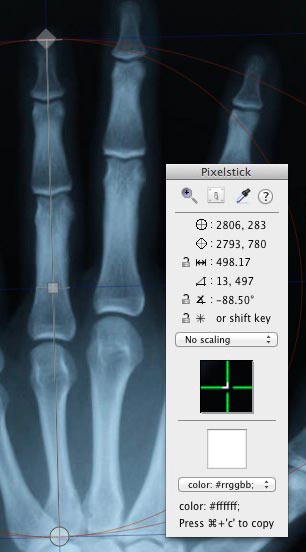
PixelStick is a professional measuring tool used by:
- Cartographers – for maps or all kinds.
- Biologists – for microscopy and morphology.
- CSI Technicians – for crime scene investigations.
- Manufacturing – for design and fabrication.
- Physicists and Astronomers – for all kinds of measurements.
- Engineering – for mechanical, electrical and civil engineering.
- Builders – for measuring existing buildings or blueprints.
- Education – for students, teachers and researchers.
- Photographers
- Designers – for graphic, architecture, interior, space, marine, and aeronautical.
- Software Developers – for graphics, web, layout and user interface.
- Medical Technicians – for X-rays, ECG, EKG, and microscopy.
For anyone who needs to measure objects on the Mac.
Anyone can use PixelStick because it’s easy to use, simple and fast. Measure on:
- Retina, regular displays and multiple monitors.
- Mac OS 10.6 – 13.0 or higher
- Any app and between apps.
Supports the scaling in Google Maps, Yahoo Maps, and Photoshop. Also has Customized (user settable) scaling options. PixelStick is a measuring tool you can pinch and stretch to measure anything on your screen. It’s like an onscreen virtual ruler that you can use vertically, horizontally and at any angle to measure distances (pixels), angles (degrees) and much more just by dragging. When you know the scale of the document you are measuring then you can create a custom scale to measure inches, miles, centimeters, microns, parsecs or lightyears.
Most of what PixelStick does is obvious. Drag the endpoints to change the measurement. Click the locks to constrain the movement. Launch it, play around, no more limitations to just one app in measuring distance, angle and color.
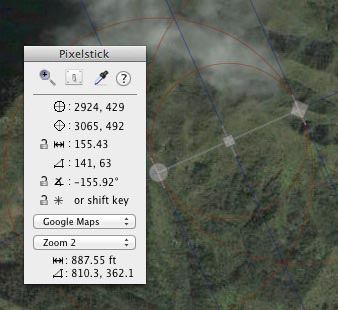
Its easy, simple and fast. PixelStick is a measuring tool you can pinch and stretch to measure anything on your screen when you know the scale
Check out this screencast which was is from a GigaOm review that shows PixelStick in use.
Use
PixelStick is totally intuitive and works exactly like what you would hope for. PixelStick sits in the frontmost position on the screen. Drag the endpoints to change the measurement. Click the locks to constrain the movement. Drag to change the angle. See the changes and info in the small on screen info panel.
Coordinate System
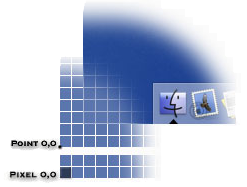
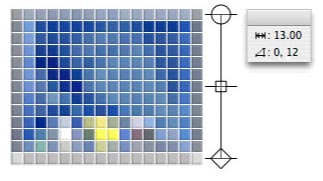
PixelStick uses a Cartesian coordinate system like the OS X coordinate system. This means that the origin (pixel 0,0) is at the lower left corner of the screen. However, OS X deals mainly in points, whereas PixelStick is all about pixels. A point has no width and resides between pixels.
Distances
In the illustration below, the height of the picture is 13 pixels, so the distance is reported as 13.00. Note that if the diamond endpoint is at a position of y = 1, then the circle endpoint is at a position of y = 13. Thus pixel difference is 13 – 1 = 12.The pixel distance includes the width of the PixelStick endpoints. This is so that the actual size of the item being measured is reported. The pixel difference merely subtracts the coordinates.
PixelStick Tips:
When measuring, position the endpoints inside the area to be measured.The easiest way to get both dimensions of an area is to position the endpoint exactly on top of the corner.After measuring the height (see example), the circle endpoint can be dragged over to the other corner to get the width.
Requirements:
PixelStick requires Mac OS X 10.6 or later.
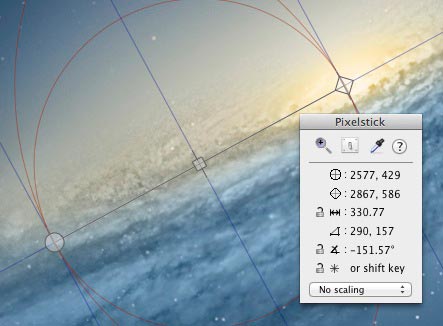
“I’ve used a number of different screen rulers over the years, including Free Ruler and the rulers in Art Directors Toolkit. But nothing comes close to PixelStick.
PixelStick is different. There are no rulers to block your view of the screen. Instead, PixelStick displays a measuring line. Drag the endpoints to measure the distance. To measure height and width, position the endpoints on the corners, then drag one endpoint to the opposite corner to measure the other dimension. You can lock the endpoints to constrain the length or angle, or to snap the line to the nearest 45° angle. PixelStick also displays guidelines to help you quickly measure or align objects at a glance.
Bottom Line: If you want to rule your screen, don’t use a ruler, shake a PixelStick.”
Robert Ellis, Upstart Blogger
PixelStick is a tool for measuring distances, angles and colors on the screen. PhotoShop has distance, angle and color tools but they only work in PhotoShop. PixelStick works in any app and anywhere on screen anytime and costs a hundred times less.
PixelStick is a professional measuring tool used by:
* Designers – for graphic, architecture, interior, space, marine, and aeronautical.
* Software Developers – for graphics, layout and user interface.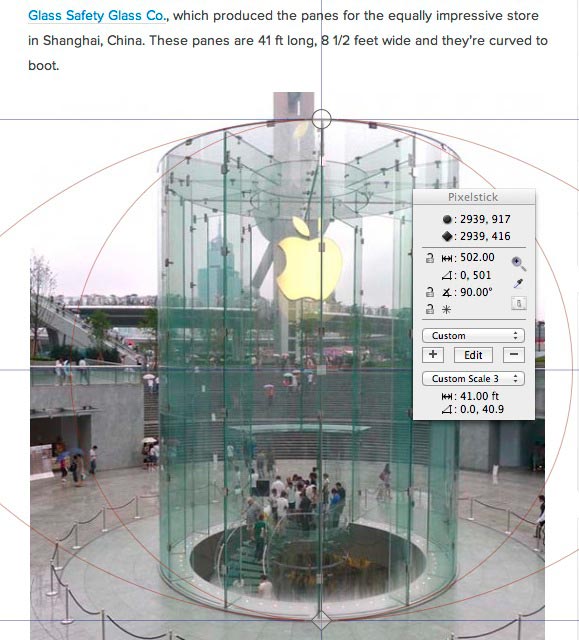
* Cartographers – for maps or all kinds.
* Medical Technicians – for X-rays, ECG, EKG, and microscopy.
* Biologists – for microscopy and morphology.
* CSI Technicians – for crime scene investigations.
* Manufacturing – for design and fabrication.
* Physicists and Astronomers – for all kinds of measurements.
* Engineering – for mechanical, electrical and civil engineering.
* Builders – for measuring existing buildings or blueprints.
* Education – for students, teachers and researchers.
* Photographers
…anyone who needs to measure objects on the Mac.
Anyone can use PixelStick because it’s easy to use, simple and fast.
Modern measuring for:
* Retina, regular displays and multiple monitors.
* Mac OS 10.6 – 10.8 +
* Any app and between apps.
PixelStick is a measuring tool you can pinch and stretch to measure anything on your screen.
Use the loupe to magnify anything on screen.
Use the eyedropper to copy colors that are anywhere on your monitor in 4 formats (CSS, RGB, RGB hex, HTML) to the clipboard for use in any app.
It’s like an onscreen virtual ruler that you can use vertically, horizontally and at any angle to measure distances, angles and much more just by dragging. Using the palette one can lock distances and angles (also by using the shift key).
Supports scaling for Google Maps, Yahoo Maps, Photoshop and Customized scaling options.